MusicRadar Verdict
The Lüm Texture Engine takes the signature DNA of the Slö, Lore and Fable pedals and fractures them into something new and insanely expansive: a granular reverb texture engine that can transform your sound in a seemingly endless number of ways. This is no replacement for a vanilla reverb pedal, but a pedal that will lift your tunes into the next dimension. Endless fun.
Reasons to buy
- +
Genuinely distinctive granular textures and ambient reverb functions with seemingly endless ways to shape your sound.
- +
Excellent pairing potential with a wide range of pedal types and board positionings.
- +
Preset saves make recall quick.
- +
Ability to crossfade smoothly between presets.
Reasons to avoid
- -
A smaller form factor can make usability a little fiddly with some of the switches.
- -
Mono only, no MIDI or expression input.
- -
It’s certainly not cheap, coming in at around $279.99.
- -
Despite the name, it’s no replacement for a conventional reverb.
MusicRadar's got your back Our team of expert musicians and producers spends hours testing products to help you choose the best music-making gear for you. Find out more about how we test.
What is it?
Walrus Audio makes stylish pedals on the premium end, catering mostly to the ambient guitarist (fans of Knobs on YouTube assemble!).
With the beautiful spacey ARP-87 delay pedal a mainstay on my board, I've been an interested party since I first came across the brand during a Youtube video of Julien Baker’s pedalboard.
The video gave a rundown of Walrus Audio’s Fathom and Descent reverb pedals; Two beautiful reverb pedals with very different and unique qualities used for layering ambient texture into your guitar sound.
The Lüm Texture Engine is built from the fundamental pieces of three other existing, well-loved Walrus pedals: it uses the reverb engine from the revered Slö Multi-Texture Reverb pedal, the reverse-reverb character of the Lore, and the granular soundscape generation of the Fable.
The result is three unique granular and textural reverb modes, a moment button which we’ll get into, and three preset slots. At a price point sitting slightly higher than just one of those pedals, it feels like an experimental distillation of what made them so damn fun to play around with.
And the good news is that you certainly don’t feel as though you’re getting the abridged version of the three, as you’re in for an limitless sonic experience.
The Lüm Texture Engine originally launched as a 600-unit limited run, returning as a permanent addition to Walrus’s lineup due to popular demand (it sold out fast). It’s now available in two new colourways; the Guava Gloss unit I'm testing, plus a new Matte Black option.
Specs

- Launch price: $293 | £263 | €299
- Type: Granular/textural reverb pedal
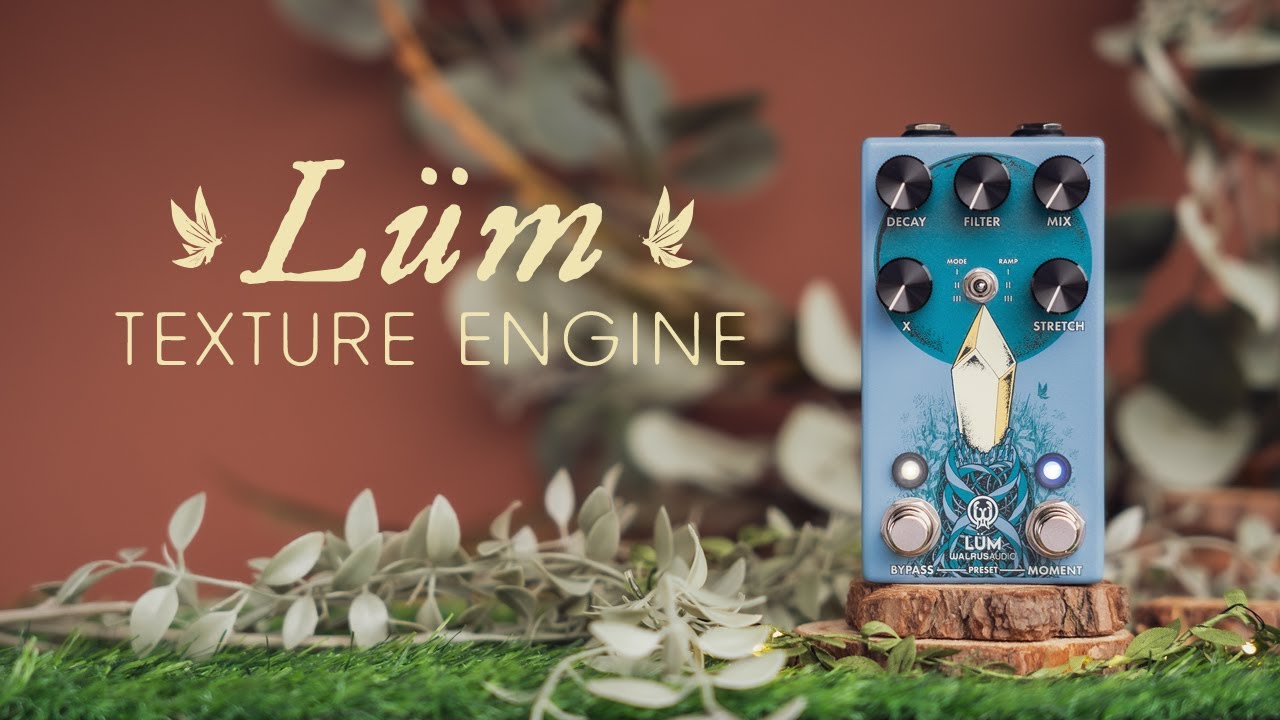
- Controls: Mix, Decay, Filter, X, Stretch, 3-way Mode toggle, Moment switch
- Features: Momentary automation (Moment Control), Ramp (glide time: 10ms/1000ms/5000ms), Stretch Engine (0.5x–2x sample rate), 3 onboard presets with crossfade, selectable Trails/Instant Cut bypass
- Connectivity: 1x 1/4" TS input, 1x 1/4" TS output.
- Bypass: Buffered, Trails or Instant Cut selectable.
- Power: 9V DC 100mA min (not included)
- Dimensions: 121 x 66 x 35mm
- Weight: 0.35kg (needs checking)
- Options: Guava Gloss, Matte Black.
- Contact: Walrus Audio
Build quality

Build quality rating: ★★★★☆
The Lüm is genuinely a compact marvel for all that it packs in. It boasts a smaller form-factor, requiring only a 100ma power feed compared with the 300ma requirements for the Lore and Fable pedals that it draws inspiration from.
In Walrus's usual fun die-cast enclosure, this thing also just looks undeniably cool on your pedalboard, whether you’re into the shiny Guava-Pink or more muted colour tones.
As you’d expect from a pedal on the higher end, the knobs are smooth and satisfying to operate, and the little metal Mode/Ramping switch that sits in the middle is satisfying to click between, if not a little small.

This begins to touch on my main gripe with the pedal. Whilst the pedal’s size saves crucial board space, some may find it makes the sheer scale of what you can do with the pedal a little physically fiddly to access at times.
Whilst the pedal’s size saves crucial board space, some may find it makes the sheer scale of what you can do with the pedal a little physically fiddly to access at times
It’s more permissible as a bedroom ambient guitarist where you might be sat with it, but live performances in a band would mean you’d need to be a little more meticulous in making sure it’s set up to the desired settings (with how much you can do with this thing, you and your listeners will know straight away if it isn’t!).
I also find that the Bypass footswitch doesn’t always register when clicking it, and feels perhaps a little loose. It doesn’t seem to be an issue with the grub screw, which is tight, but the switch itself feels a little flimsy and loose in its socket.
The footswitches themselves have multiple purposes, so this is a little annoying as it occasionally takes a bit of clicking around with it to get to the desired settings, such as accessing the three preset settings.
Usability and features

Usability and features rating: ★★★★½
Three modes give the Lüm Texture Engine a whole lot of range for you to experiment with; Grain Cloud, Grain Verb and Forward/Reverse Verb.
The Grain Cloud mode gives you a granular texture built from dual taps reading off a feedback delay line; the X knob crucially controls our grain size, from a fine misty spray into large and looping stuttery effects.
The Grain Verb has the same dual-tap granular approach, but reads from a reverb algorithm's delay memory instead. It gives a washed-out, ambient result.
Forward/Reverse Verb combines forward and reverse reverb algorithms for rhythmic, evolving reflections from the Lore pedal.

The Moment switch lets you automate any one of the five knobs; hold it down and the assigned parameter glides toward the target you set. The Ramp control (accessed by holding down the Bypass switch whilst adjusting the Mode toggle) sets how fast that glide happens, from a speedy 10ms to a 5-second swell.
I have the most fun using this with the Stretch knob, but there is endless experimenting to be done with these in combination with the three modes- And that’s not even yet getting into using the pedal in combination with other pedals.
The wonderful news for the technophobes amongst us that love ambient soundscaping, is that Lüm will let you save three presets (denoted by a red, green or blue light). If you like what you’re hearing, these are easy to save and return to.

This is something particularly useful for, say, live performance, but also just for the less technically-minded musician. You don’t need to know what you’re doing when you’re changing up settings, as you can simply save your favourite noises and recall them at will!
Another neat little feature is that it has a selectable Trails mode, allowing you to crossfade between your preset settings, so there’s no need to ruin the zen, ambient state you’ll no doubt be in. If you don’t care for zen, don’t worry as you can also select an Instant Cut.
Whilst the sheer scale of settings and choices may make it technically less user-friendly, I don’t think it would be right to mark this pedal down for its complexity. It’s a bit of a wonder in that it is basically the best bits of three other pedals smooshed into one smaller body. I will mention again, however, that this smaller form-factor does cause some fiddly-ness in its operation, mitigated somewhat by the ability to recall presets
Sounds

Sounds rating: ★★★★★
Something I look for in a pedal is one I can sit down with and always discover something new, and the Lüm satisfies this to no end. Time melts away with this on my board. There are endless combinations of settings and board placements to keep the ambient guitarist fed for hours.
Paired with the Walrus ARP-87 delay, it's one of the most fun and interesting combinations I've run this year. Forget Interstellar, if you want to know what being sucked into a black hole might sonically sound like, this is the pedal for you. The most fun is integrating a loop pedal into the mix, layering looped ambient swells and atmosphere using the Lüm's granular textures.
You can also spend literally forever experimenting with 'board placement and using it in combo with other pedals, which will drastically change your output. Putting the Lüm before a fuzz or distortion pedal and I'm hearing lo-fi shoegazer-y texture and guitar noise. Moving it to the end of the chain, right before a reverb pedal, and you’re transported to space.

I’m primarily testing this out at home on an Orange CR60C amp, as well as through my PC and a pair of Yamaha HS7 monitors. This lil’ guy also doesn’t sound half bad cranked through a small Roland Cube practice amp either.
I am impressed at how much detail and grain the Lum can output. Despite how wide and expanded it can make your audio feel, part of me wishes that it featured a stereo output too – although this is just splitting hairs at this point, for all the other features it boasts.
To further stress-test just how far it can go, I tried pairing it up with the Enzo, a silly pedal by Meris Audio that essentially turns your guitar into a polyphonic synth. This is ultimately the point that is worth hammering home, and what I keep landing on with this thing. This is a pedal that you really can have endless fun and experimentation with and always get interesting results!
Verdict

One thing worth stressing is, as I’m sure you’ve realised, this is no like-for-like replacement for a conventional reverb.
Judging it as one will no doubt disappoint, as it is at its best used in tandem with one. Reviewing it as what it really is, a granular texture engine? It's a technical, pioneering, feature-packed joy of a pedal, making a solid case for a permanent stay on your board.
It's a joy of a pedal, making a solid case for a permanent stay on your board.
If you're someone who loves to make ambient music at home (or in a studio) and loves to push the limits of their rig beyond just a plug and play experience, then consider the Lüm.
Whether you’re interested with subtle ambient swells or grain textures that sit behind your main guitar sound, or if you want to know what stardust sounds like, the Lüm is so incredibly versatile and appropriate.
It doesn’t sit at a cheap price, but considering you’re getting a 3-in-1 experience with a great form-factor and you possibly won't notice or regret not owning the Walrus Audio pedals it’s based on, this is a bargain of the century.
There’s a strong argument here for getting this and it actually satisfying your ambient sound creation itch. Its size and 100ma power draw feels crazy for the sound it unlocks. It allows for so much versatility, too, in what you choose to combine it with on your board. Making these a permanent fixture of Walrus Audio’s lineup beyond the initial run was such a good move.
MusicRadar verdict: The Lüm Texture Engine takes the signature DNA of the Slö, Lore and Fable pedals and fractures them into something new and insanely expansive: a granular reverb texture engine that can transform your sound in a seemingly endless number of ways. This is no replacement for a vanilla reverb pedal, but a pedal that will lift your tunes into the next dimension. Endless fun.
Test |
Results |
Score |
|---|---|---|
Build quality |
Despite a slightly wobbly feeling bypass switch, the Lüm looks great on the board and its compact form feels premium to operate. |
★★★★☆ |
Usability and features |
The sheer scale of ambient textural features that this pedal crams in are immense. |
★★★★½ |
Sounds |
Taking point from three other beautiful Walrus pedals, the Lüm makes a plethora of ambient sounds. |
★★★★★ |
Overall |
A pedal that may actually leave the ambient pedal enthusiast sated, Walrus did us a service by combining three pedals into one. |
★★★★½ |
Also try
Hands-on videos
Walrus Audio
The Guitar Geek