MusicRadar Verdict
The Strymon TimeLine MX does a great job in retaining its reputation as the powerhouse of the delay pedal workstations. Despite the huge depth of choice on offer, it manages to be really easy and satisfying to use thanks to relying on physical controls and not keeping too much hidden behind menus. With finer control over the time knob, it would be close to perfection. For a lot of players it’s complete overkill, but for those who want great-sounding delay algorithms with plenty of options, it’s still the king.
Reasons to buy
- +
Super easy to change settings.
- +
Superb quality delay algorithms.
- +
Rock-solid build quality.
- +
Excellent one-button looper.
Reasons to avoid
- -
The time knob is too sensitive.
- -
Some looper functions only available with additional footswitch.
MusicRadar's got your back Our team of expert musicians and producers spends hours testing products to help you choose the best music-making gear for you. Find out more about how we test.
What is it?
A ground-up rebuild rather than a refresh, the Strymon TimeLine MX is an update to one of the most popular delay pedals of all time. The original TimeLine is going on 15 years old now, having debuted at NAMM in 2011, and went on to win numerous awards thanks to its philosophy of packing studio-quality delay algorithms into a pedal.
The original had a SHARC DSP processor running at 266 MHz. The new version is packing a tri-core 800 MHz ARM chip, significantly increasing the power available. It now has dual-engine operation, so you can run two algorithms at the same time in series, parallel, or split modes. Each engine can be assigned to a footswitch and has a pan control on its output.
The TimeLine MX has 11 delay algorithms and a reverb algorithm, with oil can, drum, multi-tap, and spectral being the new delay engines. Five of the original 12 have gone, with swell and duck modes now available on every engine, trem folded into the filter engine, and pattern folded into the multi-tap mode.

The looper runs for up to 5 minutes, which is a huge increase over the 30 seconds of the original
Some of the classic algorithms remain, and you can switch between different voices. dTape and dBucket each have a new MX voice alongside the classic TimeLine one. Digital has four different voice modes, one of which is the original TimeLine voice, too.
The looper runs for up to 5 minutes, which is a huge increase over the 30 seconds of the original. You can place it before or after the delays, and it has a one-button mode you can use without having to switch the pedal specifically into looper mode. To access reverse, undo/redo, and half speed, you’ll need to connect an additional footswitch or access via MIDI.
Every jack on the TimeLine MX is now TRS stereo, with selectable configurations for mono/stereo effects loop, wet/dry, and wet/dry/wet combinations available. It’s got a USB-C port, and it can now handle MIDI via TRS alongside the classic 5-pin DIN connectors.
Specs

- Price: $679 | £699 | €799
- Type: Stereo multi-delay workstation with onboard reverb and looper
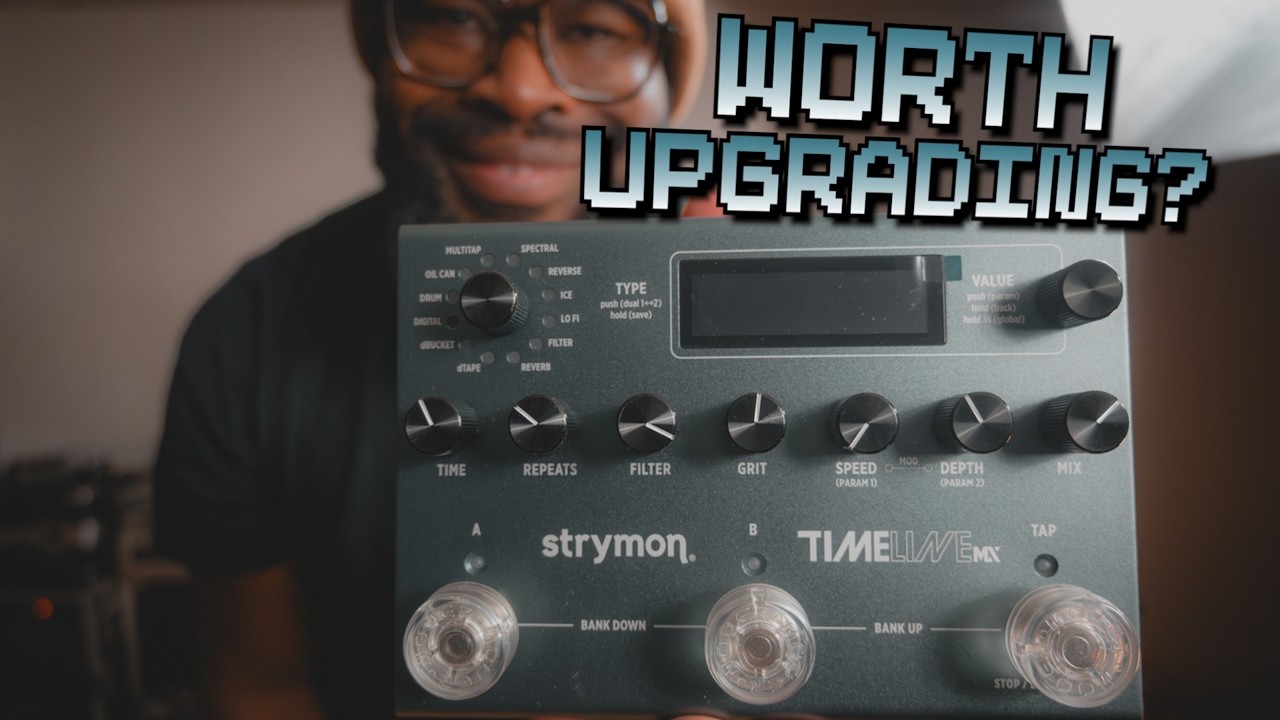
- Controls: Type, value, time, repeats, filter, grit, speed, depth, and mix knobs; A/B footswitches plus a dedicated TAP footswitch
- Features: 11 delay engines (dTape, dBucket, Digital, Drum, Oil Can, MultiTap, Spectral, Reverse, Ice, Lo-Fi, Filter) plus a new reverb engine; dual engines routable in series, parallel or split with independent panning; five-minute stereo looper with multi or one-button modes; swell and duck available on every engine; 300 onboard preset locations
- Connectivity: Stereo TRS in/out with switchable mono, stereo effects loop, wet/dry and wet/dry/wet configurations; USB-C for MIDI, firmware updates and Nixie 2 editor software; 5-pin MIDI in/out; EXP jack for expression pedal, MultiSwitch or TRS MIDI control
- Bypass: True bypass (electromechanical relay) or buffered, switchable
- Power: 9VDC centre-negative, 500mA minimum (adaptor sold separately)
- Dimensions: 172mm W x 127mm D x 48mm H (6.87" x 5" x 1.87")
- Weight: 699g (1.76 lb)
- Contact: Strymon
Build quality

Build quality rating: ★★★★★
The footprint of the MX is nearly identical to that of the original pedal, although it is ever so slightly wider and shallower. The chassis is anodised aluminium, in the classic TimeLine grey most guitarists will recognise. It’s not particularly heavy, weighing 699g on my scales.
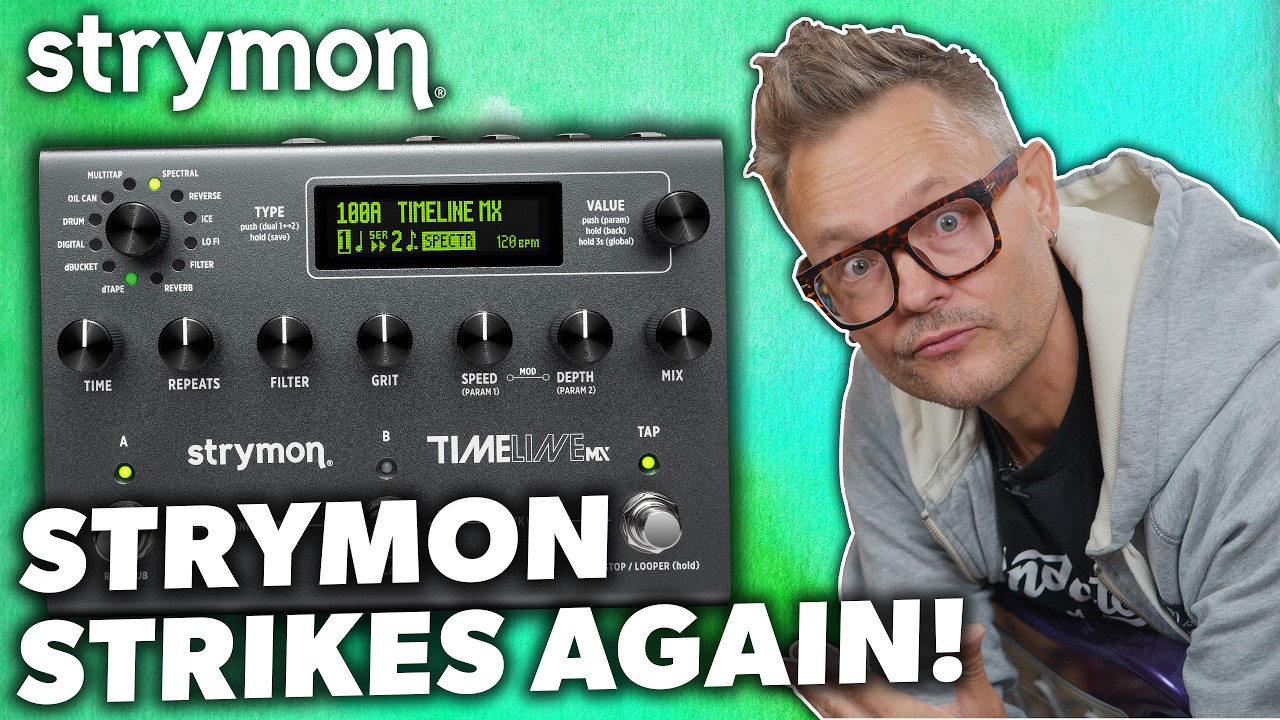
The screen has had a significant upgrade over the original, moving to a larger, OLED screen that’s incredibly bright and high definition. It’s more central now, with the type knob moving to the top left, and the controls in one long row running beneath the screen.

The type knob isn’t ratcheted, which goes against the trend of modern-day pedals. There’s a slight delay between when I begin turning it and when the light moves to the next engine. Turn quickly, however, and it skips through them with much more haste. The control knobs are slightly firmer in their feel than the type and value knobs, with everything feeling very well applied.
The footswitches offer a solid pressing feel, with a soft click and short travel. They feel very robust and capable of putting up with abuse, so I don’t doubt this pedal will last 15 years like the originals still going today.
Usability and features

Usability and features rating: ★★★★☆
The Strymon TimeLine MX is, like its forebear, actually pretty simple to use. The value knob changes presets, with each footswitch selecting one of two in that particular bank. Pressing two of the switches down does the same move, and I can then select the A or B footswitch to determine which preset I want.
The knobs for tweaking the sounds are all within easy grasp, which makes customising presets an absolute breeze. Handily, there’s a small arrow that tells you where the knob was originally set, too, should you make changes you end up not liking. This immediacy means I don’t feel the need to install the companion app for bigger changes, because pretty much everything is right there on the front of the chassis.
There are some deeper-level settings hiding beneath the value knob, which can be accessed via a single press down. These settings are individual to each preset and include the ability to change voices, add a high-pass, change filter shapes, and adjust LFOs. It’s all well marked on the unit and very easy to navigate, even without diving into the manual.

I do find that making very precise changes here is difficult with the knob when working in milliseconds
Holding the value button for longer unlocks global parameters, which include things like switching the bypass from true to buffered, changing the input level from instrument to line, a kill dry function, spillover, plus plenty more. I can also change what the footswitches do, change the way the preset navigation works, and turn tempo from milliseconds to BPM.
Having the tap tempo with a dedicated button makes total sense here, and I can quickly tap in with my foot or finger the rhythm that I need to adjust each preset. I can also do this via the time knob, but I do find that making very precise changes here is difficult with the knob when working in milliseconds. If you’re using it in a studio, you may find you need the companion app to get exact timing to lock into your track tempo, or look at the MIDI Clock sync.
I already have Nixie 2 installed on my laptop from reviewing a previous Strymon pedal, but it doesn’t recognise the TimeLine MX. The next natural step is to update the firmware on the hardware itself, but this still doesn’t end up with the app recognising it. So, I head back to the Strymon site to download the latest version of Nixie 2. I’m not sure why there’s no auto-updating in Nixie 2 itself, but it would be a welcome addition.

With the editor ready to go, my first port of call is to see how incremental I can be with the timing of the delay repeats. Thankfully, there’s an easy way to type in exact BPMs, and every other function of the pedal can also be easily accessed. Dragging via the knobs is pretty imprecise on a laptop trackpad, but every value can be double-clicked in order to type in the exact value I need.
I learn from browsing the manual that I can change the tap tempo button to become a one-button looper, accessible via the global settings menu. Once this change is done, looping is accessed via a press of the furthest footswitch to the right, with another press playing back, while further presses engage overdubs. A double tap stops the loop playing, while a hold clears it entirely.
To access the full looper, I need to switch the third footswitch back to tap tempo. I can then hold down the same footswitch to access a three-button looper. It works as expected, but there’s no way to clear the loops once played in, unless you turn the pedal completely off. Features like reverse, half speed, and undo/redo need an external footswitch like the Strymon MultiSwitch to unlock these, but I didn’t have a third-party footswitch to test if you can use something you already have.
Sounds

Sounds rating: ★★★★★
Setting up the TimeLine MX so it runs stereo into my audio interface, I load up a stereo instance of Line 6’s Helix Stadium Native to test out the sounds. I've created demos of all the delay engines so you can hear them for yourself further down the page.
Playing harmonics with the Spectral engine on gives crystalline repeats that shimmer around my core tone but never overpower the original note. It’s like playing along with a set of really high-pitched violins, similar to the sound of a shimmer reverb but one that bounces in time with my playing.
Switching to a preset that utilises the dBucket algorithm, I get those classic modulated repeats behind some chord stabs and arpeggiated licks. They’re dark and warm, enveloping my playing with washy delay tails that bounce rhythmically against my core playing. The wobble on the tails is really present when I hold chords and let them ring out, a feature that adds to the rhythm of the repeat timing.
The Lo-Fi setting is really intriguing too. It sounds like ring modulation on the delay tails, giving them the feel of degraded computer noises from the early 2000s. It’s a really interesting tonality, slightly discordant but still manages to fit in nicely with the single-note licks I play that build up gradually. It occupies the space between my notes in a captivating manner, adding an extra layer of musicality to my playing.

The new reverb engine is really handy
Turning on the gain and switching to a preset that utilises the Oil Can engine (an algorithm similar but not the same as the standalone oil can-style delay Olivera pedal), I’m straight into lead lick heaven. Playing a hopeful lead line, the murky wash of the distorted delay tails adds a darkness to the sound, and with a discordant turnaround it’s something that bridges the gap between Russian Circles and Mogwai. I could go on, but needless to say, the sound quality on offer here is incredible.
The ability to pair two different engines offers some truly amazing options for tones. You can blend them together or pan them hard left and right. It adds an extra layer of creativity not found on the original, opening up the possibilities for an array of unique delay sounds. The new reverb engine is really handy as well, allowing you to feed a delay into it for a more natural feel to the delay tails.

To complete my testing, I set about trying the different voices to see if there’s a major difference between the original TimeLine and the MX voices. On dTape, the MX version feels a touch warmer and more lifelike. The variance in the repeats is a lot more obvious when I switch them back to back, which gives the MX voice more of a dynamic quality versus the original’s more linear approach to the repeats, which sounds a lot more staccato and less washy.
On dBucket, the difference in voices is much less obvious. Both have that classic modulated repeat. At a push, I’d say that the MX voice has a bit more low end, and like the dTape, a bit more of a dynamic feel to the repeats that doesn’t sound so consistent in its sound. These are really tiny differences though, and for the most part they’re very similar to my ear.
Verdict

There are those who will likely think that the TimeLine MX isn’t worth the upgrade over a used original, but I beg to differ. There’s plenty here to justify the upgrade with fresh algorithms, improved original sounds, and more options for connectivity. It improves in all the right places to make it a worthwhile purchase even for existing TimeLine users.
The only thing I could fault about it is the time knob
The only thing I could fault about it is the time knob, which lacks the accuracy studio users will want. You can, of course, do this more accurately in the Nixie 2 companion app, but it would be a much better experience being able to purely interact with the knobs without having to plug it into your laptop or PC. That small niggle aside, the TimeLine MX is a phenomenal delay pedal with loads going for it.
MusicRadar verdict: The Strymon TimeLine MX does a great job in retaining its reputation as the powerhouse of the delay pedal workstations. Despite the huge depth of choice on offer, it manages to be really easy and satisfying to use thanks to relying on physical controls and not keeping too much hidden behind menus. With finer control over the time knob, it would be close to perfection. For a lot of players, it’s complete overkill, but for those who want great-sounding delay algorithms with plenty of options, it’s still the king.
Test |
Results |
Score |
|---|---|---|
Build quality |
Exceptional quality, tour-ready chassis. |
★★★★★ |
Usability and features |
Surprisingly easy to use, but some functions are better in the app. |
★★★★☆ |
Sounds |
An incredible array of tones that will cover any style. |
★★★★★ |
Overall |
Retains its place as the best delay pedal in the business. |
★★★★½ |
Also try
Hands-on videos
Sweetwater Soundcheck

Andertons Music Co
Jason Mays