



It’s never been easier to DJ. Preparing a set once meant months of saving to afford 7 and 12-inch records, but today it’s possible to move hearts and minds with little more than a streaming service subscription – and the right hardware, of course. That's where this guide t the best DJ controllers for all budgets comes in.
Technology has trivialised problems older-school selectors never knew they had, heralding an age of tool-assisted digital audio mix-mastery. Vinyl DJing is never going away, but a new era of digitalised DJing has been here for some time, and isn’t set to budge either.
With that new era comes a new set of tools and skills that change the game for DJs altogether. Stem separation, live on-the-fly remixing, integrated light-show control, and on-demand audio streaming are all part and parcel of this new wave, enabled by the latest iterations of DJ software and the hardware controllers that control them.
Whether you’re an old hand with a 45 or a new DJ exploring your options, there’s a great deal of value to investing in a DJ controller. They’re powerful tools for practice, excellent alternatives for portable performance, and an easy route to recording or streaming your own mixes, whatever your setup. You just need to make sure you pick the right one – which is precisely what this guide to the best DJ controllers is designed to do.
If you'd like to know my top pick before diving into my full selection below, I've stuck with the Pioneer DJ DDJ-FLX10. It's a little on the pricey side, but it's crammed full of features and is, in my opinion, simply the best DJ controller on the market.
For more information, take a look through my FAQ section and I've also included a glossary highlighting the key terms you'll come across when shopping for a new DJ controller.
Best overall

✅ Buy if you want your last DJ controller: The DDJ-FLX10 is full-featured, and somewhat future-proofed. No matter what you add to your setup, this DJ controller can handle it.
❌ Avoid if you’re on tight budget: Some of these features are beyond the requirements of beginner and intermediate DJs, and other, cheaper controllers are just as viable.
The lowdown: Pioneer is the big name in DJ tech, largely for the sheer ubiquity of Pioneer gear in professional and public-facing setups. Pioneer’s CDJs were game-changing, earning the brand and its ever-expanding ecosystem a central role in the shape of tech to come. Pioneer’s DJ controllers are, generally, small-format translations of this same ecosystem; the FLX10 is Pioneer’s latest flagship in this space, designed for plug-and-play use with both rekordbox and Serato DJ.
Features: This is a four-channel, four-deck DJ controller for use with rekordbox or Serato DJ; owning it unlocks some of the more powerful paid features of either platform, which can be controlled via some nifty hardware-control additions to the interface. Among these, you’ll find dedicated buttons for stem separation, isolation and stem-specific effects capabilities.
On the visual front – a rare consideration for DJ controllers – the FLX-10 boasts jog wheel displays capable of showing detailed waveforms, deck info, track artwork or your own DJ logo. The controller also adds a DMX output on the rear, allowing it to connect directly to a lighting rig for control via rekordbox’s Lighting function, which is a paid extra.
Build quality: This is one of the more solid-feeling DJ controllers out there, a reliably pro-grade piece of kit that’s just at home behind a booth as it is at home. The jog wheels are decently sized and have the same ‘jog feel’ tweakability as the CDJ-2000 series. There’s high-quality Magvel crossfaders here, too. It’s almost the platonic ideal control interface for DJs, and somewhat bombproof to boot.
Performance: ‘Almost’ is an important word for the FLX10, mainly for the centralised presence of stem separation and isolation features. They may be the future, very much now, but they’re also not at the centre of every DJ’s new practice. Still, while elements of Pioneer’s design divide opinion, it still inarguably offers some of the slickest and tightest control designs going. And the FLX10, in practice, is sleek as they come.

"With its high level of functionality, industry-standard appearance, new track separation technology and multi-platform compatibility, the Pioneer DDJ-FLX10 is like a stripped-down version of a pair of pro-level CDJs, and is a powerful and flexible unit that’s hard to beat at this price point."
Read more: Pioneer DJ DDJ-FLX10 review
Best budget
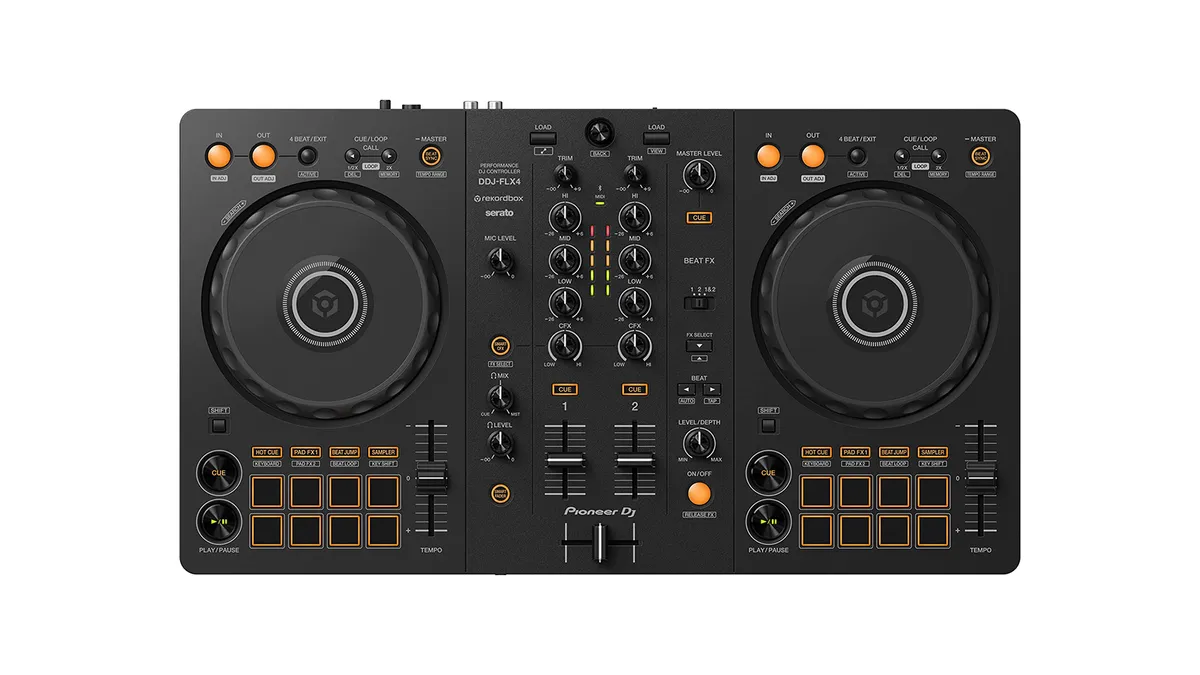
✅ Buy if you’re a beginner: The FLX4 is one of the most beginner-friendly DJ controllers going thanks to its widely-replicated control layout and for its assistive Smart CFX controls.
❌ Avoid if you want a hybrid setup: The FLX4 doesn't have a standalone mixer section, so you can’t double up on decks or add turntables; it’s purely for controlling software.
The lowdown: If a four-figure, four-channel pro-grade DJ controller is a little out of reach, you may be after something a little more restrained – and a lot more budget-friendly. Enter the DDJ-FLX4, an entry-level DJ controller that delivers the same crucial capabilities as its larger, more feature-packed DJ-controller siblings, but in a smaller, simpler and friendlier little package.
Features: The Pioneer DDJ-FLX4 is a two-channel, two-deck DJ controller, and one of the cheaper models in the Pioneer/Alphatheta ecosystem. It’s a step up from the ultra-basic FLX2, and a perfectly capable little unit. Each channel has three-band EQs, there are eight performance pads for each deck, and all the loop-related CDJ-ish gubbins you’d want for performance besides.
It's compatible with multiple DJ software platforms, including rekordbox and Serato DJ, but it will ultimately play best with rekordbox. That's because it has hardware buttons to access rekordbox’s Smart Mixing features along with effects and interventions designed to make it far easier for beginners to find their way through a mix.
You can use the Smart Fader to automatically adjust EQ, BPM and volume on tracks during a transition, or apply various clever effects using Smart CFX.
Build quality: The Pioneer DJ DDJ-FLX4 isn’t the most robust of DJ controllers featured in this guide. Per its budget price point, it’s quite lightweight, with a decently-solid plastic chassis. Everything’s on the smaller side to accommodate a greater level of portability, too, which might give some larger hands or precision enthusiasts pause for thought. Still, it’s a capable piece of kit, and outclasses many other budget DJ controllers too.
Performance: The DDJ-FLX4 is a great little platform, despite some of the limitations it has with respect to other, more feature-packed controllers. It’s intuitive and comfortable to use even with its smaller footprint, and it’s happy to blend into whatever setup you have (albeit, without its own dedicated inputs or booth output). Anyone can get a serviceable mix out of the FLX4, though it is more suited to newcomers who are looking for a great beginner DJ controller.
"With its smart mixing function, Bluetooth compatibility, mic signal integration and general ease of use, simple design and overall functionality, the FLX4 is likely to be a successful successor to the DDJ-400, and is a strong contender for best beginner’s DJ controller on the market right now."
Read more: Pioneer DJ DDJ-FLX4 review
Best pro controller

✅ Buy if you want a pro performance setup: The Rane Four is everything you need for a pro setup, with comfortable controls, high quality components, on-board effects and I/O that enables any manner of hybrid setup.
❌ Avoid if you’re a rekordbox baby: The Rane Four plays ball with Serato and a couple of lesser DJ platforms, and is not vying directly for Pioneer’s rekordbox terrain. You may want to stay within that ecosystem if you’re settled with rekordbox.
The lowdown: Rane is one of the premier brands in the DJ world, in large part for its world-renowned DJ mixer designs. It remains the brand of choice for bespoke and top-flight DJ setups in listening bars and music-first DJ venues globally. Though its solid presence in the DJ controller market doesn't carry the same stoic reverence as those early analog mixers, there’s still a great deal of healthy regard for what Rane’s doing – and the Rane Four is the logical conclusion to that regard.
Features: Rane’s Four DJ controller is, as the name might suggest, all fours. Four channels, four-deck control, four lots of inputs, and four out of four performance. Well, that last one’s me, but still. The Rane Four is a modestly-sized, forward-thinking DJ controller of techy excellence, which embraces the new stem-splitting tech of Serato DJ via dedicated Stem Split buttons and control over Stem FX.
The Four is crammed with features too, including on-board effects, control over mixer parameters and more. It's also nicely expandable, with ins-and-outs that allow the user to connect analogue inputs such as turntables, or additional controllers such as the Rane Twelve.
Build quality: The Rane Four is one of the best-constructed DJ controllers around. It’s impressively built, and in possession of some remarkably sturdy controls too. I’m a huge fan of the removable Mag Four crossfader, echoing the chop-and-changeability of standalone DJ and battle mixers.
Performance: The Rane Four performs admirably. As a four-deck controller, managing tracks and mixing between them is seamless. With Serato’s pioneering (sorry, Pioneer) stem separation algorithms, the Rane Four is even more practical; dedicated stem split buttons let you spread a track across two channels, to mess with as you please. Another winner is the on-board Rane effects, supplied independently of Serato and letting you benefit from performance FX without a laptop (if you were using the Four as just as mixer, for instance).
Best for scratching

✅ Buy if you want to scratch without records: The Rane One MkII’s motorized platters are the closest you can get to the real thing without buying a pair of turntables and a library of wax.
❌ Avoid if your needs are simple: With motorized platters, hefty stem-separating control interfaces and a great deal of techy smarts, if you’re at the start of your journey, you probably don’t need everything this has to offer.
The lowdown: Rane is a well-regarded brand across the DJ landscape, but it curried a great deal of its favour from collaborations and consultations with turntablists and scratch DJs – meetings-of-minds which led to some of Rane’s most popular products. That pedigree very much remains with the brand, as demonstrated by easily the best DJ controller for scratch DJs on the market – the Rane One MkII.
Features: The Rane One MkII is a second-generation scratch-DJ controller, and one which only improves on the form of its predecessor. The Rane One MkII sports 7.2” motorized platters, which provide real force feedback to you in the same way that a real record would. This is the big sell, but the MkII has some other clinchers in its arsenal – including a suite of 29 onboard Rane effects, serviced by an OLED screen for easy navigation and parameter shifts. This is on top of the extensive hardware-controlling of Serato’s powerful stem separation capabilities.
Build quality: The Rane One MkII is without peer. It’s astonishingly robust, and really trustworthy as a piece of DJing kit. The feel of the platters is great under-hand, the faders are excellent – particularly the feather-light Mag Four crossfader, which can be tensioned to your liking with ease.
Performance: To use, the Rane One MkII is a delight. The sheer volume of potential might be a little spooky at first glance, but the controls are deeply intuitive and ergonomic too. It’s easy to fly around this thing, and with every conceivable control being linked to a dedicated button or interaction, everything feels more like a performance than anything else.
Best all-in-one

✅ Buy if you want peak versatility: The XDJ-RX3 is a club-standard standalone DJ setup, but can also control rekordbox on a computer. Add in phono inputs and dual mic/line inputs, and it’s a widely applicable piece of kit.
❌ Avoid if money is an object: The XDJ-RX3 is an expensive bit of kit. If you could do without any of these features, it may be worth looking a little further down the price ladder.
The lowdown: Pioneer has an outsized impact on this guide for a reason. It’s all over the DJ market, with various products that all meet an industry standard in one way or another. This all-in-one, the Pioneer XDJ-RX3 is the top-flight transitional DJ controller for nascent mix-masters, being the latest in the leg-up RX series designed to graduate DJs from the world of entry- to mid-budget desktop controllers.
Features: This is a two-channel, two-deck standalone DJ controller. You can use a rekordbox-formatted USB (or, more accurately, two rekordbox-formatted USBs) to mix directly on the controller; a central 10.1” touchscreen shows you waveforms for both channels, and allows you to navigate your folders and playlists just as you would on a CDJ. However, there’s also a USB-B port on the back, that allows you to control rekordbox or Serato DJ on your computer. In this way, you have a lot of freedom with respect to setup.
That freedom extends to the I/O, too, where each mixer channel has separate RCA inputs for line and phono. If you have extra CDJs or even turntables, your two-deck DJ controller just (sort of) became a four-deck one. Throw in two combo TRS/XLR inputs for mics or line inputs, two further stereo aux inputs, and three flavours of output (two masters and a booth output) and that’s already more than you might actually need.
Build quality: As with practically any DJ controller, there’s a lot of plastic here. It understandably feels a little cheaper than the standalone CDJs it seeks to borrow from – but the buttons and faders are all on form. The encoder and buttons for navigating menus are nice and solid, and the unit feels robust.
Performance: To use, the Pioneer DJ XDJ-RX3 feels, in a word, familiar. It shares a great deal in common with the CDJ-plus-Pioneer-mixer setups of most clubs and venues, making it a friendly control surface to those that have used them before. It’s also a serious graduation from the simplified control surfaces of even the best budget DJ controllers. Navigation is easy, effects are fun to use, and the jog wheels are seriously comfortable.
Best for iOS

✅ Buy if you want to DJ using an iPad: The Mixon 8 Pro is ideal for portable mixing, in part due to its specifically iOS-friendly design.
❌ Avoid if you only need basic features: this is the best DJ controller for iOS, but that doesn’t mean it’s the best for you. As a beginner, you might want a smaller, less-expensive controller.
The lowdown: Reloop’s budget-friendly turntables are a regular find in beginner vinyl DJ setups, and compellingly priced for their capabilities too. But they’ve also been intervening in the DJ controller market since the late 2000s, albeit not to much fanfare. However, the Mixon 8 Pro deserves a great deal for its uniquely brilliant specialism.
Features: Reloop’s Mixon 8 Pro is a hybrid DJ controller that’ll play well with just about anything that runs Serato or algoriddim’s djay – but which seems especially well-designed for use with iPads. It’s an extremely dense box of tricks, from a bevy of analogue inputs and outputs to some forward-thinking per-track effects controls.
The big feature win for me is the commitment to four-deck potential, by virtue of those phono and line inputs on the rear. To be able to hook up turntables to this thing is a power move. The Mixon 8 Pro is also designed to support DVS – a major control-option upgrade on the predecessor Mixon 4, that makes this a rewardingly redundancy-friendly DJ controller.
Build quality: The Mixon 8 Pro is a very suave-feeling controller, and satisfyingly well put-together. It’s a far cry from the thin, light, cheap and otherwise uninspired toy-like designs we’ve seen for tablet-friendly DJ controllers. And that tablet friendliness extends to some thoughtful product design, by way of the slotted rear dock for holding your iPad.
Performance: The Reloop Mixon 8 Pro is a hard thing to fault. It’s extremely ergonomic, and also boasts some top-shelf features that are always winners for DJs. The jog wheels, while small, feel comfortable – and are big enough to squeeze some handy central screens in too. The performance pads are big and comfy, and the transport buttons are responsive. It’s a tactile thing – and the pair of USB inputs for dual-connectivity to different devices makes back-to-backing easy.
How to choose a DJ controller

The DJ controller market is big and full of options covering a broad range of prices. This makes it difficult to make out the clear frontrunners, particularly if you’ve got wants and needs of your own to cover. Let the following guide your thinking a little:
1. Software
Given we’re talking about physical DJ hardware, some might find it odd that software would be the first discriminating factor in choosing the best DJ controller for you. It’s for good reason, though; most DJ controllers are designed to play well with a specific piece of DJ management or performance software, meaning you need to be on the same page to get the most out of a given controller’s features.
Most controllers will have some functionality with multiple DJ software, and almost all can be configured to work with anything via MIDI mapping – but for the simplest, smoothest user experience, you want a DJ controller that talks to your favourite software.
The big two are Pioneer’s rekordbox, and Serato DJ, but other options like Algoriddim’s djay Pro are also available. Since Pioneer CDJs are the de-facto industry standard for clubs and venues, rekordbox and rekordbox-compatible DJ controllers are the most popular choice for gigging DJs. Serato DJ, though, is better-regarded for its DVS capabilities, control interface and stem separation technology.
2. Interface
The primary purpose of a DJ controller is to act as a tactile control surface for your DJing – and that control surface has to meet your preferences for it to be a worthwhile purchase. There are many variables between DJ controller designs, and some specific variables may speak to your own wants and needs.
For instance, smaller DJ controllers save space by using smaller jog wheels and short-throw faders, a trade-off that some would prefer; others, though, might prefer larger jog wheels that more accurately reflect club DJ setups.
There’s also the matter of specific interface features, that might not be common to all DJ controllers. If you’re a budding turntablist, you’ll want a DJ controller that gives feedback similar to cutting and scratching with real vinyl – which means plumping for a DJ controller with motorized platters.
3. Portability
Portability is its own criteria, too – and one which can be a major deciding factor for what makes the right DJ controller. All DJ controllers are portable to an extent, but some are more suitable to on-the-go mixing than others.
Larger, flagship DJ controllers such as the Pioneer DDJ-FLX10 are full-featured, but also require a separate power adapter to their USB connectivity – that is, they can’t receive bus power vis USB. Other controllers make physical design decisions that support portability, and can run via USB bus power too – meaning less cables, quicker setup and more portability besides.
4. I/O
Connectivity options can vary wildly from DJ controller to DJ controller. The vast majority sport main and headphone outputs, but some go a step further with a dedicated booth output, or a recording output.
Pro-grade DJ controllers are there as a holistic solution, a stand-in for club-level systems that incorporate CDJs and a central mixer; as such, they’ll sport some of the same inputs as a standalone DJ mixer, including phono/line inputs for turntables or additional decks, and even a separate mic/line input and channel for voice overdubs or auxiliary input.
5. Price
Budget is ultimately unavoidable as a consideration, particularly when the best DJ controllers can command a considerable cost premium. This value comes from the build quality, and the complexity of the hardware feature-sets on display. How much you’re willing to put towards your next DJ controller should depend on which features are non-negotiable; if you have no intentions of building a physical media library, you won’t need something with phono inputs for turntables.
FAQ

What is a DJ controller?
A DJ controller is an interface that connects to a computer or tablet, enabling you to DJ using your digital audio files or streaming subscriptions via your DJ software of choice. DJ controllers take after professional DJ setups, but in a reduced and comprehensive format; a mixer with EQs, crossfaders and effects controls, bounded on each side by a deck interface with a jog wheel, performance pads and other performance-friendly controls.
What does a DJ controller do?
The DJ controller acts as a physical extension of the capabilities of your DJ software, and can also act as an audio interface. A headphone output gives you the cue mix and master mix, and a master output on the rear sends your performance out to speakers. The higher in price you go, the more I/O you’ll find, by way of separate booth or recording outputs, mic or line inputs, or even dedicated per-channel phono/line inputs for extra CDJs or turntables.
All DJ controllers enable you to perform with just the controller and your laptop or tablet; some will let you expand your setup. Certain DJ controllers are specialised, in that they cater to specific styles of DJing. Scratch DJs and turntablists, for instance, benefit from DJ controllers with motorized platters that act like real vinyl.
What DJ controller should I buy?
There are many variables that dictate which is the best DJ controller for you to buy – variables I’ve broadly covered in my How to Choose section above. In short, though, the main things that affect what DJ controller you should buy are budget, software, portability and connectivity.
Software is arguably the most important of the bunch, since most DJ controllers are designed with one or two specific programs in mind, and many unlock the pro-grade features of one such application. Of course, there are other considerations. If you’re planning on taking your controller out for gigs, then build quality and weight will be more of an issue than if you intended it for home use only. You’ll need to consider if you want built-in audio inputs to connect turntables, CDJs, a mic or an instrument to your set-up and if you want to expand with timecoded vinyl or CDs in the future.
Some controllers included in this guide also work as a standalone DJ mixer, without the need to connect to a computer, which could be another consideration. Then there’s sound quality, size, looks, build quality, price... the list goes on.
In short, it’s difficult to crown any one bit of kit the absolute ‘best’ controller, but what I can do is present you with a round-up of my favourites among the options currently available.
What is stem separation?
One of the newer trends in DJ software and hardware is the implementation of stem separation, which uses AI to near-instantaneously extrapolate individual instruments or elements from mastered stereo tracks – typically vocals, drums, bass and synths. Many newer controllers will have dedicated control surfaces for these features, enabling stem isolation, doubling across channels and even independent effects overlays.
What are the key brands for DJ controllers?
There are many brands with their fingers in the proverbial pie that is DJ equipment and accessories, arguably the biggest of which is AlphaTheta. This is the parent company of Pioneer DJ, the de facto industry standard for club and venue DJ systems. Pioneer was responsible for the first successful iteration of digital-forward DJ controllers in professional environments, courtesy of the turntable-alternative CDJ and its XDJ successors.
Other key figures in the DJ controller world include Rane, Reloop, Denon, and Traktor. Not all of these make an appearance in this guide, being that many are better regarded as manufacturers of the best beginner DJ controllers – but Reloop and Rane do make a showing, for their unique and highly valuable interpretations of the form.
What DJ software should I use?
There’s a wide variety of options for DJ software out there too, the key competitors being: rekordbox, Serato DJ, Algoriddim djay Pro, Virtual DJ and Traktor Pro. The first three have arguably the biggest footprints – djay Pro being an accessible and highly compatible software for learners, rekordbox being the de facto software for club and venue DJs, and Serato finding a home among pros, enthusiasts and DJs with their own portable setups. There’s also Engine DJ, a music management software for preparing files and playlists to work with Denon hardware.
If I were to tell you to use one software in particular, it would have to be rekordbox. This is simply for the fact you can use it as performance software with your DJ controller, but also perform pretty much everywhere else with just a USB stick. Pioneer equipment is truly ubiquitous, and that arranging your digital music library on rekordbox means you can take the resulting USBs to most any venue, and play on what they have without issue.
Serato DJ is another highly-regarded software, for its interface, preferable DVS capabilities and first-to-the-punch stem separation technology. It’s a breeze to use as performance software, and the brands that make Serato-friendly DJ controllers will make the most of the software capabilities on offer with hardware controls – Rane chief among them.
Do I need to buy music to DJ?
Yes and no. Conventionally you would purchase vinyl records to spin on turntables, or digital audio files to fill your USBs with. Streaming, though, has become a key option for budding DJs, as most DJ software now enables you to sync up with a paid music streaming subscription. Spotify and Apple Music are the most well-integrated of these mainstream services, but Soundcloud and Beatport are also up there.
Glossary
Audio interface: A device that receives audio to convert it to digital information, and vice versa. In DJ controllers, this presents as the output of audio from DJ software through dedicated main, headphone and monitor outputs.
Beatmatching: The practice of matching the tempo of one song with the tempo of another, on the beat, so they play in time – thus allowing you to transition between one and the other.
Crossfader: A horizontal fader used to switch seamlessly between the output of one deck and the output of another. In the middle of its throw, the crossfader enables both tracks to play at the same volume, and at either end, only one track is audible. Crossfaders are more commonly used in tandem with scratches by turntablists.
Cue: The setting-up of a track to play from a certain point; also, a secondary mix channel that enables you to audition audio and effects in your headphones, separately from the master output.
DMX: Stands for Digital Multiplex, referring to a communications protocol that enables digital control of lighting systems.
DVS: Stands for Digital Vinyl System. DVS is a system by which vinyl records, stamped with timecode, control digital files through interpretation of the timecode as read by a turntable stylus.
EQ: Stands for equalisation. Relates to the performative adjustment of different audio frequencies to control the energy of a mix, or the strength of a blend. Smooth blends are accomplished between tracks by ‘swapping’ EQ bands, for instance pulling out the low end on one track to make room for the bass and drums of another.
Fader: A linear potentiometer that enables you to increase or decreases a parameter by moving a slider. Faders are used for channel volumes, the crossfader, and tempo adjustment for each deck.
Filter: A powerful, creative one-knob tilt-EQ effect.
FX: Stands for effects, which are used to enhance DJ performances or enable creative blends. Effects are typically found in DJ software, but some DJ controllers have built-in effects hardware. Effects can be applied on a per-channel basis, but also to stems extrapolated from a digital audio file in certain software.
Hot cue: A user-set point on a digital audio file, that enables easy access to parts of a song via performance pads on a DJ controller.
Jog wheel: The platter-sized rotary encoders either side of the mixer on a DJ controller. These are stand-ins for vinyl platters, or the jog wheels on standalone CDJs, used to navigate and manipulate tracks loaded to their respective decks. Most jog wheels are touch-sensitive, to allow two types of operation: scrubbing and scratching using the face, and momentary tempo adjustment using the edges.
Master: The final output of your DJ controller, to be supplied to your speakers or PA system. The master output is typically an array of stereo RCA or XLR ports.
Mixer: Receives and mixes audio from disparate sources, to produce a master output. DJ controllers have mixer sections, some of which are outfitted as standalone mixers; as well as controlling the volume of channels of digital audio, as routed through the decks, the mixers can receive analog audio from other decks or even turntables.
Motorized platter: A powered, rotating form of jog wheel, which controls and manipulates digital media but with the feel of a real vinyl record on a platter.
Performance pads: Velocity-sensitive buttons or touchpads found above or below the jog wheels, which provide control over hot cue points, looping, stems and other forms of creative programming or mixing – dependent on the brand and feature-set of the DJ controller.
RCA: Also referred to as phono, being a standard of coaxial connector. Stereo RCA connectors are pairs – red and white respectively – that supply each channel of stereo audio.
Rekordbox: A form of DJ software developed by Pioneer. rekordbox is the file management software of choice for working DJs, since club systems are typically Pioneer – and rekordbox-formatted USBs can be used on any Pioneer system.
Serato: Another form of DJ software, which in its early years pioneered the DVS format of DJing. Serato is widely loved for its control interface, forward-thinking stem separation algorithms and DVS utility.
Scratch: A DJ technique in which tracks are scrubbed back and forth, to create a rhythmic sound.
Stem separation: Digital technology which extrapolates individual instruments and elements from a master track. Stem separation enables you to isolate different elements for creative blends and live re-mixing.
Tempo: The speed at which a track plays, measured in beats per minute (BPM).
Waveform: A visual representation of a song’s dynamic range, displayed by DJ software to give an indicator of beat, song length and dynamics.
XLR: A class of audio connector, used for balanced outputs on the rear of pro DJ controllers. These enable clean connectivity to a venue PA system or audio interface.
How we choose the best DJ controllers
There’s only really one sensible way to test a DJ controller, and that’s to get hands-on and mix with it. That’s exactly what our team of reviewers do whenever trying out a new DJ device.
However, we’re aware that not all DJs perform in the same way, so we do our best to get into the mindset of as many different styles of DJ as possible to investigate how each might get on with any particular controller. We ask how each feels for long, slow mixes, how the crossfader and jogwheels feel for quick cuts and performance, how any pads, EQs or effects controls respond in a performance setting.
A key factor too, as with any musical controller, is how well the device interacts with its intended software. Does it feel tight and responsive? Do the controls offer easy access to all the most important elements of the application? A good controller should keep you away from the mouse and screen and let you feel connected to your music. That’s exactly what we’re looking for when we’re testing a new DJ controller.
Read more about how we test music making gear and services at MusicRadar.
Why you can trust us
✔️More than 9,500 reviews on-site
✔️Over 17 years of product testing
✔️ 2.9 million monthly users globally
With more than 17 years of experience, MusicRadar is the premier music-making website in the world. Run by musicians for musicians, we offer expertly written gear round-ups and high-quality, authoritative reviews by an extensive team of highly experienced industry professionals.
We also interview world-renowned musicians and stars about their creative processes and the nuts and bolts of their gear and technique. This gives fans an insight into the actual craft of music-making that no other music website can.
But that's not all. We also provide excellent tuition, from bite-sized tips to advanced techniques and guidance from recognised musicians.
As well as delivering high quality written reviews and features, we also produce a wealth of video content on YouTube. MusicRadarTV is where you'll find all of our access-all-areas interviews, hot gear demos and exclusive video lessons.
Below you'll find more information on the authors of this guide.
Meet the experts

I'm the Managing Editor of Music Technology at MusicRadar and former Editor-in-Chief of Future Music, Computer Music and Electronic Musician. I've been messing around with music tech in various forms for over two decades. I've also spent the last 10 years forgetting how to play guitar. Find me in the chillout room at raves complaining that it's past my bedtime.
Harold Heath is a UK music writer and author. A DJ since the late 80s, Harold also produced a few hundred singles and remixes and two artist albums, and worked as a performer, ghostwriter and music-technology teacher. His first book Long Relationships: My Incredible Journey From Unknown DJ to Smalltime DJ was published in 2021.

James Grimshaw is a freelance writer and music obsessive with over a decade of experience in music and audio writing. He's lent his audio-tech opinions (amongst others) to the likes of Guitar World, MusicRadar and the London Evening Standard – before which, he covered everything music and Leeds through his section-editorship of national e-magazine The State Of The Arts. When he isn't blasting esoteric noise-rock around the house, he's playing out with esoteric noise-rock bands in DIY venues across the country, or DJing in venues across the nation, including supporting art rockers Everything Everything behind the decks.
Latest updates
16/07/26: The guide has been rewritten from the ground up, with each of the six products featured receiving complete rewrites and additions. Each DJ controller now has an At A Glance panel telling you the pros and cons, and expert verdict panels have been added where applicable. A new How To Choose section has been added with practical information to help you choose the right DJ controller, and the FAQ section is entirely new. Finally, we've also added a glossary highlighting the key terms you may come across.
Read more:
MusicRadar's got your back Our team of expert musicians and producers spends hours testing products to help you choose the best music-making gear for you. Find out more about how we test.
- Our pick of the best DJ headphones available today
- Upgrade your rig with the best DJ speakers
- The best DJ turntables: top decks for vinyl DJs
- How to DJ on a laptop: a beginner's guide
- Check out the best beginner DJ mixers
- Essential DJ accessories for the studio to the booth
- Our pick of the best gifts for DJs
