





MusicRadar Verdict
KeyStep Mk2 is a solid upgrade, offering new features and streamlined controls at a highly competitive price.
Reasons to buy
- +
Quality mini keybed with velocity and aftertouch
- +
Plenty of creative options
- +
Excellent rotary encoder implementation
- +
RGB backlit buttons
- +
Slimline profile
- +
Simultaneous USB, MIDI and CV/Gate output
Reasons to avoid
- -
No included PSU
MusicRadar's got your back Our team of expert musicians and producers spends hours testing products to help you choose the best music-making gear for you. Find out more about how we test.
What is it?
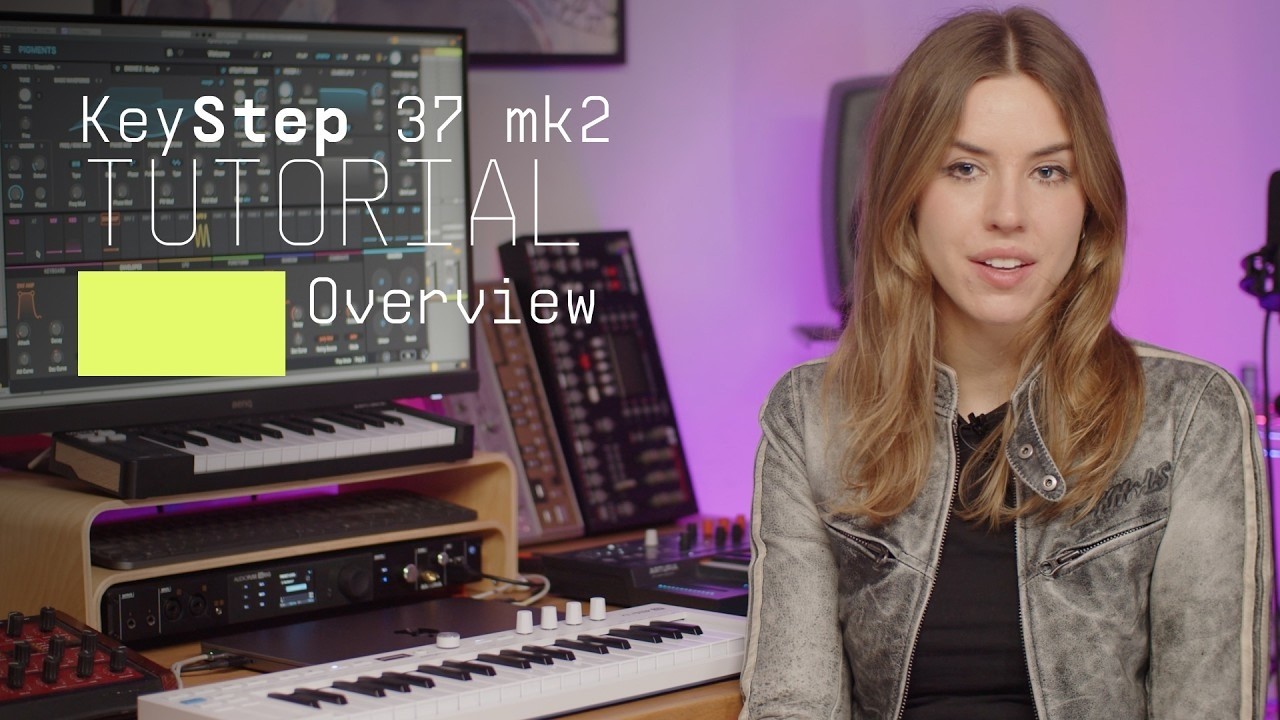
Arturia’s KeyStep range is a line of controller keyboards with a step-sequencer focus, and the new KeyStep 37 mk2 is the latest model. Offering a more performance-focused alternative to their KeyLab controller keyboards, the KeyStep devices are designed for use in both standalone and DAW-based setups.
Although visually similar to the KeyLab controllers, closer inspection reveals a bunch of features aimed at sequence creation. Meanwhile, on the back, support for CV, MIDI and USB formats means you’re all set to simultaneously control multiple types of devices.
Let’s take a look at the layout. The KeyStep 37 mk2 is built around a quality slimline keybed with velocity and aftertouch. On the left-hand side, you get ribbon-style modulation and pitch bend alongside octave shift and note Hold. A further blue Shift button provides additional functionality.
The top panel, which has been considerably reworked since the previous version, is centred on a mini OLED screen with push button rotary encoder. You’ll find various RGB backlit buttons on either side of the screen, and 4 rotary encoders on the right. Meanwhile, a line of 39 note-indicating LEDs accompanies the keys.
Back panel connectivity includes MIDI in and out, 4 CV outputs (pitch, gate, mod1 and mod2), pulse synchronisation (in and out), USB-C, sustain pedal input and on/off switch. Power is provided either via your USB-C connection or by using a regular USB-C power supply (this needs to provide 5V at 100mA). Alas, there’s no included PSU, but you do get a rather nice 2m Arturia-branded USB-A to USB-C cable.
Also included are licences for Ableton Live Lite and Arturia’s Analog Lab Intro instrument. Overall product management and activation is handled using Arturia Software Centre, and firmware upgrades and many device parameters can be set using Arturia’s MIDI Control Centre desktop app.


Performance
Much like its predecessor, KeyStep 37 mk2 is a single-track sequencer with step and real-time options and sequence and arpeggiator modes. However, with the removal of the physical arp and sequencer knobs, from an operational perspective, things have changed quite a bit. Now, buttons work alongside the OLED-based menu, which provides access to both settings and real-time parameter feedback. Meanwhile, holding down some buttons gains access to secondary functions. Global functions such as clock and transport mode (main/secondary) are now menu settings rather than real panel dip switches. Impressively, the 4 rotary encoders work with both the MIDI CC and Control buttons.
For MIDI CC output, the encoders have 4 banks, cycled through using the MIDI CC button. The Control button provides quick encoder access to parameters for the Sequence, Arp, Mutate and Chord modes once they are selected. The Shift button adds a further layer of settings and options across all the buttons, keyboard keys and rotary encoders. Thankfully, labelling is good and coupled with the OLED feedback and task-specific RGB button backlighting, it’s pretty easy to see what’s happening.

Much like the latest KeyStep mk2, the KeyStep 37 mk2 has some excellent creative features that help you enhance and manipulate patterns. For example, the Shift button, combined with the pitch and modulation ribbons, accesses the Gate and Spice features, respectively. The latter adds pattern variation with an optional dice feature (3 taps of the modulation strip) for randomisation of the outcome. However, of most interest is the Mutate feature, which is based on Arturia’s Minifreak option.
Designed to add a degree of musical randomness, it affects note length, swing, pitch and polyphony and can be applied repeatedly to sequences and arpeggios, but also completely reset back to the starting point. On the KeyStep 37 mk2 Mutate has extended functionality via the 4 encoders, allowing you to set parameters to influence the outcome. These vary slightly depending on which arp or sequence mode you’re using, but in essence, you have control over things such as probability, randomness, polyphony and density.


Verdict
The KeyStep 37 mk2, much like its smaller sibling, is an excellent upgrade and great fun to use. If you can afford the extra spend, the new encoders and particularly their excellent implementation make this the more desirable unit.
Hands-on demos
Arturia
Alternatives
Specifications
Price |
$189 |
Keyboard
|
37‑note slimkey keyboard with velocity & aftertouch |
Controls
|
2 capacitive touch strips, RGB backlit buttons, 4 continuous controllers |
Screen
|
mini OLED screen with push button rotary encoder |
Sequencer
|
1 track with up to 64 steps, 8-note polyphony per step |
Arpeggiator |
15 preset modes, 1 user mode |
Creative features |
Chord, scale, mutate, spice and dice options |
CV outputs |
Pitch, Gate, Mod 1, Mod 2 |
MIDI |
In and out 5-pin DIN |
Control |
Sustain pedal input ¼” TRS jack |
Power |
USB-C |
Accessories |
USB-A to USB-C cable |
Software bundle
|
Arturia Analog Lab Intro, Ableton Live Lite |
Dimensions |
58(h) x 547(w) x 148(d) mm |
Weight |
1.09kg |
Contact |
