MusicRadar Verdict
It's hard to say who actually 'needs' low-latency wireless headphones, but if you want a pair for DJing or instrument monitoring, the Studio Max 2 ticks all the necessary boxes and a few more besides, and comes at a very tempting price.
Pros
- +
Solid low-latency performance with a surprising lack of background noise.
- +
Good battery life for both the headphones and M2 transmitter.
- +
Multiple wireless and wired connectivity options.
- +
Comfortable to wear.
Cons
- -
Large case
- -
They look big on your head.
- -
No USB audio.
MusicRadar's got your back Our team of expert musicians and producers spends hours testing products to help you choose the best music-making gear for you. Find out more about how we test.
What is it?
As anyone who’s tried to make music using Bluetooth headphones will tell you, the latency that they introduce makes this all but impossible in most situations. The obvious solution is simply to use a wired connection, but for the past few years we’ve seen various companies giving us another option: low-latency wireless headphones.
AIAIAI is the company most closely associated with this technology, which involves adding a dedicated wireless audio transmitter into the mix, and AlphaTheta has had a go, too. And then there’s OneOdio, a Chinese company that’s seeking to disrupt the market by offering similar tech at a lower price.
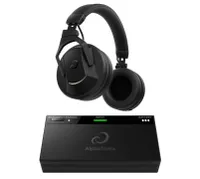
The company is now having another bite at the low-latency wireless cherry with the Studio Max 2, the successor to the original Studio Max headphones. These introduce OneOdio’s 3rd Generation RapidWill+ Ultra-Low Latency 3.0 technology, which promises to bring latency down to nine milliseconds and to up the wireless bitrate from 160kbps to 400kbps to deliver cleaner, better quality audio.
Alongside the low-latency mode, the Studio Max 2 also offers Bluetooth 6.0 and wired connectivity options. OneOdio actually claims that there are four connectivity modes, but two of these are just the wired option with two different plug sizes (mini-jack and 1/4-inch) which is a little misleading (if you were hoping that the fourth mode was USB audio, we’re afraid you’re out of luck). You do get all the required audio cables in the box, though (including a nice curly one), along with a mini-jack-to-1/4-inch adapter.
On the Bluetooth side, there’s support for the high-quality LDAC codec and dual connections, so you can pair with two devices simultaneously. There’s also a gaming mode, which reduces latency.
Both headphones and transmitter are charged using the supplied USB-C cable, and promise up to 120 hours (60 hours in low latency mode) and 50 hours of operation respectively. There’s a dedicated app, where you can make EQ adjustments, change settings and update the firmware.

Performance
The first thing that strikes you when you unpack the Studio Max 2 is the size of the hard case that comes supplied. It’s a bit of a beast, and the same could be said of the headphones themselves.
There’s no sense of minimalist design here: these are unapologetically large headphones that will take up a fair amount of space in your backpack. The vinyl-style pattern on the back of each earcup indicates that DJs in particular are the target market, a hunch that’s supported by the fact that the Studio Max 2 is launching alongside a limited edition (just 1,000 units) signature model from DJ KSHMR, which features his own “acoustic tuning” and comes with a pack of his samples.
There’s a fair bit of plastic in the build, though the internal adjustable headband is metal. What’s more, although these are chunky cans, they’re not outrageously heavy, and feel reasonably comfortable being worn for extended periods of time.
Engaging the low-latency wireless mode is pleasingly simple. Assuming both the transmitter and the headphones are charged, you just need to turn them both on and ensure that the mode selection switch is set to ULL (Ultra Low Latency). At this point, pairing should be automatic.
If your audio source is a computer, tablet or phone, you can simply plug in the transmitter over USB-C – no analogue audio connection is required. If you’re working with an instrument or DJ mixer, you’ll use the appropriate audio cable.

We’re pleased to be able to report that low-latency performance exceeded our expectations. When using some similar products, the transmitter has introduced a noticeable background hiss that you could never really get rid of, but the signal on the Studio Max 2 is pretty clean. The connection was also reliable during testing; we didn't experience any dropouts, and the quoted 10-metre range seems conservative, if anything.
What’s more, the latency really is low – to the point where it doesn’t really feel like an issue at all. The response when playing a keyboard was perfectly acceptable, and it did feel good not to have a cable trailing around the place as we jumped between that and a DAW.
Sound quality is also pretty decent. Out of the box, it’s well-balanced, and we noticed plenty of snap on the snares in particular. There is a slight lack of sparkle, and perhaps a little mushiness at times, but the Studio Max 2 is certainly a match for other headphones in its price range.
As you’d expect, the wired connection offers the best performance, but the Bluetooth listening experience is also a satisfactory one. You can make EQ adjustments in the app, but we were happy enough to keep this flat for the most part.
All the pieces are in place, then, for the Studio Max 2 to be a success, though the question you still need to ask yourself is whether you actually need low-latency headphones when, in most instances, you’ll still be standing within a cable’s reach when you use them. Yes, it’s a nice thing to have for instrument monitoring and DJing, but we’d struggle to think of a specific situation where it’s essential.
But then you’ve also got to consider the cost. Even if there was no wireless transmitter, the sub-£200 price for the Studio Max 2 wouldn’t seem outrageous when you consider the rest of the feature set. We’re not sure we’d want this to be our only pair of headphones – the case is just too bulky for them to be a pair that you’d throw in your bag everyday, there's no active noise cancelling, and they do look big on your head – but for the price, and when compared to the direct competition, there’s plenty to like here.


Verdict
It's hard to say who actually 'needs' low-latency wireless headphones, but if you want a pair for DJing or instrument monitoring, the Studio Max 2 ticks all the necessary boxes and a few more besides, and comes at a very tempting price.
Alternatives
Specifications
Price |
$189.99/£179.99/€186.80 |
Key features |
Design: closed-back over-ear Driver: 45 mm dynamic driver with studio-grade magnet Frequency range: 20 Hz to 40 kHz Impedance: 34 O Sensitivity: 98 dB ± 3 dB Maximum sound pressure level: 118 dB Playtime: Headphones, 120 hours; M2 transmitter, 50 hours Multipoint Connection: Yes Wired connectivity: 3.5mm/6.35 mm jack M2 wireless latency: 9ms |
Weight |
N/A |
Contact |