





MusicRadar Verdict
KeyStep Mk2 is a solid upgrade, offering new features and streamlined controls at a highly competitive price.
Reasons to buy
- +
Excellent new generative features.
- +
OLED screen for real-time controls and global settings.
- +
Simultaneous control via multiple output formats.
- +
Integrated keyboard with aftertouch.
- +
8-note polyphony per sequence step.
Reasons to avoid
- -
Limited to one sequencer track.
MusicRadar's got your back Our team of expert musicians and producers spends hours testing products to help you choose the best music-making gear for you. Find out more about how we test.
What is it?
Arturia produces some of the best and most stylish control keyboards and control devices available. Its KeyLab controller keyboards come in an array of sizes and performance at multiple price points. KeyStep is a parallel product that focuses on real-time step sequence and arpeggio creation and is aimed at those working with a hybrid or even DAW-free setup. Options include the original 32-key design as well as a 37-key version and KeyStep Pro, which is a 4-track design.
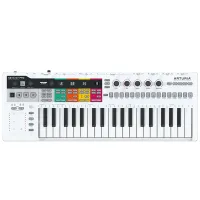
KeyStep Mk2 is a considerable overhaul of the 32-key version, nevertheless it still has some aspects in common with the original controller. It features the same slimline keybed, with velocity and aftertouch. Meanwhile, you get ribbon-based control of modulation and pitch bend to the left and dedicated octave buttons just above. Step sequencing is a single track with 8-note polyphony per step.
There have been some changes to connectivity, which now includes MIDI in and out, four CV outputs (pitch, gate, mod1 and mod2), pulse synchronisation (in and out), and USB via USB-C. There is simultaneous output from all outputs. Further back panel options include sustain pedal input and on/off switch. Power is provided either via your USB-C connection or by using a regular USB-C power supply (this needs to provide 5V at 100mA).
You’ll find KeyStep Mk2’s biggest changes are on the top panel, and these are primarily down to the removal of the three physical arp/sequencer controls. Indeed, the whole top panel has been redesigned to incorporate the new mini OLED screen, push button encoder and RGB backlit soft buttons. The panel buttons work in conjunction with the OLED-based menu, but also extensively via the Shift button. The Shift also works in conjunction with the keyboard keys to select patterns/arp modes, sequence banks and rate. You even get an Undo option that works when recording patterns.


Performance
Although KeyStep Mk2 is primarily a sequence and arpeggio creation device, it can also work as a straight-up MIDI controller keyboard. Meanwhile, you can incorporate KeyStep Mk2 into your setup as both a clock and transport master or slave. On the original KeyStep, setting this up required fiddling with the back panel dip switches. Thankfully, this is now handled via the OLED menu, as are many further settings.
As you might expect, the reworked top panel directly affects KeyStep operationally, and although options such as tempo are easily set via the metronome button and encoder, this is less immediate than the original physical knobs. However, this is a minor inconvenience, and the panel upgrade now includes more creative options. Two of these – Gate time and Spice – are Shift options that are assigned to the pitch bend and modulation ribbons, respectively. Spice is a pattern variation feature that influences both sequences and arpeggios. As you increase the modulation ribbon, the variation becomes greater, meanwhile returning the modulation to zero returns to the original pattern. Tapping the modulation strip three times activates Dice mode, which further randomises the Spice outcome.
The other main generative feature is Mutate and this primarily influences the notes played. A short press of the Mutate button creates small changes, but holding the button down longer and changes become much greater. This is great for adding more left field pitch changes to a sequence. However, if you don’t like the outcome, you can simply use the handy Reset option to return to the original.


Verdict
Overall, the KeyStep Mk2 is a well-designed and creative sequencer. With an expanded feature set for real-time sequencing and performance, it offers a straightforward yet well-featured entry point for anyone wanting to control a hybrid sequencing setup.
Hands-on demos
Arturia

Alternatives
Specifications
Price |
€129 / $139 |
Keyboard
|
32‑note slimkey keyboard with velocity & aftertouch |
Controls
|
2 capacitive touch strips, RGB backlit buttons |
Screen
|
mini OLED screen with push button rotary encoder |
Sequencer
|
1 track with up to 64 steps, 8-note polyphony per step |
Arpeggiator |
15 preset modes, 1 user mode |
Creative features |
Chord, scale, mutate, spice and dice options |
CV outputs |
Pitch, Gate, Mod 1, Mod 2 |
MIDI |
In and out 5-pin DIN |
Control |
Sustain pedal input ¼” TRS jack |
Power |
USB-C |
Accessories |
USB-A to USB-C cable |
Software bundle
|
Arturia Analog Lab Intro, Ableton Live Lite |
Dimensions |
50(h) x 484(w) x 145(d) mm |
Weight |
1.1kg |
Contact |
