
MusicRadar Verdict
With the latest iteration, the Akai MPK Mini IV is still one of the best MIDI keyboards on the market right now. It’s jam-packed with features and functionality that will serve more experienced users well, and simple enough to use that pretty much anyone could pick it up and start making music with. The Studio Instrument Collection sounds are really great quality, and definitely add a lot to the MPK Mini offering. If you’re looking for a great MIDI controller below the $/£100 mark, it’s hard to look past this as one of the best options out there.
Pros
- +
Joystick for pitch and mod finally replaced with wheels.
- +
Small screen adds additional visual workflow cues.
- +
Excellent Studio Instrument Collection with great sound selection.
- +
MPC-style drum pads are as playable as ever.
Cons
- -
Mini keys can feel pretty cramped.
- -
No AAX version of Studio Instrument Collection.
MusicRadar's got your back Our team of expert musicians and producers spends hours testing products to help you choose the best music-making gear for you. Find out more about how we test.
What is it?
As one of the all-time best-selling MIDI keyboards, Akai’s MPK range will need little introduction to anyone who’s even dabbled in the realms of music production. With the arrival of the Akai MPK Mini IV, there’s yet another MIDI controller added to an already long list for music makers to consider.
The MPK series is highly regarded as one of the best all-rounders for getting people started in music production, but it’s also a very capable controller for more advanced musicians. Akai hasn’t played too much with the format versus the previous generations here, instead choosing to make a series of small upgrades that will improve usability and enhance production workflows.
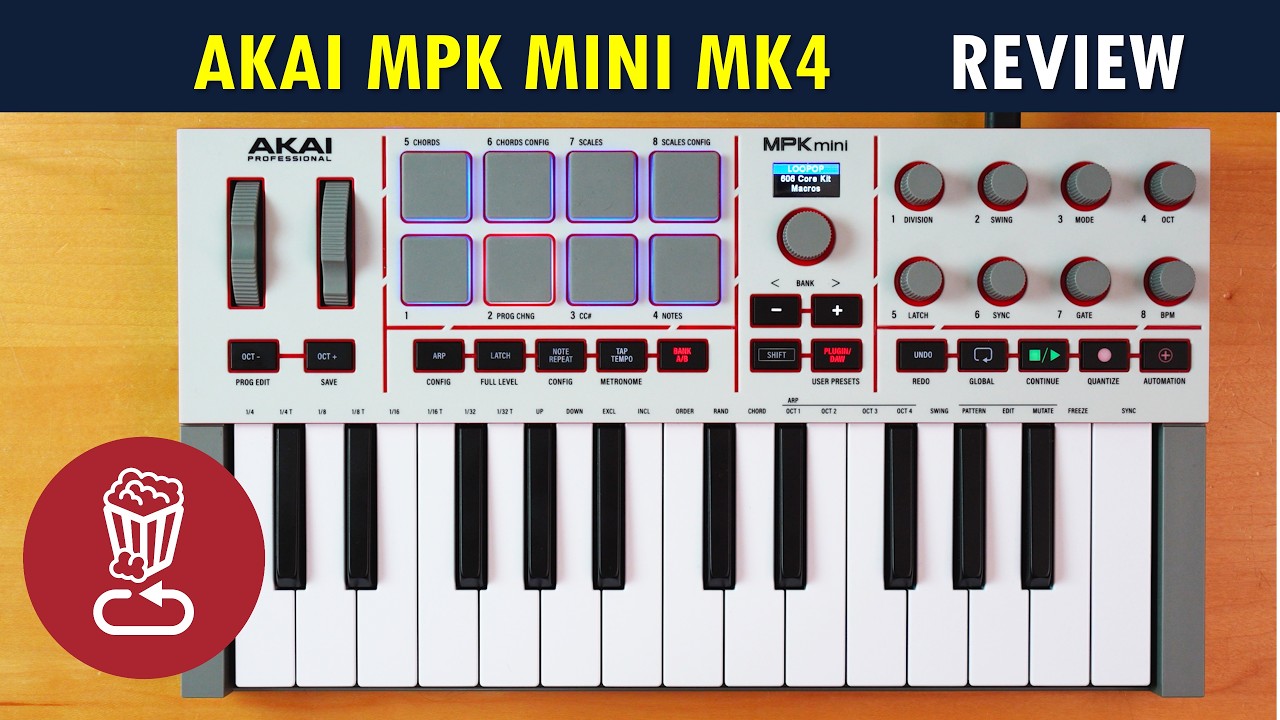
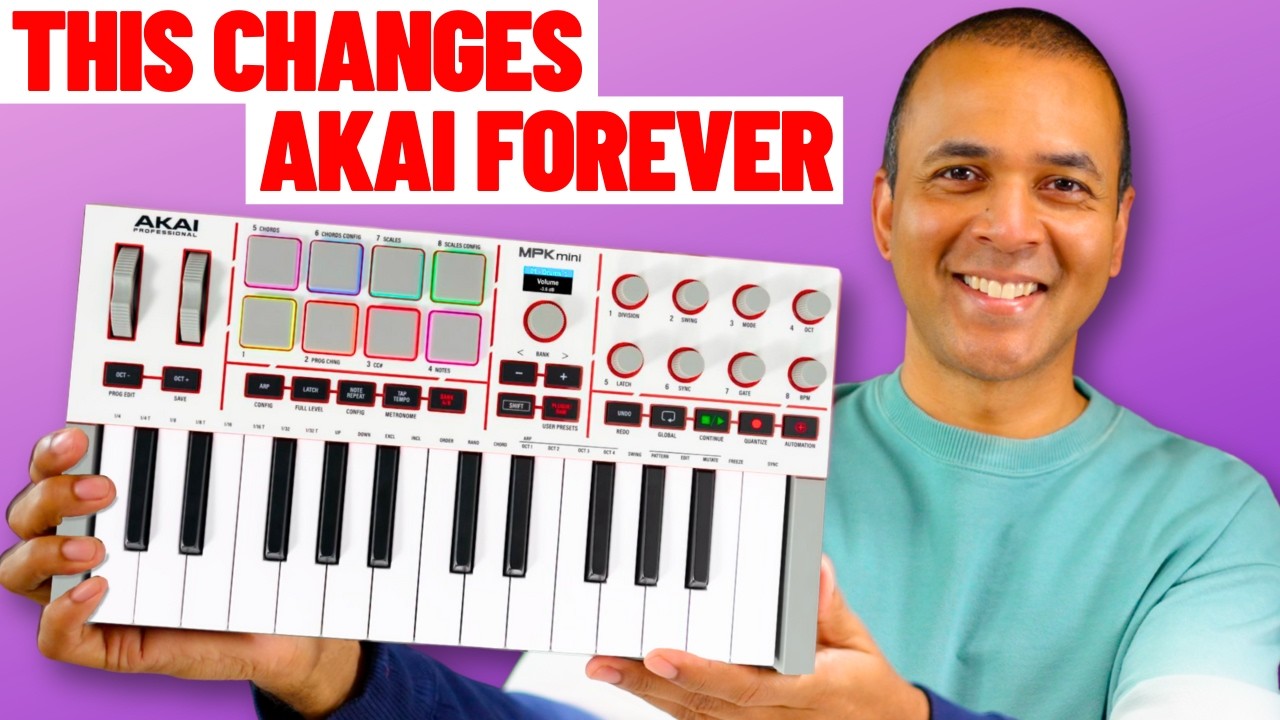
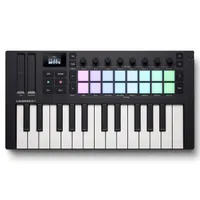
Most noticeable is the replacement of the much-maligned joystick with separate wheels for controlling the pitch shifting and modulation control. The function buttons, once scattered across the unit, are now all in a single row above the keybed for easy access. The screen remains from the previous version but is upgraded to full colour, and now with its own endless encoder to allow you to control a brand new instrument collection, a first for an Akai MIDI keyboard.
Other changes are more subtle, like the slightly smaller MPC-style drum pads or the 8 slightly redesigned encoders for controlling various parameters. It also features dedicated transport controls for use with your chosen DAW, promising ‘1 to 1’ control with most major software. Chord mode returns from version 3, as does a more advanced version of scale mode, which has jumped from pad-only to be playable on the keybed.
The apreggiator has also gotten an upgrade, with the introduction of three new modes to jazz up your compositions with mutate, arp freeze, and pattern mode. In a boon for synthesizer users, the MK4 version also has a 5-pin MIDI output for hooking up to external hardware.
It’s available in two colourways with a familiar black and red motif and on my review model, a very fetching grey and off-white colour scheme that echoes the aesthetic of the original MPC, and gives me some '80s Amstrad PC vibes, too. It’s a very cool-looking piece of kit, and a nice balance of retro and modern.

Performance
As with most things I review, I prefer to jump straight in, so I plug the MPK Mini MK4 straight into my MacBook Pro M3 and load up a recent Pro Tools project. I’m pleased to report that after I create an instrument track and load up my copy of Wavestate Native, the MPK works straight off the bat, and I can begin adding some orchestral sweeping pads to a spacious guitar interlude immediately.
Keen to try what in my eyes is the biggest change from the previous iteration, I get to working the pitch and modulation wheels to see the action. The pitch wheel has a nice bit of resistance and automatically returns to the middle position when I let go, so I find I can really slowly and subtly bend the notes as they tail off. The travel of the wheel appears on the screen as both a bar that fills either way depending on where I bend, and a selection of numbers.
The modulation wheel has less resistance to it, which makes sense based on its use case. Here, the wheel sits where you leave it, and again is represented on the screen as a bar that gradually fills and a number. It’s taken Akai a while to upgrade these from the joystick of the previous versions, and it’s a much better experience than I’ve found on the prior generations of the controller.

The 8 encoders in the top right also work straight off the bat in Wavestate Native, so I can manipulate my sounds in real time. The labels don’t correlate, so presumably the MPK just picks the first 8 controls in the plugin of choice, but it’s great to see it work without any further input required. I immediately start experimenting with sounds, adjusting the timing, pitch, and step sequence without having to reach for my mouse or keyboard.
However, the same can’t be said for the transport controls, which don’t work for me straight out of the box. After an extended period of messing around with various presets, I head for the Akai website to get the software that comes with it and attempt to get all the controls up and running, as well as demoing in the brand new suite of instruments that comes with it.

I downloaded the inMusic Software Center, which houses the MPK software bundles. It includes Komplete Select 15, Ableton Live Lite 12, and the Studio Instrument Collection. The process asks me to update the firmware, which leads to the pads becoming illuminated, which wasn’t the case previously, as well as asking if I’d like to install DAW control scripts for FL Studio, Cubase, Logic Pro, and GarageBand. Unfortunately, there’s no script for my DAW Pro Tools, nor is there AAX compatibility, so I can’t run the Studio Instrument Collection inside my DAW either, which is a big shame.
I can run the software in standalone mode, so I chose to demo it that way for the purposes of the review. Upon initial load, I have to change the latency settings so that there isn’t a delay between hitting the drum pads and the sound emerging, but I find a second issue in that the control knobs don’t change the corresponding controls in the software. After some searching online, I’m told to delete the MPK from the MIDI Studio on my MacBook, which resolves the issue.
Diving into the software, there’s a huge array of sounds to choose from on the synth side, with over 1,000 different presets to choose from. These can then be augmented via the control knobs, which are sometimes just labeled as ‘Macro 1’, whereas on other presets they’re given proper names like Resonance, Attack, Cutoff, etc.

Combining so many presets with the ability to edit each and every one means there’s a huge depth on offer here. They don’t feel like they’re tacked on sounds either, with the tones being very high quality from the off, and the controls as responsive as any soft synth I’ve tried. I lose a good few hours demoing different sounds and tweaking them, and I only really touch the surface of what’s on offer.
On the drum side there’s less to choose from however, with just 36 kits. This feels a bit anaemic compared to the synth side of the program. It features techno, trap, boom bap, classic house, and more genres to choose from, and you can buy more kits via the MPC store to fill out your collection, but it’s a quick process to get through these sounds, and some are better quality than others.

Verdict
The Akai MPK Mini MK4 doesn’t exactly reinvent the wheel when it comes to MIDI keyboards, but it certainly adds enough to make it a worthwhile upgrade for music-makers, especially as it’s less than $/£100. The new pitch and modulation wheels are much needed, and the brand new Studio Instrument Collection gives you a lot of value for money in the software department.
I am disappointed that there’s no AAX version for it, although I do appreciate that the core audience is likely to be using Ableton, Logic, or FL Studio. Still, it would be nice if this were introduced in the future so that everyone can use the excellent sounds within the Studio Instrument Collection.
Hands-on videos

Alternatives
Specifications
Price |
£94 | $99 | €109 |
Keybed |
Number of keys: 25 Key size: Mini Key type: Velocity sensitive |
Controls |
8 x RGB Backlit Pads (velocity/pressure-sensitive) Pitchbend Mod Wheel 14 x LED Buttons 2 x Bi-color LED Buttons 8 x 360° Rotary Knobs (assignable) 1 x Navigation/Menu Encoder Dedicated transport control |
Connectivity |
1 x 1/4" (sustain) MIDI Out or via USB 1 x USB-C |
Power |
USB powered |
Dimensions |
36.83 x 346.96 x 191.77mm |
Weight |
0.99kg |
Contact |
