
MusicRadar Verdict
The MPC XL is an all-round improvement on its predecessor and a worthy flagship to the modern MPC range, although some users may still prefer the portable immediacy of its smaller MPC Live sibling.
Pros
- +
A massive step up from the MPC X and SE in terms of both power and storage.
- +
The step sequencer is a great addition to the MPC workflow.
- +
Additional controls speed up the workflow.
- +
MPCe pads are a joy to play.
- +
Can stream multiple tracks of audio via USB-C.
Cons
- -
Track limits are the same as the smaller, cheaper MPC Live III.
- -
Analogue I/O is pretty much unchanged from the MPC X.
MusicRadar's got your back Our team of expert musicians and producers spends hours testing products to help you choose the best music-making gear for you. Find out more about how we test.
What is it?
Last year’s MPC Live III is probably the most appealing MPC model Akai has released this side of the Millenium. By increasing the under-the-hood power and hands-on control, the Live III feels like true a return to the self-contained, hands-on production ethos that made the original MPCs so beloved, albeit now equipped with the DAW-level capabilities modern users have come to expect.
Although the MPC XL is primarily an update to 2017’s MPC X, it’s also a continuation of that design ethos introduced with the Live III. Like that latter model, the MPC XL vastly expands on the processing power of its direct predecessors.
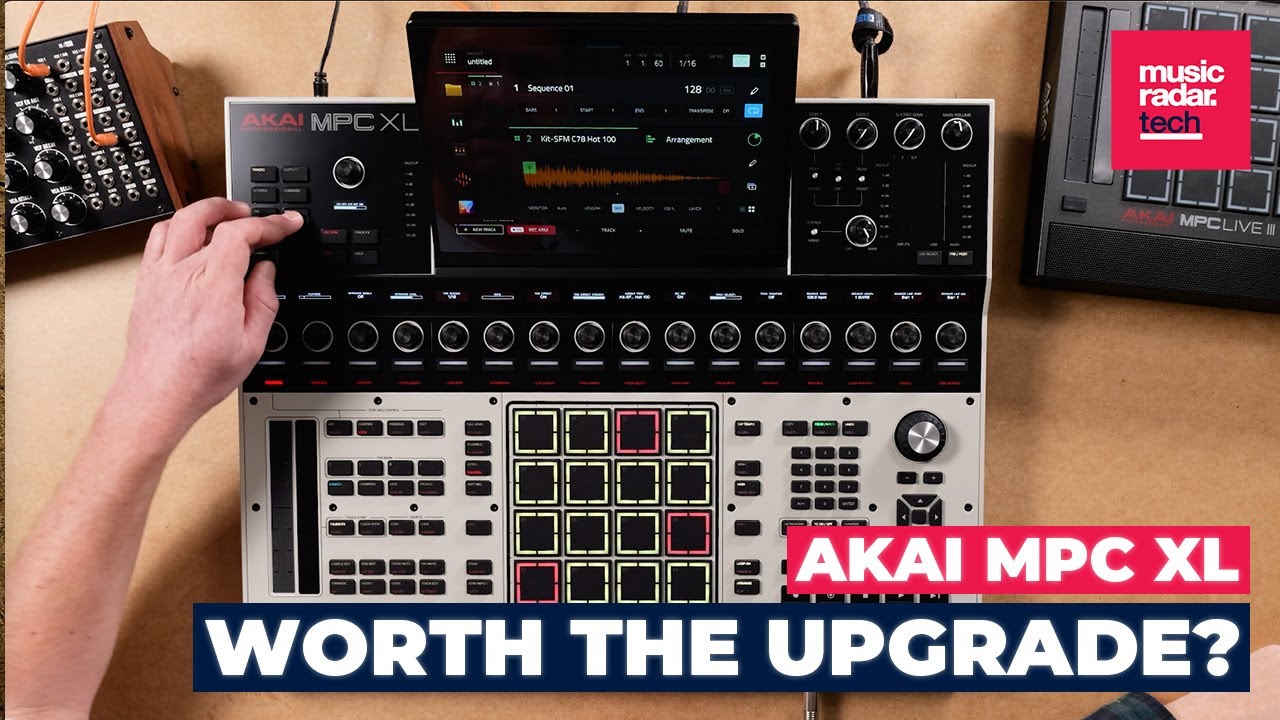
The original MPC X had 2GB of RAM under-the-hood, later doubled to 4GB for 2023’s MPC X SE. The MPC XL has the same 8-core processor as the Live III, but with 16GB RAM – double that of Live III – making it comfortably the most powerful MPC to-date.
It also massively expands on the storage of its predecessor. Where the original MPC X had a now somewhat stingy-feeling 16GB, the MPC XL has a 256GB SSD, still expandable via SATA expansion bay.
There are other features ported over from the Live III too. The MPC XL gains the same MPCe pads, which put a finger drumming-focused spin on MPE-style expression, allowing users to do things such as modulate sounds by moving their fingers around the pad or trigger different samples, expressions or repeats by playing different areas across the pads’ four quadrants.
The MPC XL also features both the touchstrip and step sequencer of the Live III. The former is used for a diverse range of performance functions, from pitch bends and volume changes to a suite of fun hands-on effects. The step sequencer, on the other hand, introduces a classic drum machine workflow alongside the MPC’s pad grid.
Performance
The core updates that impressed us with the MPC Live III are equally impressive here. Those expressive MPCe pads, combined with the new touchstrip, add layers of additional potential when considering how to perform and create with the MPC.
That said, this isn’t the same expressive experience users have come to expect from MPE gear such as Roli’s Seaboards or Ableton Push 3. Whereas those devices are tailored to melodic playing with per-note pitchbends and expression, Akai’s MPCe pads are better suited to applying modulation and variation within rhythmic playing. On the whole, traditional melodic ‘playing’ of synths and sampled instruments remains the weakest side of the hardware workflow.
The physical step sequencer is a fantastic addition to the MPC workflow. Previous iterations of the MPC were capable of creating step sequenced patterns, but doing so involved using a combination of the pad grid and touch screen, which would involve switching between pad modes and lacked the satisfying physicality of punching in patterns on a drum machine.

The 16 step sequencer buttons now allow for that workflow to exist side-by-side with the finger drumming, sample chopping approach more traditionally associated with the MPC range. It makes for a really nice pairing, particularly for users working simultaneously with samples and external hardware.
The sequencer also interacts nicely with the new clip launching workflow, which brings an Ableton Live influence – via Akai’s own Force hardware – to the MPC system. Although it’s hardly a groundbreaking addition, the clip view offers a welcome new way to sequence and perform and slots nicely into the software design without adding extra confusion or increasing the learning curve.
Naturally, the additional processing power is very welcome. The increase will be particularly noticeable for users upgrading from the MPX X and X SE. Compared to these machines, the XL has an overall faster workflow with considerably fewer limitations on track and plugin counts. It’s now possible to record 16 tracks of audio and 32 plugin tracks when using the MPC XL in standalone mode.
That being said, these limits are the same as those set for the MPC Live III, and it’s arguably a disappointment not to see the capabilities upped for the flagship model, bearing in mind its additional RAM, footprint and price.
The extra power does more than just up the track counts though. As with the Live III, the MPC XL can make use of the high-quality version of Akai’s stem separation algorithm in standalone mode, unlike previous models that had to rely on an ‘efficient’ version of the tech.

Aside from its processing power, the most obvious difference between the MPC XL and the MPC Live is its size. Whereas the Live is designed as a portable beatmaker, the XL is significantly larger and heavier, clearly intended to be installed in a studio and left in place or, as proved a popular choice for those using the MPC X in larger studios, mounted to a trolley.
The MPC XL has significantly more inputs and outputs than the MPC Live, although its I/O offering is broadly the same as its MPC X predecessor. This includes a total of eight inputs covering mic, line, instrument and phono options, along with eight outputs and dual headphone ports. There’s plenty of control connectivity too, with four MIDI outputs, two MIDI ins, two footswitch inputs, eight stereo CV ports and multiple USB connections.

The main connectivity upgrade that the XL offers compared to the MPC X isn’t immediately obvious from looking at the hardware itself. Like the latest MPC Live, the XL can now stream multiple channels of audio over USB, allowing for 24 channels of audio and 32 channels of MIDI to pass through a single USB-C connection.
This is a smart addition. The extra power and flexibility of the MPC XL mean that, more than ever, it functions primarily as a standalone machine, rather than an interface to work with Akai’s desktop MPC software, which remains the weakest part of the MPC ecosystem. Easy audio streaming means that, if and when users want to move a project beyond the MPC XL, there’s an additional option for getting your work into a DAW. It also works in the other direction too, making it possible to sample into the MPC from a computer or smart device.
Take control
The MPC XL’s chunky footprint also means it has space for a lot of physical controls. The interface has been rearranged and expanded significantly compared to that of the MPC X and SE. Those machines had the bank of assignable Q-Link rotaries to the left of the main grid of pads, the MPC XL now shifts these to sit in a neat row across the top of the interface, directly above the step sequencer.
Of all the changes made for this latest MPC, it's this that is most likely to divide opinion among existing users. Personally, I like the new placement of these controls, which allows them to interact with the step buttons for controlling a variety of sequencing functions. Those accustomed to an existing Q-Link setup might find it fiddly breaking away from previous muscle memory though.

The move frees up a space for numerous new buttons that provide quick access to various MPC functions. This additional control is very welcome, particularly since it offers rapid access to fundamental MPC tools such as sample slicing, as well as stem separation. Some might argue that the extra controls make the interface feel far more cluttered, although to me this feels like an acceptable trade off for the additional navigational tools.
That said, there are a few minor annoyances to how the interface has been designed, some of which are hangovers from previous models. For one, there are now two buttons both labelled ‘Arrange’, which do different things: the one to the left of the interface is used to access the MPC’s arrangement view, the one to the right cycles between arrangement and clip as recording destinations. It’s fairly easy to remember which is which once you’re up and running, but it’s still an example of slightly muddled design.
Also, unlike the MPC Live, the dial used for navigating through menus and interfaces isn’t clickable, meaning that making selections requires pressing a separate button, rather than depressing the dial itself, which feels more natural.
Verdict
These few minor complaints aside, the MPC XL is otherwise a resounding success. Compared directly to the MPC X and MPC X SE, this latest flagship model is an all round improvement. The under-the-hood power and storage space is a massive step up, making the slight jump in price feel largely justified. Users of those previous models will immediately notice a difference in the speed and capabilities.
While some changes to the control panel layout might split opinion, it undeniably opens up a multitude of creative possibilities, from expressive finger drumming to speedier sequencing of external gear. While there’s more to memorise, control wise, the workflow is faster and more user-friendly than any other MPC in recent years.

It’s arguably disappointing that Akai hasn’t expanded the physical connectivity to the extent it’s upgraded other areas of the MPC, although multichannel USB-C audio streaming certainly adds to the flexibility.
Comparing the MPC XL to the – considerably cheaper – MPC Live III is a little less clear cut. The XL has more under-the-hood power, additional I/O, more physical controls and a larger screen, although in practical terms there’s not actually that much that can be done with the MPC XL that the MPC Live III isn’t capable of.
There are also several winning features of the Live III absent from the XL, including its onboard battery, speaker and mic.
In reality, comparing these two machines directly isn’t a fair or accurate way to appraise them. The MPC XL isn’t exactly a bigger and better version of the Live III, rather it’s a slightly different take on the MPC concept, one which trades the portable immediacy of the Live for a machine that acts as an all-encompassing studio hub.
If you’re performing on stage, jamming with friends or simply want to get away from a conventional studio environment, the MPC Live III remains the one to go for. If you want something that can sit in pride of place amongst your hardware and sampling sources, always plugged in and ready to create, the MPC XL is a machine worthy of building your whole workflow around.
That said, I still miss the built-in speaker and mic – sometimes it’s just nice to throw together a quick beat without turning on your monitors and plugging in any external gear.
The MPC ecosystem has come a long way since the ‘90s. While the roots of the original sampling and sequencing workflow remain, the MPC XL is more like a full-on DAW built into a custom controller-come-interface. Some users will always miss the simplicity of that bygone era, but those willing to buy into the modern age of MPCs will find a serious amount of depth and power here.
Hands-on demos
Akai
Alternatives
Specifications
Price |
$2,899 / £2,499 / €2,899 |
Key features |
Pads (16) velocity- and pressure-sensitive pas with 3D-sensing technology (8) banks (selectable via Pad Bank buttons) Knobs (17) 360° touch-sensitive Q-Link knobs 1) 360° encoder with push (7) 270° knobs (gain, mix, level) Buttons (105) dedicated buttons (36) single-color LED (43) dual-color LED (1) dual color + red (17) RGB LED (8) unlit Display (1) 1280×800 full-color, optically bonded, multi-touch display (10.1” / 256.5 mm) (17) monochrome 128×32 OLED displays CPU Processor: 8-core processor RAM: 16 GB Storage: 256 GB internal NVMe SSD + SATA expansion bay Connections (2) 1/4” (6.35 mm) combo XLR/TRS inputs (stereo pair) (2) 1/4” (6.35 mm) TRS line inputs (stereo pair) (2) RCA phono inputs (stereo pair) (2) 1/4” (6.35 mm) instrument inputs (2) 1/4” (6.35 mm) TS footswitch inputs (8) 1/4” (6.35 mm) TRS outputs (4 stereo pairs) (1) 1/4” (6.35 mm) stereo headphone output (1) 1/8” (3.5 mm) stereo headphone output (4) 5-pin MIDI outputs (2) 5-pin MIDI inputs (8) stereo 1/8” (3.5 mm) CV/Gate outputs (1) USB Type-C port (3) USB Type-A ports (1) SD card slot (1) power adapter input (1) drive bay for 2.5” SATA drive Wireless Wi-Fi Bluetooth |
Modulation
|
1 digital filter per track/Subtrack; 2 assignable LFOs per track; 1 assignable modulation envelope per voice; 2 assignable FX LFOs per audio track; 2 assignable LFOs per effect bus, send effect, and mix; modulation setup per track for pitch bend, mod wheel, breath control, aftertouch
|
Dimensions
|
543 × 488 × 94 mm
|
Weight
|
7.2kg
|
Contact |
