
If you’re working in a cramped home studio, producing on a desk, or building a travel rig you can actually carry, small studio monitors can offer a bigger upgrade than you’d expect.
Speaker design has moved on fast in the last few years, and it’s now realistic to get genuinely mixable clarity from cabinets that won’t dominate your workspace, with some models even offering room correction or desktop tuning to help when your setup is less than ideal.
The compact monitoring market is also broader than it used to be. Some options are purpose-built for portability and quick setup, while others are simply the smallest versions of serious studio ranges, aimed at producers who need proper translation but have limited space.
Either way, the goal is the same: accurate, repeatable decisions at close listening distances, without the compromises that come from relying purely on headphones or hi-fi speakers.
My top pick in this guide to the best small studio monitors is the IK Multimedia iLoud Micro Pro, thanks to their great build, size and sound that's closer to proper studio monitors than most small speakers.
Best overall

✅ Buy if you want an upgrade to your iLoud Micro: The pro model is a step up from the previous unit thanks to its all-round better performance.
❌ Avoid if you're happy with the original: The Micro is still a great studio monitor and the financial outlay on an upgrade might not be worth it for you.
IK Multimedia’s iLoud Micro Monitor Pro takes the original iLoud Micro idea and pushes it into prosumer territory.
It’s still tiny enough for desks, hotel rooms and mobile rigs, but the voicing is far more “monitor” than “mini speaker”, with a tighter midrange, cleaner top end and DSP control that’s aimed at clarity and accuracy over what ‘sounds nice’.
The headline feature is built-in calibration that works with IK’s ARC X software and included measurement mic in the pair version, letting you tame common nearfield problems like boundary boom and desk reflections without external DSP boxes.
You also get practical onboard filters for LF extension, LF and HF trim, plus a desk setting, so you can quickly adapt to awkward placements. Connectivity is studio-friendly, too, with balanced XLR alongside consumer RCA and USB-C for control and calibration.

"The Micro Monitor Pro is a big sounding monitor considering its size. Add in the integrated room correction and software support and you have a very flexible and portable tool that’s ideal for a multitude of users."
Read our full IK MultiMedia iLoud Micro Pro review
Best budget
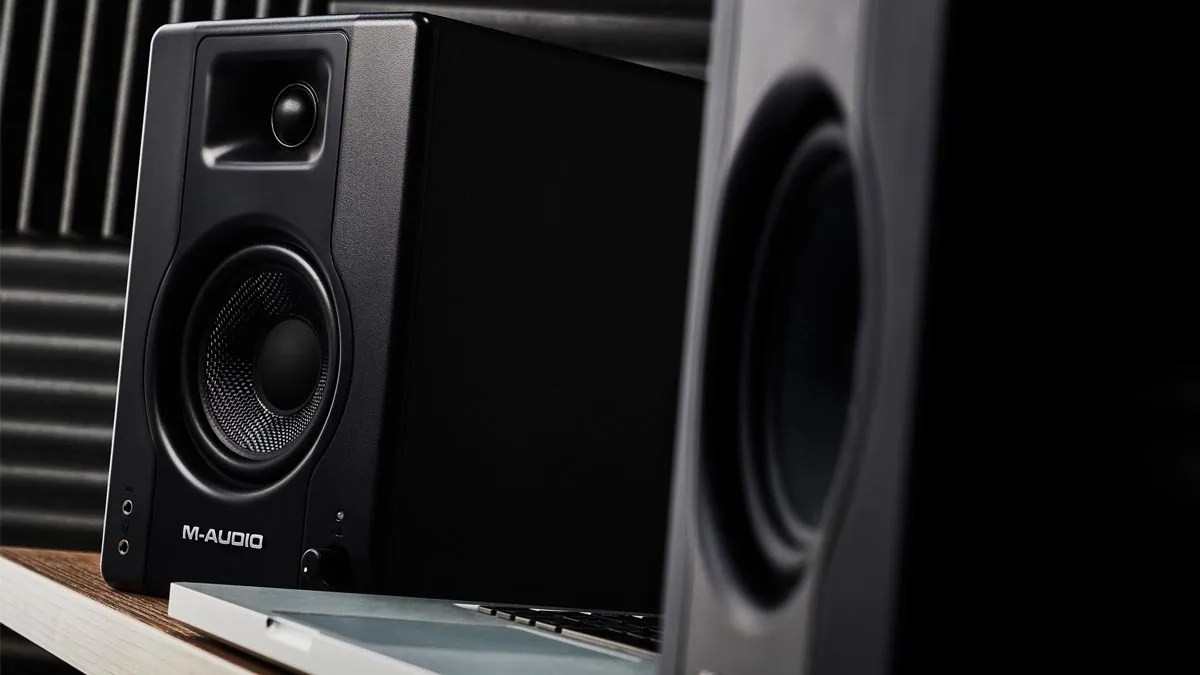
✅ Buy if you want a well-priced monitor that punches above its price point: The BX-3 is well-built, sound great and represents good value for money.
❌ Avoid if you're looking for a studio monitor with EQ functionality: The fact there's no onboard EQ could be a deal-breaker for some.
M-Audio has long been one of the most notable brands in the realm of entry-level and budget-friendly music tech gear. The company’s BX monitors are well regarded as some of the best budget studio monitors in the business.
These aren’t as small or portable as many of the truly ‘compact’ monitors listed above, but they are some of the best value, studio-quality nearfields on the market. If both space and budget is an issue, you could do a lot worse.
There’s no EQ or customisation options here, perhaps unsurprisingly considering the price, but the BX3s do have both RCA and TRS inputs on the rear, plus front panel aux and headphone connections.
Read our full M-Audio BX3 review
"Compact and convenient, M-Audio’s new BX monitors expand the appeal of this established range and do so at an incredible price."
Read our full M-Audio BX-3 review
Best sound quality

✅ Buy if you want a premium studio monitor that's built to last: The 8010A boasts accurate frequency response, is portable and beautifully constructed.
❌ Avoid if you're on a tight budget: There's no escaping the fact that these are pricy studio monitors.
Genelec’s 8000 series monitors have been on the market in various forms for almost 20 years, and it’s probably fair to describe them as modern classics. Easily recognisable thanks to their distinctive rounded design, which aims to eliminate diffraction for a flatter frequency response, the 8000s are also built to last thanks to their die-cast aluminium build and metal grilles.
The 8010As are the smallest in the range, aimed at those working in tight spaces or putting together a portable production set-up. They come equipped with Genelec’s adjustable Iso-Pod rubber stands, which are designed to help maintain isolation between the monitors and whatever surface they’re placed on, as well as allowing for easy angle adjustment. They can also be easily mounted to a variety of stands and sockets though.
The 8010As are 2-way monitors and have rear-ported (bass reflex) enclosures. Just beneath the port is a recess housing five dip switches. Three contour the low-frequency response: -2dB and -4dB bass tilts which combine for -6dB, and Desktop Control which dips -4dB at 200Hz.

"Genelec monitors are not cheap and, considering the quality of design, components and sound, nor should they be. The quality of the 8010A is no exception and easily worth the price. If you are regularly on the move they will make a great investment, combining portability and durability equal to the calibre of sound."
Read our full Genelec 8010A review
Best value

✅ Buy if you want a small monitor that delivers clean and accurate audio: Small they may be, but the iLoud Micro's audio delivery is fantastic.
❌ Avoid if you need a bit more flexibility from your monitor: The lack of larger ¼” jack or XLR inputs could be an issue for some.
Not so long ago, the idea of finding a set of compact studio monitors with the clout required for serious music production was somewhat unthinkable, but IK’s iLoud Micros prove that small speakers don’t have to sacrifice on sound. Despite the small, 3” drivers, these monitors provide clear and accurate sound, and are capable of surprising volume levels given their size.
What’s more there’s a host of features here that make the iLoud Micros flexible for on-the-move use. Room correction EQ is handy, particularly if you plan on using the speakers in different locations and need the ability to adapt to varying spaces.
Mini-jack and RCA input connections mean they can easily connect to a laptop, DJ gear, a home stereo, or make use of Bluetooth for home listening. The lack of larger ¼” jack or XLR inputs make them slightly more awkward to use with an audio interface, although this is easily overcome with cheap adapters.

"The iLoud Micro Monitor speakers from IK Multimedia are, quite simply, a cut above anything else at this size and price range. For clear, accurate referencing, they compare favourably with more established brands, and I’d urge you to give them a try."
Read our full IK Multimedia iLoud Micro review
Best for bass

✅ Buy if you want chunky bass from your monitor: The ADAM Audio D3V's bass is very impressive - especially for the size of the unit.
❌ Avoid if you want a more balanced delivery: With emphasis on bass, the D3V might not be the ideal choice for some.
ADAM Audio’s D3V is a desktop-first monitor system that borrows the company’s pro-audio credentials and packages it for producers working up close.
The star of the show is the 1.5-inch D-ART tweeter, designed to keep highs precise and low-fatigue when you’re sat a metre from the speakers for hours. Low end comes from 3.5-inch aluminium woofers supported by dual passive radiators, which helps the D3V reach further down than you’d expect from something that fits beside a laptop and controller.
Connectivity is unapologetically modern: USB-C for plug-and-play digital audio, plus balanced ¼-inch TRS for a traditional interface setup, and there’s also a front headphone socket for quick switching.
Add DSP room adaptation switches and the included angled desk stands, and it’s clearly built for real-world workspaces rather than idealised studio placement.
"Adam Audio’s desktop speakers are both small and great value, but most importantly sound fantastic and that is why you should check them out."
Read our full ADAM Audio D3V review
Best for travel

✅ Buy if you want eye-catching monitors that are perfect for when you're on the go: The GoAux 3 and 4 deliver above average audio and are designed for portability.
❌ Avoid if you want a bigger sound: While the GoAux 3 and 4 don't lack punch, their delivery might not be as beefy as some would want.
KRK’s Rokit monitors are some of the most popular speakers for home studios, particularly among electronic musicians. The newer GoAux range takes a lot of what makes those popular – including the distinctive yellow and black look – and puts it into a smaller speaker specifically designed for use on the move.
Sonically, these aren’t quite a match for their larger counterparts – notably in the low-mids, which lack a little presence – but for their size and price they still impress. The high frequencies are not unpleasant and the mid and upper mid-range is reasonably forward. The rear-ported configuration enhances the low end enough so you don’t feel they lack punch.
If your budget stretches to the approx £50/$50 more for the 4s, we’d recommend the upgrade. Not only do you get a larger driver – meaning more power – but that model also adds automatic room correction (ARC). This uses a test tone to apply an automatic corrective EQ curve, allowing the speakers to adapt to new spaces – undoubtedly handy if you plan to use them on the go.
"KRK’s GoAux monitor is great for those on the move or short of space. The extra features are what take it into really noteworthy territory."
Read our full KRK GoAux 3 and 4 review
Best high-end

✅ Buy if you want an excellent, top-of-the-range unit: The Focal ST6 Solo6 looks and performs beautifully... but it carries a price tag to match.
❌ Avoid if you're not in the market for a top-tier monitor: This costs a lot of money and there are some great options out there if you don't want to hand over such a large amount.
Unlike some of the explicitly ‘compact’ speakers in this round-up, Focal’s Solo6 monitors aren’t necessarily pitched as being uniquely small. We’re into the realm of standard studio monitors here, although as the smallest speakers in Focal’s range, these are probably the best option you’ll find if you’re looking for a properly high-end, professional-grade monitor suitable for a small studio space.
The Solo6s sound absolutely excellent, and are incredibly honest and detailed. The frequency response extends way up to 40kHz with no distortion, which means it’s possible to listen to mixes with extreme precision while suffering little fatigue. Around the back of the Solo6 you’ll find extensive EQ controls that enable it to sound at its best whatever the room.
These are hand-made monitors and the thick wooden cabinets both look and feel classy. Of course, all of this comes at a fairly substantial price. A pair is likely to set you back well over £/$2k. While that’s money well spent if you want the best possible sound for a small studio, it’s also something of a significant investment.

"These are sublime, top-drawer monitors that will be an asset to a small studio (or as satellite monitors in more ambitious installs)."
Read our full Focal ST6 Solo6 review
Best for streaming

✅ Buy if you're looking for a pair of flexible monitors for your home set-up: The JBL One Series 104-BT are flexible and worth a look for at-home streaming.
❌ Avoid if you need onboard EQ from your monitor: Sometimes you just can't have everything, and if onboard EQ is a must, give these a pass.
Like many compact monitors, JBL’s One Series are designed to function in a variety of different scenarios, with features to suit musicians, podcasters and home-listening set-ups alike. Core to this flexibility is the range of inputs – RCA and 1/4” jack inputs can both be used together to connect two sources and a 1/8” input on the front overrides rear connectors. These BT models include Bluetooth 5 too, for wireless use and home listening.
Given their very reasonable price point, these monitors sound impressive too, with plenty of power from the 4.5” driver and decent bass response.
The main drawback here, compared to many comparable monitors, is the lack of any kind of onboard EQ. That means there’s no option to adapt the sound to different spaces when moving from studio to studio (or anywhere else).
Best mid-range

✅ Buy if you're in the market for a well-priced and effective small monitor: The price is attractive and performance is excellent - ideal for at-home producers.
❌ Avoid if you're a more experienced producer: The Eris 3.5BT Gen2 are great for beginners, but more experienced hands will likely find what they're looking for elsewhere.
While they lack the compact portability of something like the iLoud Micro or JBL One Series, PreSonus’ two-way Eris monitors are certainly small enough for use in small studio spaces. In fact, given their very attractive price point, modest size and broad level of connectivity, these are a perfect first step up for bedroom producers graduating from working purely on headphones to their first proper monitoring set-up.
The low-end reproduction isn’t amazing here – even compared to some more ‘portable’ speakers – but it’s respectable for the price. In our tests we found they suffer a little in terms of sound quality at higher volumes, but given their primary suitability for small spaces, it’s unlikely you’ll need to crank them up too high in any case. Rear panel EQ makes it easy to adjust the overall sound to your studio space too.
This BT model is a shade more than the standard Eris 3.5s. They add Bluetooth alongside the analogue connectivity, which is a handy option if you’re looking to balance production and home listening duties.
FAQs

Does studio monitor size matter?
It’s a common misconception that, when it comes to studio monitors, bigger always equals better, and smaller speakers inevitably mean compromising on quality. In reality though, the best size of speakers to purchase will depend on the size of the space you plan to use them in.
All of the speakers discussed in this round-up fall into the category we call ‘nearfield monitors’. These are speakers designed to be placed in close proximity to the user, typically on a desk or stands close behind. A speaker of this kind with a small driver – around 3” to 5”, like many in this round-up – is perfect for a compact studio set-up, but will lack the power to properly translate your mixes in a bigger space. Conversely, overpowered and over-sized speakers used in compact spaces won’t allow for proper positioning and use at appropriate volume levels.
What should I look for when buying small studio monitors?
Beyond the size and sound quality, monitor speakers have a variety of feature options to consider. One major factor is connectivity. You need to consider how you’ll connect them to your laptop, recorder or other device. For many, an audio interface will be required. This connects to the laptop or PC via USB and provides connectivity for audio going in (instruments) and audio going out (monitor speakers). Studio monitors are mostly active, which means they employ their own amplification, and require a power source to do this.
Connection-wise, most of the best studio monitors are generally hooked up to your device via USB, XLR, or by shielded ¼” jack cables – the shielding helps reduce the hum from nearby electrical equipment or lights. Many smaller and portable speakers also include Bluetooth connectivity. We don’t tend to recommend using Bluetooth for production purposes, as it can introduce latency – a delay in the audio signal – but the inclusion of wireless tech is handy if you plan to use your speakers for home listening too.
The final feature to consider is EQ or room correction tools, which are included with some monitors. These allow the user to artificially shape the sound to compensate for the acoustics of the space they’re being used in – for example, cutting some bass frequencies to reduce build. These tools are particularly handy if you plan to use the speakers in a variety of different spaces.
Are small studio monitors actually good enough to mix on?
They can be, as long as you treat them like nearfields and work at appropriate distances and volumes. The best compact designs prioritise mid-range clarity, imaging and consistency, which are the things that make mix decisions translate. Bass is the main limitation, so you either learn the low end through reference tracks, add a sub later, or cross-check on headphones.
What size woofer is best for a small room?
In a truly small room, smaller can be easier. A 3 to 4 inch woofer often integrates more cleanly at a desk because it is easier to place close to walls. If you move up to 5 to 6.5 inches for more low end, placement and basic treatment become more important, otherwise the extra bass energy can mislead you.
Do I need room correction or DSP?
It's not essential, but it can be genuinely useful when your monitors are on a desk or up against a wall. DSP features like boundary EQ, desktop filters and measurement-based correction are designed to reduce predictable problems like bass build-up and low-mid smear. It won’t fix a bad room, but it can reduce the amount you are fighting your setup day to day.
Are Bluetooth studio monitors OK for production?
Bluetooth is fine as a convenience input for checking consumer-style playback, referencing, or quick listening, but wired connections are still the right choice for serious work. Wired is lower latency, more consistent, and integrates cleanly with audio interfaces and monitor controllers. Models that include Bluetooth can still be excellent monitors as long as they also offer proper analogue inputs.
How should I place small monitors on a desk?
Aim for an equilateral triangle between your head and the two speakers, with tweeters roughly at ear height, then angle them in so they point at your listening position. Get the speakers off the desk if you can, even if it’s just with compact stands or isolation pads, because desk reflections can skew the upper bass and low mids.
What outputs should I look for, RCA, TRS, or XLR?
TRS and XLR are preferable for studio wiring because they can run balanced, which helps reject noise over longer cable runs. RCA and mini jack are common on compact models and work perfectly well at short distances, especially for laptop rigs and travel setups, but you may end up using adapters with an audio interface.
Do I need a subwoofer with small monitors?
Not automatically. A sub can help you judge kick and sub-bass more confidently, but it also adds setup complexity, because you have to manage crossover, level, and placement. Many producers get better results by learning their small monitors with reference tracks and checking sub frequencies on headphones, then adding a sub only when their room and workflow are ready for it. That said, I’ve had some great results with IK Multimedia’s iLoud Sub, which benefits from the company’s proprietary ARC calibration wizardry to balance out the benefits of the additional low-end with the harsh sonic realities of my current temporary studio space.
Glossary
Nearfield: A monitor designed to be listened to from a short distance, typically on a desk or small stands, so you hear more direct sound from the speakers and less of the room.
Ultra-nearfield: An even closer listening approach, often around 0.7 to 1.0 metres, where the system is tuned to give a coherent stereo image at arm’s length.
DSP: Digital signal processing built into the speaker, used for tuning, EQ, protection limiting, and sometimes time alignment.
Room correction: Measurement-based EQ and calibration that compensates for predictable room and placement issues, usually via onboard DSP or companion software.
Boundary EQ: A switch or DSP preset that reduces bass build-up when speakers are placed close to walls or corners.
Passive radiator: A non-powered diaphragm used to extend low-frequency performance in small enclosures without a port, common in compact desktop designs.
Coaxial driver: A design where the tweeter is mounted within the woofer, aiming for point-source imaging and consistent dispersion, often useful at close listening distances.
How we choose the best small studio monitors
Choosing small studio monitors is mostly about matching the speaker to your listening distance, your room, and the kind of decisions you need to make. And, of course, the budget you have to play with. Start with the physical reality of your setup - your actual setup, not the idealised Instagram version.
If you’re producing at a desk with the speakers less than a metre away, look for designs that are comfortable at close range and don’t rely on being cranked to come alive. Ultra nearfield systems and compact nearfields are built for exactly this, giving you focused imaging and a clear midrange without needing a big room to breathe.
Next, think about placement constraints. Small rooms often force speakers close to walls, corners, or computer screens, which can exaggerate bass and blur the low mids. This is where practical tuning features matter. This is much of an art as it is a science, but look for rear switches for boundary compensation, desktop filters, or - better still - DSP-based calibration, which can reduce predictable problems caused by tight placement. If you cannot treat your room properly, these tools can be the difference between speakers that feel trustworthy and speakers you constantly have to second-guess.
Connectivity is another quiet deal-breaker. If you’re using an audio interface, balanced TRS or XLR inputs keep things clean, especially if you have other gear on the same desk. Some compact monitors lean towards consumer-style inputs like RCA and mini jack, which is not inherently bad, but it may affect how easily you can integrate them into a studio chain without adapters. If the speakers also include Bluetooth, treat it as a bonus for referencing and casual playback rather than the main production path.
Finally, be realistic about bass. Small cabinets cannot cheat physics, so the smartest approach is to choose monitors with an honest low end rather than an overhyped one, then build your workflow around cross-checking. Use reference tracks you know well, occasional headphone checks, and careful gain staging to get you further than chasing an extra few Hertz on a spec sheet. If you later add a subwoofer, do it to improve confidence, not to compensate for monitors you never truly learned in the first place.
How we test
Here at MusicRadar, we are experts in our field, with many years of playing, creating and product testing between us. We live and breathe everything music gear related, and we draw on this knowledge and experience of using products in live, recording and rehearsal scenarios when selecting the products for our guides.
When choosing what we believe to be the best small studio monitors available right now, we combine our hands-on experience, user reviews and testimonies and engage in lengthy discussions with our editorial colleagues to reach a consensus about the top products in any given category.
First and foremost, we are musicians, and we want other players to find the right product for them. So we take into careful consideration everything from budget to feature set, ease of use and durability to come up with a list of what we can safely say are the best small studio monitors on the market right now.
Our tests for small studio monitors are exactly the same as those we'd perform when using a regular-sized set. We'll look at the overall build quality of the unit, from the tweeters and woofers to the construction of the cabinet. We'll then check out the connectivity and any additional features present such as trim controls or gain boost options. This overview allows us to determine who the product is intended for.
Next up we'll test the sound using our regular set of reference tracks. These are songs we know intimately, professionally mixed and mastered in top-of-the-range studios. Comparing the test set of monitors with our regular set allows us to make a judgement on the quality of their sound, based on years of mixing, mastering, and listening experience.
We'll try and live with any studio monitors we test for a good amount of time, ideally somewhere around the two-week mark. This allows us to gauge how they work over a period of time, and get over that initial rush of getting a new piece of gear. It also gives us time to use the monitors in various situations, whether that's writing music, mixing it, or mastering it.
Find out more about how we test music gear and services at MusicRadar.
Why you can trust us
✔️More than 9,500 reviews on-site
✔️Over 17 years of product testing
✔️ 2.9 million monthly users globally
With more than 17 years of experience, MusicRadar is the premier music-making website in the world. Run by musicians for musicians, we offer expertly written gear round-ups and high-quality, authoritative reviews by an extensive team of highly experienced industry professionals.
We also interview world-renowned musicians and stars about their creative processes and the nuts and bolts of their gear and technique. This gives fans an insight into the actual craft of music-making that no other music website can.
But that's not all. We also provide excellent tuition, from bite-sized tips to advanced techniques and guidance from recognised musicians.
As well as delivering high-quality written reviews and features, we also produce a wealth of video content on YouTube. MusicRadarTV is where you'll find all of our access-all-areas interviews, hot gear demos and exclusive video lessons.
Meet the experts

I'm the Managing Editor of Music Technology at MusicRadar and former Editor-in-Chief of Future Music, Computer Music and Electronic Musician. I've been messing around with music tech in various forms for over two decades. I've also spent the last 10 years forgetting how to play guitar. Find me in the chillout room at raves complaining that it's past my bedtime.

Matt is a Junior Deals Writer here at MusicRadar. He regularly tests and reviews music gear with a focus on audio interfaces, studio headphones, studio monitors, and pretty much anything else home recording-related. Responsible for over 60 buying guides, a large part of his role is helping musicians find the best deals on gear. Matt worked in music retail for 5 years at Dawsons Music and Northwest Guitars and has written for various music sites, including Guitar World, Guitar Player, Guitar.com, Ultimate Guitar, and Thomann’s t.blog.
Chris Corfield is a journalist with over 12 years of experience writing for some of the music world's biggest brands including Orange Amplification, MusicRadar, Guitar World, Total Guitar and Dawsons Music. Chris loves getting nerdy about everything from guitar and bass gear, to synths, microphones, DJ gear and music production hardware.
Read more
MusicRadar's got your back Our team of expert musicians and producers spends hours testing products to help you choose the best music-making gear for you. Find out more about how we test.
Latest updates
12/03/26: The guide has been updated with two new product entries: IK Multimedia iLoud Micro Pro and the ADAM Audio D3V. We've made our picks easier to navigate at the top of the guide with a "Best Picks" panel. Each entry now features an "At A Glance" boxout with the pros and cons of each monitor, while expert verdict slides have been added where applicable. The FAQ section has been significantly expanded, while a new glossary section highlights key terms. A new "How To Choose" section has been added, alongside a panel on why you can trust MusicRadar. Finally, we've added a "Meet The Experts" sectiojn so you can learn more about the authors behind the guide.
- Best studio monitor stands: Optimise your home studio
- Best studio monitors under $500/£500: High-range sound on a mid-range budget
- Best budget audio interfaces: record for less than $100/£100
