
MusicRadar Verdict
Ozone 12 continues to offer a wealth of usable tools, which will prove useful to anyone trying to master at home, or in the professional domain. The streamlining is a real boon to workflow, which will ultimately save time.
Pros
- +
Superb suite of mastering modules, all in one suite.
- +
Very flexible, with individual modules available as plugins too.
- +
Simplified Mastering Assistant customisation options.
- +
Useful if you need assistance with mastering, and flexible if you prefer to make your own mastering decisions.
Cons
- -
It’s not cheap, but there are cheaper editions and upgrades available.
- -
Depending on your mastering ethos, there might not be enough to tempt you to upgrade from Ozone 11.
MusicRadar's got your back Our team of expert musicians and producers spends hours testing products to help you choose the best music-making gear for you. Find out more about how we test.
What is it?
Ever since the concept of one box-mastering became an alternative to racks of equipment, the concept of mastering within the DAW has become a highly viable and desirable option, and one that is incredibly cost-effective. We don’t all have acoustically treated rooms in which we mix and master, so suites such as Ozone can be a useful extra pair of ears, designed to fine-tune your finished track to a level of perfection and fine sheen.
More recently, mastering plugins have started to appear as part of many DAW packages, so why spend more money on a suite such as Ozone 12?
iZotope has a strong reputation, which stands it in good stead. Apart from a host of other interesting plugins, Ozone is often regarded as an industry standard, used by enthusiastic amateurs and professionals alike, with a track record going back nearly 25 years. It now ascends to Ozone 12, superseding the previous version which came out two years ago, but what’s new, and is v12 a worthy upgrade?

Performance
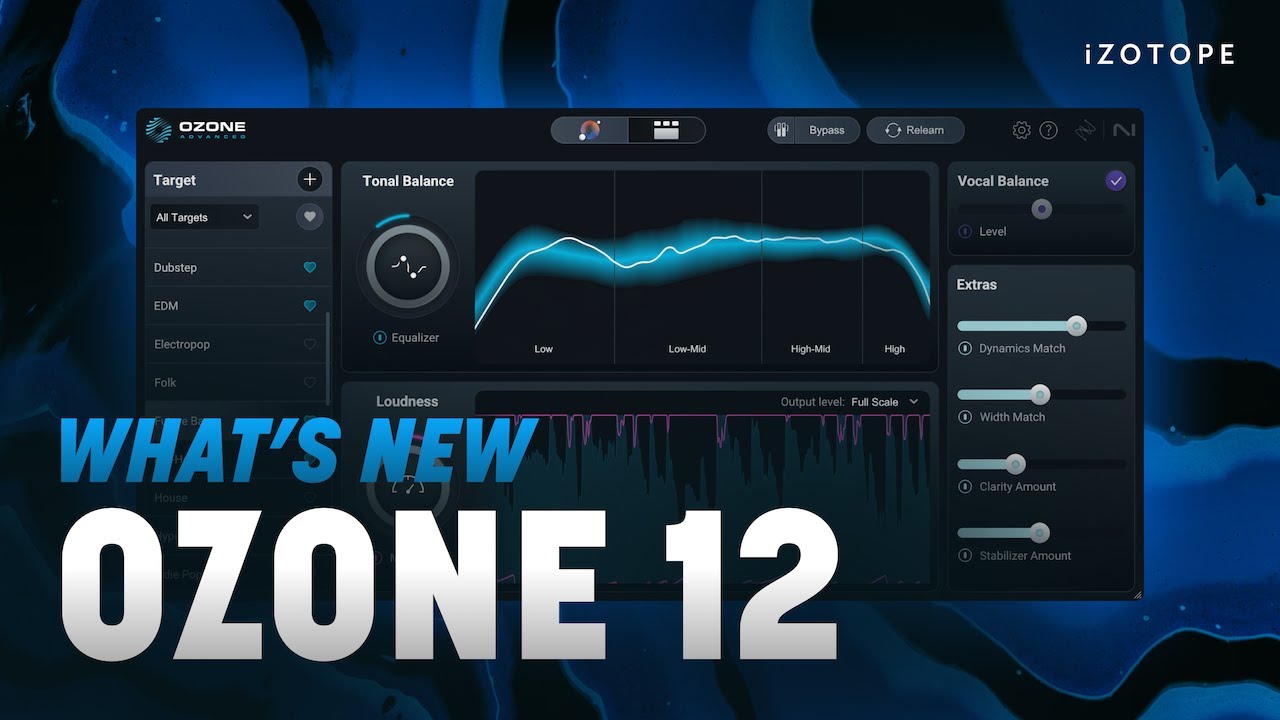
The Mastering Assistant function is a much-used feature within Ozone, which employs AI to listen to the audio from your track, assembling a signal chain which it believes will improve your audio output. Ozone 10 tended to suggest this as more of a fait accompli, while Ozone 11 rolled back slightly, treating the AI’s suggestions as more of a starting point. With the upgrade to Ozone 12, iZotope have made this function customisable, with the ability to immediately apply or disable mastering modules, as part of this process. You can also indicate your style of music, and the amount of time you want Ozone to take while listening to your track. This can be extended up to a full minute; longer listening times often result in a better performance.
This might seem like a minor upgrade, but it’s fairly significant for anybody who wishes to have a little more control over the signal chain. The Mastering Assistant can sometimes overburden a track with processing, particularly music related to soundtrack or classical styles. This new facility makes it far easier from the outset, meaning that you don’t have to switch off modules after the AI has worked its magic. It’s also possible to save your preferences as a default, which is an enormously appealing timesaver.

Trio de force
In the full ‘advanced’ version of Ozone 12, there are now three new modules.
Stem separation tools are one area which is advancing rapidly. Ozone’s new Stem EQ allows you to audition and EQ individual stems in real time, from within the Ozone suite, without the need to separate stems manually beforehand. There are limitations; you can only apply this function to only four different stem areas, namely vocals, drums, bass, and ‘other’ which lumps together the remaining instrumental content.
For the most part, this is a very useful tool, particularly if working in mainstream styles. It’s an impressive feature, which we found exceptionally useful when working with bass and drums. It was debatably less useful for soundtrack style cues, lacking in vocals, and is unlikely to be a substitute for many composers who are already required to organise and deliver stems.
Bass Control is the second of the trio, which is designed to assist and fix particular issues in the bottom end. This goes far further than just balancing, particularly with commercial styles of music. We found that we could add plenty of punch to synth basslines, tightening up the whole bottom end along the way.
The Unlimiter is the last of the new modules in the trio, and provides a couple of excellent usage options. In the first instance, it can rein back instances where tracks may appear overly compressed. If you find yourself with a loss of transients in a track, it’s an easy process to bring back the punch, which can then be re-compressed further down the chain. It’s interesting to note that iZotope suggests that this is an industry first, and certainly appears to be the case within a suite of this kind, however we have seen this form of technology before, from Hugging Face, through their de-limiter web-based algorithm. It’s not quite the same or as advanced, but the concept has been around for a couple of years.

Verdict
As an overall unit, Ozone 12 continues to impress. There have been a number of improvements in the background, which seem to result in a more musical finished product. How you engage with Ozone arguably depends on your level of experience, and we certainly enjoyed using it alongside some of our other mastering favourites, applying third-party saturation and subtle EQ or compression. If you find yourself working in several genres, mastering can be a bit of a moving target as you switch from style to style, so Ozone 12 will always be useful in the final preparation of whatever you do.
With 20 modules included (also included as individual plugins), Ozone 12 is exceptional value for money, but it’s also not cheap! If you feel that it’s a little too much for your budget, iZotope does offer other reduced products in the Ozone range. Existing Ozone users get access to upgrade pricing, but you can also jump onto the Ozone bandwagon through the entry level Ozone Elements, for a mere £55. It represents excellent value, performing very basic mastering duties. If you are feeling a little more flush, the Standard edition is £209, and occupies the middle territory. All information can be found on iZotope’s website, where you can assess which version suits your budget and working.
Ozone 12 feels like a rite of passage, with a considerable number of enhancements that will make this a worthy upgrade, particularly if you are upgrading from before Ozone 10.
Hands-on demos
iZotope, Inc.
Alternatives
Specifications
Price |
£479 |
Key features |
Full mastering suite 20 included modules/plugins, both within the suite and available separately Customisable workflow Mastering Assistant can be employed via musical style |
Plugin formats |
Mac & PC – AAX, VST3 & AU |
Contact |
