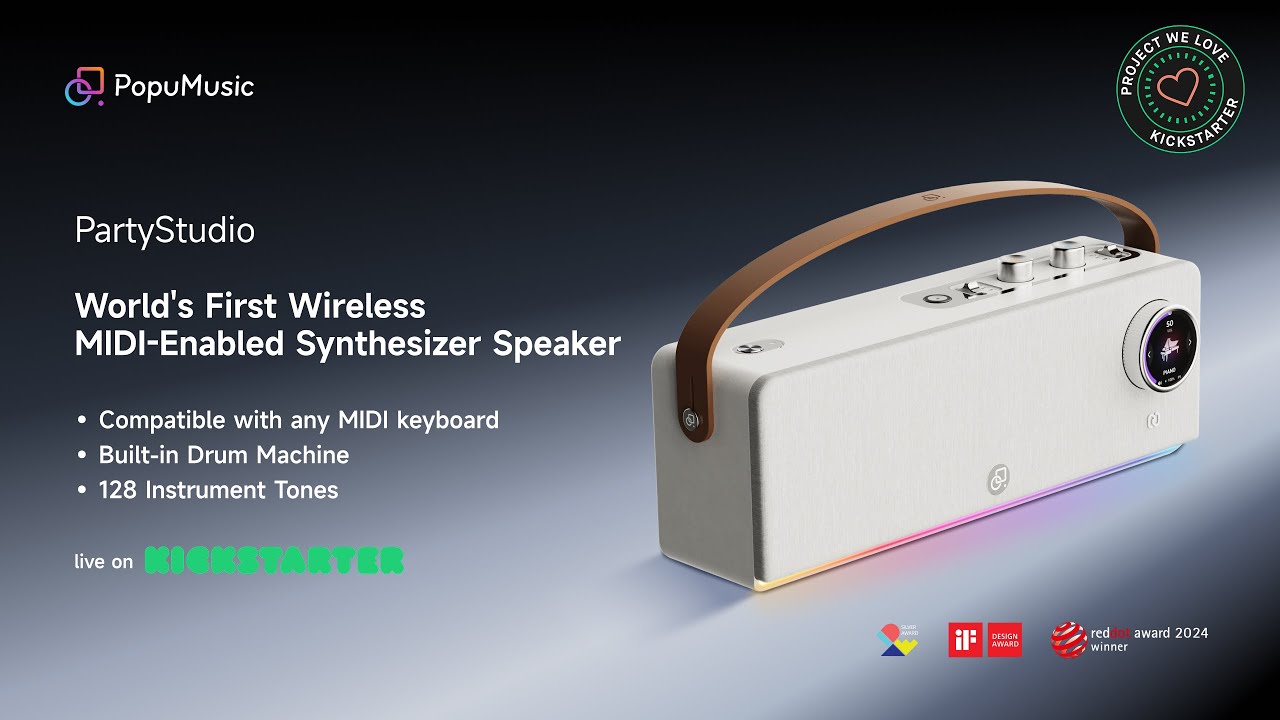
When, late last year, Popumusic announced PartyStudio - “the world’s first wireless MIDI synthesizer speaker” - the obvious question was: why?
After all, ‘the world’ has been getting along just fine up to now with synths/keyboards that either have speakers built in or need to be connected to an external speaker setup. Do we really need a third option?
Seeking answers - and with the PartyStudio now being the subject of a Kickstarter crowdfunding campaign - we decided to find out.
Get this party started
Our PartyStudio came bundled with the PartyKeys - a 36-note Bluetooth-compatible MIDI keyboard that lights up (it looks not dissimilar to Roli’s Lumi) so that, in certain modes, you can see which notes you should be playing. This ‘Music Expert Package’ can currently be bought/pledged on Kickstarter for $528, which is a pretty hefty investment. If you just want the speaker, you can pledge a minimum of $299, while the keyboard on its own is $199.
Both speaker and keyboard have built-in rechargeable batteries, and getting them working together is just about as simple as it could possibly be. With both units powered on, and their lights dancing, you just need to hold their respective NFC tap zones together and wait for the connection to happen.
As soon as this is done, you can start playing the 128 built-in sounds, which are solid rather than spectacular. Think ‘90s GM sound module’ - you get a little bit of everything (pianos, organs, guitars, synths, brass, woodwind, FX etc) at a workhorse level.
You can scroll through these using one of the two top-mounted push dials. What this controls depends on where you’ve positioned the corresponding slider - you can also adjust the part’s volume and transpose it in semitones.
A tap of this dial takes you into Play & Sing mode, which only works if you have the companion keyboard. Here, the keyboard is divided into a one-octave chord selection area at the bottom and a two-octave playing area. Press a root note with your left hand and the keys will light up to show which notes to play with your right to create the chord.

A second push-dial on the top of the speaker is used to operate the rhythm machine. This offers 50 patterns and several great-sounding kits (both acoustic and electronic) and, in terms of being a practising companion, is the PartyStudio’s biggest highlight. You have the option of adding fills just by tapping the dial, which is a nice touch.
For the drums, the slider selector also enables you to reconfigure the dial to control the volume and BPM of your beat, and as with all other modes, info is displayed on the front-mounted touchscreen (tapping this reveals further options). Dragging the edge of this to the left or right adjusts the overall volume.
There’s also a further ‘Exploration button’ on the top of the screen, which allows you to access PartyStudio’s setup and configuration settings.
With 70W of power (via two 10-watt high-frequency drivers, two 25-watt mid-low speakers and a rear passive radiator) the PartyStudio has enough oomph to fill a small-to-medium sized room, though it does lose a bit of detail when you really push it loud. What’s more, the vibrations from the bass port are such that you need to make sure the device is on a firm footing or the sound can distort a little.
As you’d expect, you can also use the PartyStudio as a standard portable Bluetooth speaker - one that sounds a cut above many that we’ve heard, it’s worth saying - so you can stream music from your phone to jam along with or just listen to.

What makes this a PartyStudio, though? That’d be the fact that you can connect up to three wireless MIDI devices, with each being capable of playing a different sound. There’s also a further USB MIDI connection round the back - it’s hidden under a very snugly fitting rubber cover that also conceals a USB-C App connection socket and a 3.5mm audio output - meaning that an additional wired keyboard can be connected as well.
You can navigate through each keyboard’s parts on the touchscreen, with colour coding being used to differentiate them and each having its own settings. As such, you can create your own PartyStudio ‘band’ - providing you have enough compatible keyboards, that is.
The life of the party?
Which brings us back to that original question: why the PartyStudio? If you’re on the hunt for a decent (and powerful) portable Bluetooth speaker anyway and quite fancy having some playable stock keyboard sounds and serviceable drum patterns built into it, then it sort of makes sense, but where things get tricker is when you start to compare it to the many portable keyboards that are available. They might not have such powerful built-in speakers, but there are loads of options out there if you just want basic sounds and rhythms, and many of them come at a fraction of the cost of the PartyStudio.
And then there’s the question of whether your keyboard sound source really needs to be in the speaker. Yes, this does mean that you can connect a wireless MIDI keyboard and play with low-latency, but to get the most out of the PartyStudio you need to be in reach of its controls anyway (to change sounds and rhythms, etc), so being wireless doesn’t feel like a massive advantage (unless you also have the PartyKeys, that is, as this enables you to to make certain setting changes via a combination of button and key presses).
There are also a few things that we feel the PartyStudio is missing. A wider selection of sounds would be much appreciated and, although the acoustic and electronic drum kits sound pretty good, a greater variety of patterns feels like a must.
Finally, there’s currently no option to record anything on the unit itself. Having a phrase recorder of some sort (ideally with an overdubbing option) would make the PartyStudio a far more appealing proposition, as you’d be able to get bass and drum grooves going (for example) and then jam over the top of them with another keyboard sound. Better yet, there could have been an analogue audio input on the back so your guitarist mate could have plugged in and played along, too.
On the plus side, the PartyStudio does have OTA update support, and Popumusic assures us that more sounds and rhythms will be added in due course. If this happens and a few other tweaks are made, the device might start to really deliver on its potential.
If you want to join the party right now, you can do so by heading over to the PartyStudio Kickstarter page and making a pledge. The campaign has already reached its funding target, and ends on 16 January. The PartyStudio will be shipping from next month.