
MusicRadar Verdict
A robust, although iterative, update that enhances Cubase’s creative toolkit by adding genuinely useful new modulators and sequencing tools and some simple time-savers, alongside pointers of what’s to come.
Reasons to buy
- +
Six new modulators expand sound design and automation possibilities.
- +
Melodic Pattern Sequencer is a welcome and creative addition to the Pattern Editor.
- +
Redesigned Expression Maps are a genuine improvement for orchestral and media composers.
- +
Stock plugin UIs now scalable (finally).
Reasons to avoid
- -
Stem separation quality lags behind some dedicated third-party tools and competing DAWs.
- -
Omnivocal vocal synthesis, as a beta, cannot compete with commercial alternatives in its current form.
- -
Some areas of the GUI remain inconsistent.
MusicRadar's got your back Our team of expert musicians and producers spends hours testing products to help you choose the best music-making gear for you. Find out more about how we test.
What is it?
Cubase really needs no introduction. It was the first computer-based sequencer to incorporate a graphical arrange window, and it even embraced hard-disk audio before many others. In recent years, it has settled into a steady pattern of yearly updates, and the latest of these is Cubase 15.
As before, it comes in three flavours, with the Pro version delivering the full feature set. As well as the main DAW software itself, you get a cut-down version of SpectraLayers (SpectraLayers Go) and, as usual, a big selection of sound content, virtual instruments and plugins. Steinberg’s aim is to make it a self-contained system without the recourse to third-party additions (though of course many users will have their own favourite additions).
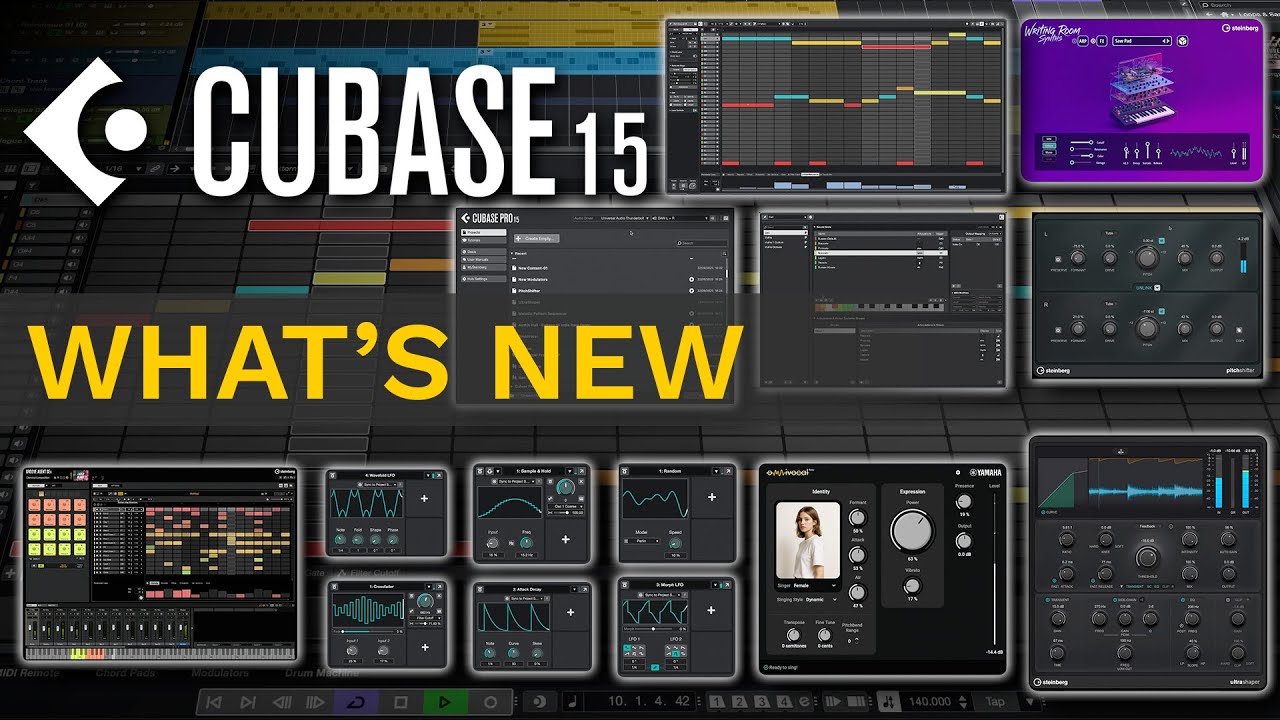
The headline additions in Cubase 15 are the expanded modulator system, a new melodic mode for the pattern sequencer introduced last year, redesigned expression map functionality, stem separation, two new effects, the Omnivocal vocal synthesis engine (open beta), plus a bunch of workflow improvements and functional tweaks. Whilst it's fair to say that a quick glance at this list doesn't point to any game-changing new features, it does cover quite a bit of territory. Let's take a closer look.

Performance
The modulators introduced in Cubase 14 were one of its big new features, and something that the users who had experience with Ableton Live and Bitwig had been calling for.
The update expands on this with six new modulator types – Random Generator, Sample & Hold, Wavefold LFO, Crossfader, Attack/Decay and Morph LFO. Modulators are a great way to create tempo-synced effects (eg, filter sweeps), but the ability to chain them and incorporate more modulator types extends their use into more creative and experimental areas.
It's worth noting, though, that Cubase works on a per-track basis for the modulators. It would be nice to see a global modulator track that can be freely routed to multiple destinations.

The pattern editor introduced in Cubase 14 was primarily aimed at drum sequencing and at the time quite a few users hoped that a more versatile version that could work easily with melodic/musical patterns might be on the cards. Thankfully, we now have it in the form of the Melodic Pattern Sequencer. It is based on its rhythmic predecessor, but to address the melodic aspects of this type of sequencing, Steinberg has added interesting scale- and shape-generation features. This means that even with a few presses of the randomisation button, the results are likely to fit well within the context of your existing track. The more we played, the more fun we had, and although it's still quite basic, especially in pattern management and copy/paste features, this is a really nice addition.

There's no escaping AI right now, and those two letters seem to be assigned to all kinds of products at the moment. In Cubase 15, it's applied to the new stem separation feature, which can split any audio file into vocals, drums, bass, and other elements (ie, all the rest). It performs this directly from the project window, splitting tracks into separate layers. It's quick, works quite well, and is free; however, you'll find better results with specialised software solutions, including online options, where there is significant competition. In fact, explore a little further and you’ll discover that SpectraLayers Go, bundled with Cubase 15, can separate vocals from music and appears to do a superior job – at least on the tracks we tested.
The same goes for OmniVocal, although this time it is clearly labelled as a beta. It's certainly not going to compete with something like Dreamtonics Synthesiser V or Ace Studio in terms of its expressiveness, realism and flexibility, but once again comes as a free addition. Hopefully, as it develops, it will become a little bit more fluid to use, particularly when adding and editing lyrics. At the moment, it can be a bit of a slog to get the most realistic results.
Regarding new plugins, Ultra Shaper offers transient shaping, limiting, and EQ, making it a useful addition. The Pitch Shifter – as the name suggests – is designed for vocal processing and features formant-preservation and saturation modes. It's not particularly cutting-edge, but it works well, though primarily suited to mixdown rather than live processing due to its significant latency.

These and other stock plugins now support UI scaling (finally!), which is a real boon when using high-res displays. We only wish there were a way to apply a simple 2x scaling to older plugins (including some from Steinberg). This would be a simple, unfussy solution for navigating plugins that shrink to tiny proportions in some setups.
One interesting feature of the newly designed hub is Project Preview, which stores a small snippet of a track for quick listening before loading. This feature only works with newly saved projects that have it enabled (allowing you to customise which small, ie, 5-second segment, is previewed). Despite its simplicity, it is surprisingly useful, especially for those who do not employ a helpful naming scheme or work on multiple tracks at once. It's also worth noting that DAWproject support allows sessions to be shared with other compatible DAWs.
A small but significant arrival in Cubase 15 is the automation’s ‘Last Touched Parameter’ feature, which provides quick drawing/editing access to whichever knob or slider you've last moved for any given track. This is a real time-saver, as is the new ability to add volume or pan directly to the Track Controls Area (though we prefer the accuracy of a vertical fader). This is a nice way to tweak levels, and it will be a real time-saver for some.
Finally, Expression Maps have been redesigned. The setup process is now more streamlined, integration with the Key and Score Editors has improved, and per-articulation attack compensation aims to enhance the realism of orchestral mock-ups. For those with large orchestral sample libraries, especially those with compatible instruments that automatically import key switches, this will be warmly welcomed.

Verdict
This release introduces many features to boost your creativity and streamline your workflow, and it is a strong update overall. However, it might seem a bit underwhelming for some, and there is certainly some sentiment on Steinberg forums that the total on offer here doesn't quite justify the annual upgrade cost. Another perspective is to consider the £83 upgrade fee as roughly equivalent to a £7/month subscription. If it were a subscription, we would say it offers fair value for money.
There is certainly some sentiment on Steinberg forums that the total on offer here doesn't quite justify the annual upgrade cost... If it were a subscription, we would say it offers fair value for money.
Nonetheless, there are some areas we would like to see improved in the future. Key Command options could be expanded, and the Remote Editor could become more accessible. Fully featured API access, capable of integrating with AI tools (such as Claude and ChatGPT), would be a fantastic addition – possibly even a game-changer – for delivering long-awaited features. We’ve barely scratched the surface of what AI can do – not as a replacement for the composer or producer, but as a time-saving assistant, and it would be great to see Steinberg take a leading role in this.
Opening, closing and project loading times can be slow on more complex projects or setups with many plugins. It would be beneficial to see some optimisation in this area. We also hope attention is given to the comping functionality in Cubase, as there are ongoing frustrations about moving active comps to other tracks and a few other issues that cause difficulty when working with multiple live audio elements.
One of the challenges with a major DAW such as Cubase is that it must accommodate a wide range of users. For every person who finds the expression map functionality or notation capabilities particularly useful, there will be others demanding clip-based playback or improved AI generative tools. Steinberg has to carefully balance its approach to satisfy everyone. Overall, however, Cubase remains a fantastic piece of software that we are happy to continue using.
Hands-on demos
Cubase
Alternatives
Specifications
Price |
£481 |
System requirements |
Windows: 64-bit Windows 10 Version 22H2 or higher / 64-bit Windows 11 Version 24H2 (or higher) Mac: macOS Sequoia, macOS Sonoma, macOS Tahoe CPU (Windows): Intel Core i5 (8th Generation) or AMD Ryzen™ Series-3000 or Windows on Arm processor CPU (Mac): Intel Core i5 (late 2018 or later) or Apple silicon RAM: 8 GB (minimum) Storage: Approx. 2.89 GB (Cubase); ~5 GB additional for SpectraLayers 12 Display: 1440 x 900 minimum resolution Graphics: Metal support (Mac) / AMD R/RX or NVIDIA 700 series+ (Windows) VST: VST 2 is not officially supported. VST 2 plugins may be loaded (excluding on Native Apple Silicon) when the VST 2 plugin scanner is enabled in the VST Plugin Manager. |
Contact |