


Remember when the internet was a brave new world, full of promise, and felt like a wild frontier where anything was possible? That’s all changed, of course, thanks to the overwhelming dominance (both negative and positive) of social media, but there’s one corner of the web that still entices: music production.
Thanks to developments in APIs involving audio and MIDI, among other things, it’s now possible to use your basic browser as a hub to make music. This isn’t a novelty any more - browser-based DAWs are packed with sophisticated tools and internal applications that often stand up to the equivalent you might have used on your desktop or as a plugin in your DAW.
Let’s explore some of the most useful and intriguing options available in your browser, from classic synthesizer emulations and modular sequencing environments to full-on DAWs.
Bet you never thought you’d be whipping up complete tracks in Chrome, did you?
André Michelle knows a thing or two about making music with web pages. As the founder of OpenDAW, a free digital audio workstation that runs in your browser, he’s fully committed to the idea of non-desktop music production.
“The web is the ideal platform for software,” he says when asked why he’d make a DAW that runs within an internet browser. “It's inherently built to be platform-independent.”

Although web-based music applications have been around for a few years now, André, explains that because of recent breakthroughs, browsers are now a much more viable way to make music. “The web now has enough APIs to cover what music tools need: audio, MIDI, WebGL (for graphics), storage,” he explains. “Developers finally started recognising the potential.”
Additionally, he identifies the ‘Wild West’ nature of the internet as to why it’s the ideal place to pioneer this new avenue for music production. “The web has also always been a place to experiment,” he enthuses. “Users are more open to new ideas, and updates ship far quicker than a desktop app allows.”
Thanks to protocols like Web MIDI - which lets you play a browser-based instrument with a controller just as you would any other piece of software - it’s more viable than ever.
We’ve always thought of DAWs as applications downloaded to a piece of computing hardware, like a laptop or a tablet, but they can also exist on the internet. Browser-based DAWs are very much a thing now, with a number of different ones available, including André’s OpenDAW.
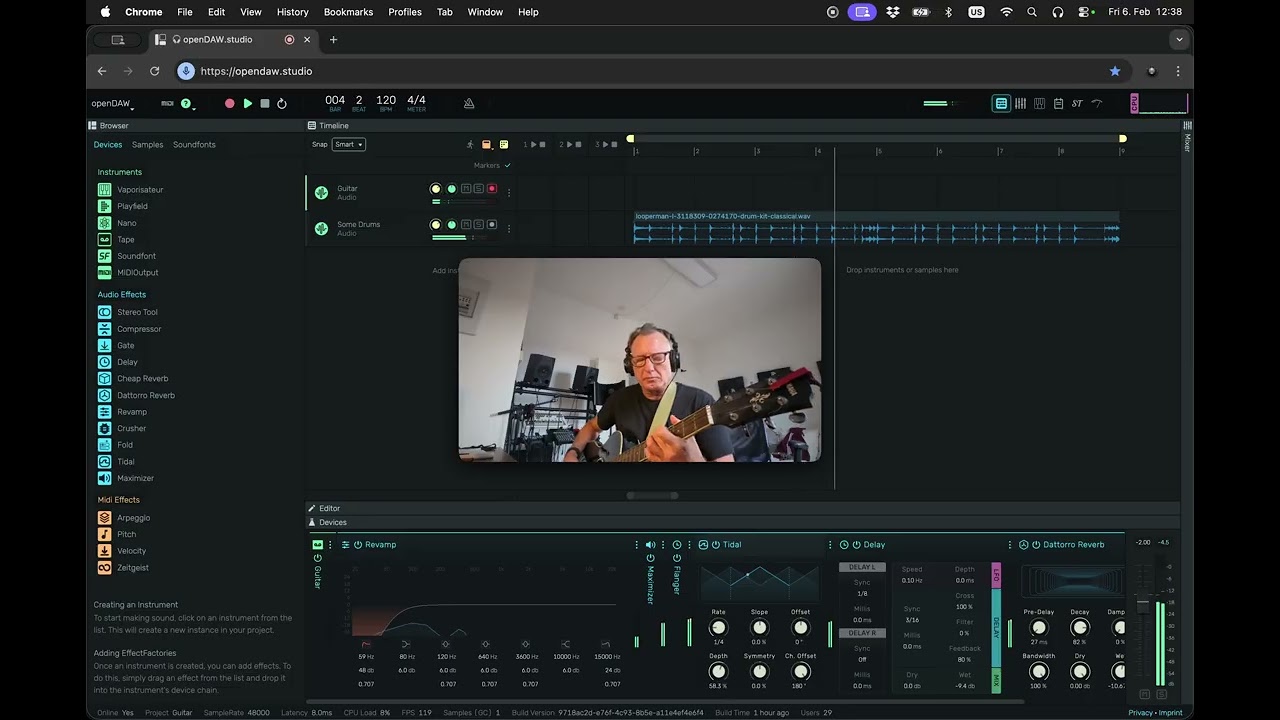
A complete (and free!) music-making platform, OpenDAW offers bespoke instruments like a synthesizer and drum machine, audio recording and effects, and even a way for you to build your own music applications on top of the OpenDAW SDK via scripting. It’s also been made with the concept of democratisation, and education, in mind.
“Sharing is the browser's own territory, so it's effortless,” André says about what a browser-based DAW offers that an offline app doesn’t. “Our Classroom feature lets people work in the same session at the same time through an invitation link, directly between their machines, with no login. It's the most accessible place to start.”
It also takes privacy seriously: “No signup, no tracking, no paywalls, no subscriptions, just create,” André says.
An online DAW like OpenDAW also makes sense if you’re often on the move and need to use a variety of different devices and machines. “Moving across platforms and computers,” is André’s response when asked why some would want to produce in a browser. “Your work isn't tied to one machine or one operating system. It runs on whatever's in front of you, a Chromebook, a borrowed laptop, your own machine.”Freedom, in other words.”
Other online DAWs include Audiotool, which supports third-party VST3s and, as of version 3.0, offers an open-source SDK that allows users to build their own instruments, plugins, and AI-connected music creation tools; BandLab Studio; and Smol Sequencer , a modular sequencing environment.

Of course, there’s more to music-making than DAWs. Sometimes you just want to kick back and have a play with a synth, sampler or drum machine without worrying about all the things that come with launching a DAW. In the same way that you might open a standalone instrument app on your desktop, you can navigate to a webpage and play a browser-based one. And, thanks to the Web MIDI protocol, you can even do it via your regular MIDI controller (although many offer QWERTY keyboard note input too).
Quirky musical gadget manufacturer Playtronica https://shop.playtronica.com/ and Chromatone, a web-based source for musical education, have curated a page called Web Synths Collection with more than 60 instruments available to jam on.
Some of the ones worth trying out include Steve Goldberg’s Juno-106, an emulation of the famous analog icon from Roland; a recreation of Yamaha’s DX7 by Matt Montag loaded with sounds like the famous (or should that be infamous?) E. Piano 1; and Matthew Cieplak’s ER-99, a recreation of the TR-909 drum machine with audio synthesized using the WebAudio API.
WebSynths is billed as ‘a free resource for any musician with internet access.’ This is a running theme with online music-making. Although browser-based instruments and tools don’t have to be free, many often are, retaining that foundational web ethos of democratisation and open-source sharing.
WebSynths currently has two instruments to play with. They are WebSynths Grooves, a booming virtual analog drum machine with some serious sound quality, and WebSynths Microtonal, a beautiful VA synthesizer with a focus on Aphex Twin-like tunings. Helpfully, both provide a way to capture audio so you can capture your sonic creations to use as you see fit later.

One of the great things about web-based music is the variety of instruments you can come across, many of them made by enthusiastic programmers who just like to code and see their ideas come to life.
One such instrument is Mezcla, an SP-404-style sampler. Says developer Capelo on Reddit;
“As a longtime beatmaker, I wanted a way to chop samples and test loops when I'm away from my gear. I built Mezcla to be a fast, distraction-free sampler that runs right in the browser.”
Interestingly, plugin developers are starting to use the browser as a way to allow prospective customers to demo instruments before buying. One such case is Jun Murakami’s Synth-80, an emulation of the Roland MKS-80 that runs right on a web page. It’s the entire instrument, complete with MIDI functionality and a QWERTY keyboard-enabled interface.
While browser-based instruments are undoubtedly not as convenient as plugins, you can still use them in your DAW with a few workarounds. Just as you would with a standalone instrument app, you can route system audio into your DAW with a client like BlackHole for Mac or VB-CABLE for PC.

With Web MIDI now very much a thing, it makes sense that hardware synthesizer editors and librarians would start migrating into browsers. You’re working from your computer or tablet anyway; why not put the editor into the internet rather than on the desktop?
Vintage synth owners know that old gear can sometimes be frustrating to work with. Having all of the menus only accessible through a single-line LCD screen can lead to many a hair getting yanked out.
Thankfully, programmers and patch librarians have long existed on computers to bring all of that arcane programming onto a big screen. As long as the instrument has good MIDI implementation, you can do your programming work from your computer. And now, thanks to Web MIDI, that editor can live on the internet too.
Knob.Monster is a new all-purpose editor. A ‘browser-native cloud SysEx librarian and patch manager,’ it connects to vintage synthesizers via a USB-to-MIDI handshake.
Knob.Monster currently supports the Yamaha DX7 and other FM-era instruments, Roland Juno-106 and Jupiter-6, Korg M1, and Casio CZ synths. The site isn’t free but it does promise an alternative to aging software librarians.
There’s a growing number of web-based editors helpfully targeting specific instruments as well. This is particularly helpful for old samplers like the Akai S5000 and Roland S-330, whose operating systems can be cryptic, to say the least.
New instruments are getting some love too, such as Behringer’s Mini series of synthesizers like the Pro VS Mini and JT Mini thanks to this lineup of free browser editors from Digital Sunset Studios. These are also available as desktop apps, but it’s nice to see the browser version as an option as well.

In the same way that browsers make excellent sense for editors, they’re also ideal host locations for tool and utility applications. No need to clutter up your hard drive when apps can live online. Here are three recently utility programs that handle useful but not necessarily bandwidth-heavy aspects of music production, such as sample slicing and wavetable creation.
Sample chopping is one of those aspects of beatmaking that can sometimes be a faff. Finding the right workflow can be tricky.
Chppr is a free online sample slicer designed to make sample loop preparation fast and easy before you take it to the DAW stage. It lets you upload or record audio, chop it, turn slices into playable pads like a hardware sampler, program patterns, arrange sketches, and export wav files from the browser. It works extremely well and is intuitive and fun to use.
Another sample-related browser utility is WavedStudio. If you work with wavetable-based synthesizers like Serum, Vital or Phase Plant, you have probably thought about making your own wavetables.
While there are standalone apps that let you do this, WavedStudio is surprisingly deep. It’s fairly complex so it’s worth looking at the documentation, especially when it comes to working with the 3D Topology functions and FM operators, but getting to grips with the main wavetable drawing parameters isn’t too difficult. WavedStudio outputs at 64 frames x 2048 samples per frame, which is the standard format for most modern wavetable synthesizers like Serum. Although WavedStudio is currently free, the developer is considering optional paid Pro features after the beta period ends.

Of course, if you want wavetables for Ableton Wavetable or some other synth with a different format, you’re going to need a converter.
You’re in luck, as the internet has you covered here too. Batch Wavetable Converter from Kimura Taro does what it says on the tin: it lets you change wavetables from one frame size to another, with control over frame number, sample rate, bit depth, and even sharpness of the output audio.
And yes, it can do more than one at a time (as you might guess from the name). Kimura also has a single-cycle waveform converter called SCW Resynthesizer and his own additive wavetable creator as well. His whole site is well worth a perusal.
Browser-based music creation is having a bit of a moment then, with so many cost-effective, slick ways to develop your music on any desktop or mobile device with internet access. Just make sure you remember to bookmark your project!
