





MusicRadar Verdict
The SSL 1 is a refreshingly simple interface with excellent audio fidelity and some extremely handy features, and provides a perfect solution for desktop and mobile users.
Reasons to buy
- +
Simple user-friendly layout.
- +
Up to 192kHz sample rate.
- +
Onboard minimal latency monitoring.
- +
Low-cut filter and SSL 4K options on mic input.
- +
Well spec’d loop back functionality.
- +
Separate optional USB-C power input.
- +
Great value.
Reasons to avoid
- -
No MIDI.
MusicRadar's got your back Our team of expert musicians and producers spends hours testing products to help you choose the best music-making gear for you. Find out more about how we test.
What is it?
For many of us who work predominantly in the box, a complex audio interface is completely unnecessary. Indeed, what we want is something compact and affordable. Couple that with excellent audio quality, solid construction and ease of use and you should be onto a winner. Solid State Logic, a company best known for its market-leading and user-friendly pro-level audio equipment, picked up precisely this baton some years ago with its SSL 2 and SSL 2+ devices. These no-nonsense units have now been joined by an even simpler offering, the SSL 1.
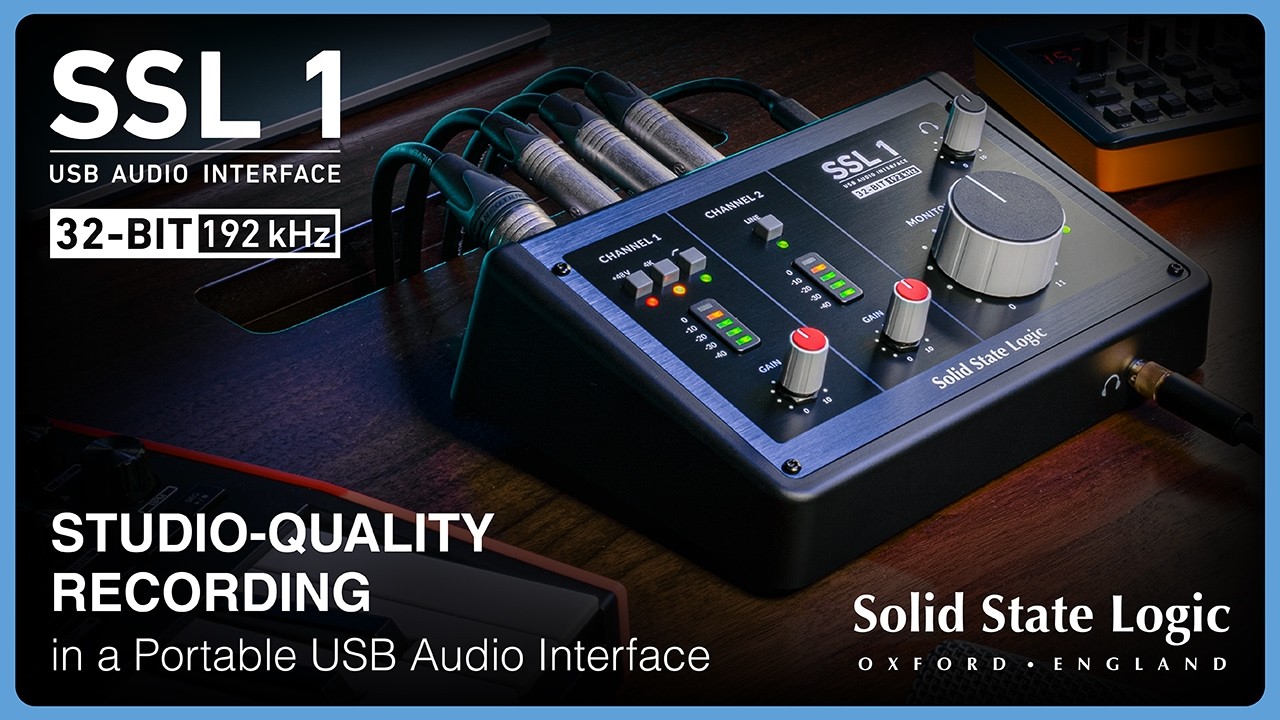
Visually similar to the MkII versions of its SSL 2 and SSL 2+ units, SSL 1 is a 2 in / 2 out desktop USB audio interface with up to 32-bit/192kHz operation. It is USB 2.0 compliant and is powered via the main USB-C audio interface connector. It also includes an additional 5V USB-C power input, so is ideal for use with a wider range of devices including smartphones and tablets.
The two inputs are clearly delineated – Channel 1 is the mic channel and Channel 2 the line/instrument channel. This keeps the rear connectivity very straightforward with a regular XLR (Channel 1) and a single ¼” jack (Channel 2). The back panel also has a single stereo output on a pair of balanced DC-coupled ¼” jacks, and two USB-C connectors as discussed above. On the front panel you’ll find a single headphone output on a ¼” jack.
SSL 1 features a combination of mechanical knobs and soft buttons, and the latter include handy LED indicators. The options for Channel 1 are 48V phantom power, low-cut filter (18dB/octave @ 75Hz) and SSL’s Legacy 4K circuit. Meanwhile, on Channel 2 you get a line level switch (the default input option is instrument). Both channels get regular Gain knobs, and 5-part post gain LED level meters.
The main level output is controlled from the large Monitor knob, which in typical SSL style goes up to 11, and the headphone level is controlled from the smaller knob in the top right. Finally, the ‘Mix’ button blends the channel inputs (which are both panned in the centre) with the stereo USB audio output for minimal-latency monitoring.

Performance
The SSL 1 has excellent build quality and, although reasonably compact, is weighty enough to stay in place on the desktop once everything’s plugged up. The rotary controllers feel smooth and solid and feature the classic SSL knob design; meanwhile, the buttons, although soft selectors rather than latched switches, have a positive action. With no power switch, simply plugging in the relevant USB-C cable gets you up and running; meanwhile, a handy two-colour power LED (green for USB, amber for external 5V power) indicates the power source. Windows users should also download and install the SSL ASIO/WDM drivers.
The layout couldn’t be simpler and the knob and button per function design is completely self-explanatory. It’s worth noting that if you use the minimal latency Mix option, there’s no manual blend control, but there is a corresponding reduction in the USB output level to help achieve a better mix. If you want to modify that mix further, you’ll need to adjust the output level from your connected device.
The mic channel provides plenty of clean gain (63dB) and although there’s no EQ, it does include SSL’s 4K emulation circuit. This adds some harmonic distortion and a high-frequency presence boost to the sound. We found this great for livening up a dull-sounding mic, and it's particularly handy for dialogue. Also worth noting is that small buffer sizes deliver very respectable round-trip latency. In Logic Pro we achieved 7.9ms at 44.1kHz with a 32-sample buffer. Use the higher sample rates and this reduces even more.
Finally, SSL 1 also includes three additional stereo software-only loopback streams. By default, the first loopback output carries the main stereo output and overall the three stereo streams provide very useful flexibility for routing audio internally between apps.


Verdict
Much like its slightly larger siblings, SSL has resisted the temptation to cram as many features into the SSL 1. Instead, the focus is ease of use and audio fidelity. It would have been great if it could have snuck in MIDI connectivity, but we won’t mark it down just for that and overall this is a great unit with a very attractive price point.
Hands-on demos
Solid State Logic
Alternatives
Specifications
Price |
£144 / €166 / $160 |
USB Audio |
2-in / 2-out with 3 stereo loopback streams |
Mic input |
Gain range 63dB, dynamic range 113dB, input impedance 1.2kΩ |
Line/instrument input |
34dB gain, dynamic range 114dB, impedance 10kΩ (line), 1MΩ (instrument) |
Balanced output |
Pair of TRS ¼” jacks, DC coupled for use with CV applications |
Headphone output |
¼” TRS stereo |
Sample rate |
32-bit up to 192kHz AD/DA converters |
USB connection |
USB 2.0, USB-C connector |
USB power |
5V power input, USB-C connector |
Accessories |
1.5m USB-C to USB-C cable, Kensington Security slot |
Dimensions |
197(w) x 74(h) x 130(d) mm |
Weight |
0.64kg |
Contact |
