





MusicRadar Verdict
This is a fantastic sounding instrument, with the concept of the supersaw placed at the very core of its makeup. Don't be fooled though, because it goes way further than huge sounding pads, and has the capacity to continually surprise.
Reasons to buy
- +
Enormous and impressive sounding plugin synth.
- +
Beautifully designed UI that inspires you to get creative.
- +
It’s just as comfortable with more intimate synth sounds, as gigantic supersaws.
- +
It does what it says on the tin, and a whole lot more!
Reasons to avoid
- -
No multitimbralility, other than the two partial layers.
- -
While the graphics are great, some controls may need clarifying, via the manual.
MusicRadar's got your back Our team of expert musicians and producers spends hours testing products to help you choose the best music-making gear for you. Find out more about how we test.
What is it?
The history of commercial music is littered with instances where a new technology has inspired creativity to go in a different direction: acoustic to electric guitars, acoustic to electric pianos, drum machines and, of course, synthesizers.
While synths took a little while to take hold of the mainstream, there were moments of backlash, with the '90s being an example, through bands such as Oasis. But it was in 1997 that Roland released a hardware synth called the JP-8000 that would notably change the sound of commercial music forever. This initial influence was evident through the style of electronic music known as trance, but quickly infiltrated other styles, remaining incredibly fashionable in today’s commercial production landscape.
The JP-8000 introduced the concept of the supersaw waveform to the world; it was a sawtooth wave, but with clones of itself that could be detuned in a controlled way, giving rise to the enormous-sounding synth pads that were popularised in trance. It also influenced other commercial synth products, with the Virus range of machines, from Access, being notable supersaw ambassadors.
These sounds are fully omnipresent in pop and commercial culture, with a majority of synths providing some form of capacity to embrace the sound. It is, however, sometimes difficult to get the exact sound you want, so wouldn't it be great to have a specific software instrument that embraces this technical trait and stamps its endorsement on the name of the product?

Performance
Super*Saw (pronounced as SuperStarSaw) is a new plugin from Native Instruments, designed in collaboration with critically acclaimed producer AG Cook. If you are unfamiliar with his work, search out his album Britpop, or his work with Charlie XCX, and you'll hear plenty of evidence of supersaw usage.
Apart from integrating seamlessly with other NI products, such as Komplete Kontrol and Maschine, Cook has supplied many of the patches, while the visual aspect of the plugin includes design elements from his longtime visual collaborator, Simon Whybray. It is very striking in its appearance, albeit in green and pink!

The new Super Star
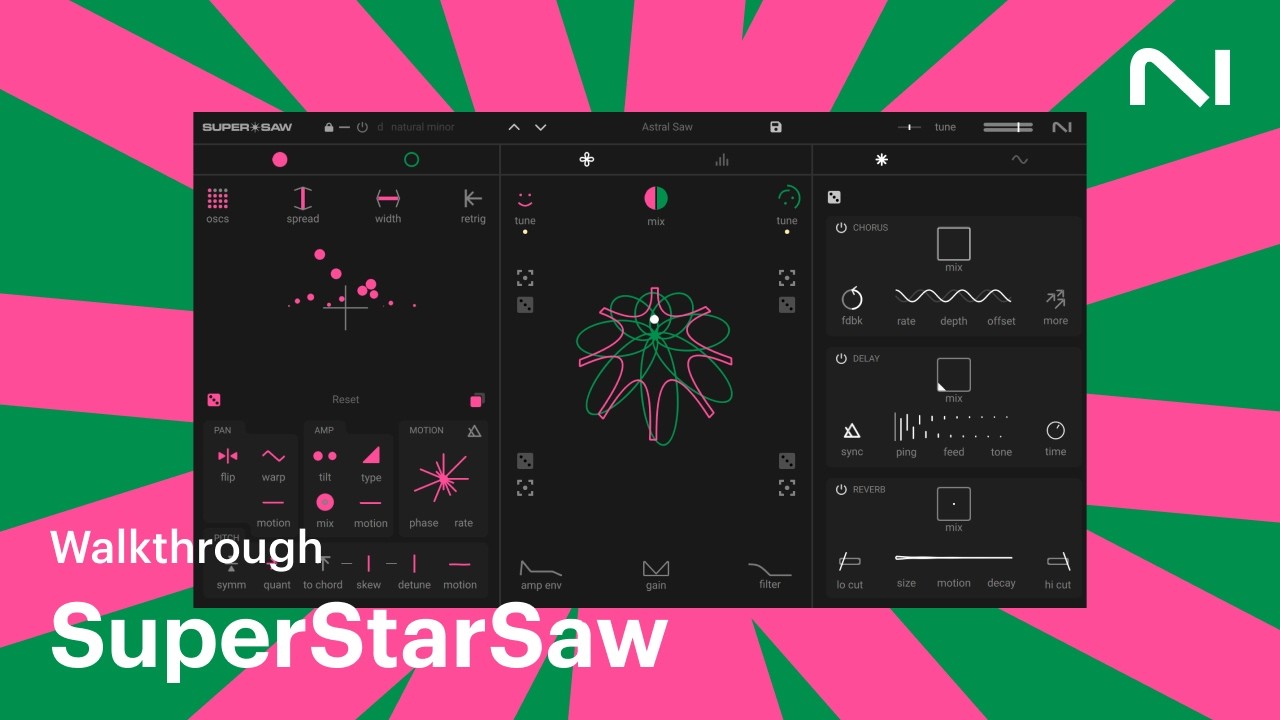
Upon loading Super*Saw for the first time, there is a degree of familiarity, which begins with the oscillator section on the left-hand side. To be honest, this rather undersells the concept, as we will quickly discover!
Super*Swarm is equipped with two partial sound sources, which are identifiable by a pink and green dot, located on the top left-hand side. Each of these sources is identical, but they are described within the context of the instrument as Swarms. Each Swarm is equipped with its own set of parameters, which begins with the number of audible sawtooth oscillators, which can then be detuned. You can't start with a single oscillator, but what's the point of that in this context, particularly when you can increase the Swarm up to 16 saws per partial? You can see how many are in play from the square graphic located on the top left-hand side of the Swarm section. Once you have selected your Swarm level, you can then de-tune and spread the oscillators across the stereo field. Even with only one Swarm in operation, it sounds gigantic!
In the lower half of the Swarm section are a host of modulation elements. Changing parameters is simple enough, once you get the hang of it, but requires the movement of the mouse over a particular parameter, at which point a value will appear, allowing you to increase or decrease with the mouse. Your connection with this interface may just depend on what you are used to. It is an elegant and simplistic piece of design, but as with all levels of minimalism, sometimes things aren't as obvious as you might hope! Like anything, once you know how it works, you quickly get used to its modus operandi.

Mix it up
Moving to the central part of the instrument (and with previous thoughts on the design ringing in our ears) you definitely have to do some experimentation.
Located at the top in the centre is a mix control, which indicates levels between the pink and green Swarm layers, as a circle. This fills or depletes with each click and drag. It's elegant, but you have to get used to it. This is also where you can change the tuning of each Swarm layer, with the ability to transpose up or down two octaves, either side of the core note.
This central section is described as the Morpher, as it allows you to take a snapshot, using the target icon, located in each corner. Much like an X/Y pad, it then allows you to seamlessly shift between the snapshots, and does so very smoothly indeed.
At the bottom of this section, icons relating to amplitude envelope and filter quickly reveal a host of control elements related to each menu category. To be honest, this felt a little bit fiddly, as a lot of information is displayed in a relatively small space, and while the elegance is maintained, a larger display area would certainly be beneficial here. The filter itself is very in keeping, stylistically speaking, with the genre intended for a synth of this kind. You can switch between 2- and 4-pole filters, with lo, band and hi-pass filters being available.
The central display is also switchable to Voice Control mode, which allows the engineering of a host of different elements, particularly relating to control of polyphonic playback. Here you can engineer all sorts of glides and bends, which can be particularly useful for creating risers or quirky synth sounds.
FX and more
The section on the far right is switchable between the effects section, which provides chorus, delay and reverb, and further modulation sources, which include LFO and two ADSR envelopes.
Verdict
It becomes very clear, very quickly, that Super*Saw is an immensely powerful sound source, as long as you don't mind starting with a sawtooth as your main constituent component. No problem there, because that's the whole point, right?
In order to get you going, there are a considerable number of presets, all placed in categories to guide your path. It doesn't take long to hear how complex sounds can quickly become, and we have to admit that despite our admiration for the concept, we felt like we only scratched the surface with its capabilities. A large part of this is because of the hieroglyphic and graphical nature of the interface, which is really fun to use, but does find you scratching your head occasionally. Of course, in an ideal world, you would work with the synth to fully understand its operational elements, and make no bones about it: if you have a requirement for huge-sounding saw-based pads, this is a fantastic synth which is going to reward you continually, but you’ll need to have the manual on hand to get the absolute most from the instrument.
Hands-on demos
Native Instruments
Alternatives
Specifications
Price |
£89 |
Key features |
2 Swarms per partial layer 16 oscillators per Swarm 2 and 4-pole filter, in lo, band and hi-pass states Scale and chord mode operation, to assist playing and chord structure |
System requirements |
MacOSX and WindowsPC : AU, VST3, & AAX formats |
Contact |
