
MusicRadar Verdict
This tidy Osmose CE package ships with an excellent bundle of MPE ready sounds, which are, for the most part, incredibly engaging to play. Whether Osmose CE is the only controller you need depends on your musical and pianistic leanings, but as a concept, it’s an incredibly exciting instrument!
Pros
- +
Beautifully built and incredibly engaging keyboard.
- +
Brings the Osmose experience to a controller format, at a cheaper price-point.
- +
The included Ctrl-e plugin software provides an enormous menagerie of excellent MPE sounds.
- +
High level of DAW integration, with support for many mainstream DAWs.
Cons
- -
It’s a unique playing experience, and will take some practice to fully find a pianistic plateau.
- -
The accompanying software is still a little glitchy and in need of refinement.
- -
As controllers go, it’s not cheap, but the quality justifies the price tag.
MusicRadar's got your back Our team of expert musicians and producers spends hours testing products to help you choose the best music-making gear for you. Find out more about how we test.
What is it?
Expressive E is a company that has always pushed the limits of MIDI control, through its impressive lineup of hardware and software. At the very heart of its development manifesto is the ability to control electronic instruments in a unique way, exploring some of the outer limits of the MPE format.
Its journey began with the unique design of the Touché, a hardware controller of sorts, which was designed as an add-on to your existing MIDI or modular setup. Then came software that fully embraced the MPE format, inviting users and players to engage the Touché for all of those control niceties.
The pinnacle of its most recent explorations arrived a couple of years ago, with the Osmose synthesizer keyboard. This not only allowed us to see its unique keybed technology for the first time, but also gave us a very weighty onboard MPE synth engine, taking full advantage of a performance-level keyboard package.
Now Osmose is available in a new CE format, providing a cheaper controller option for those who don't need Osmose’s internal sound engine. The unique selling point is undoubtedly that, where other MPE controllers provide unique styling and design, the heart of Osmose is a traditional piano layout, at least at first sight. Beyond that, the Osmose keyboard responds to all manner of strikes, after touch-style pressure, lateral movement, and more!

Performance
So if you are paying considerably less for the CE edition, what are you losing? In essence, the onboard sound engine! The keybed technology is identical in every way, so we could easily argue that there is no compromise. The lack of a sound engine is unlikely to be a deal-breaker for anyone who is studio-bound and DAW-based. Apart from its availability in both a 49 and 61 key (four and five octave) format, there is an included bounty of over 900 sounds available, through the installation of the Ctrl-e software, which runs as a VST or AU plugin in your DAW.
At the present time, there is no standalone version of Ctrl-e, or indeed a version that might run on a tablet, but maybe that might be something that appears in future. Osmose CE integrates fully with Expressive E’s other products, and arguably opens an entirely new area of control for Soloiste (its virtual solo string instrument plugins) and Noisy 2 (synth), although the Ctrl-e software is a fantastic MPE showcase for other manufacturers too, who have contributed patches – Synapse, G-Force and Kilohearts, to name just a few – alongside Expressive E’s own included sounds.

Build and construct
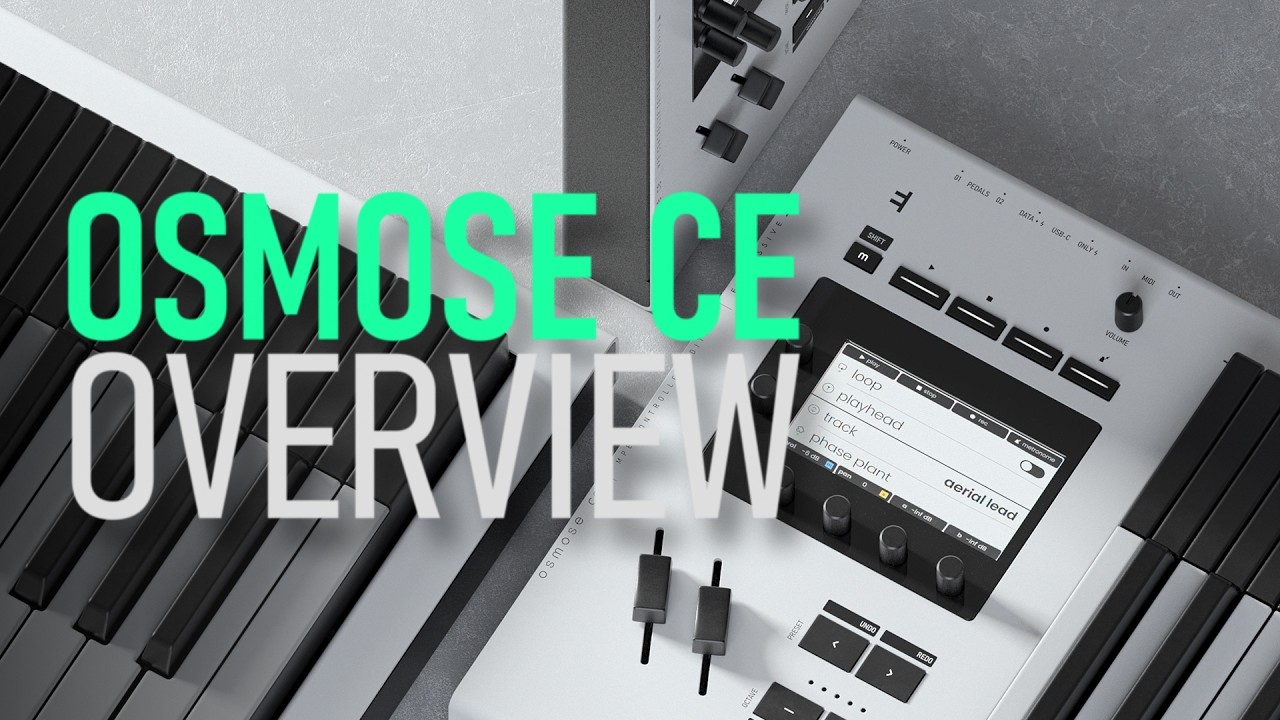
The hardware itself is manufactured in Poland, with the component elements being a black metal base and aluminium upper panel. The keybed sits proud of the fascia, with pitch and modulation sliders located on the far left, along with a number of buttons and pots and the ever-important display.
Power is supplied via USB-C, meaning that you can plug it directly into your computer for both data/MIDI and power connectivity. It's a very neat solution. Should it be more convenient for your setup, you can also connect MIDI via more usual 5-pin DIN connectors, both in and out, although you will still need to connect USB-C for power. The build quality itself is exemplary.

Use and feel
So how does Osmose CE perform, as an MPE-biased controller, versus more regular pianistic use?
This starts with the physical attributes of the keys themselves. When you play a key, pressing it down with the force of your finger, there is quite a lot of travel. Unlike a piano or similar keyboard, there is no hard stop, that is, unless you increase the travel of your finger to the very depths of a key’s depression point. This means that you effectively have a halfway point, which might be considered the more usual stopping point for a regular keyboard. If we refer to the rest of the travel as an ‘aftertouch zone’, there is about the same degree of movement again, but of course, the point here is that you can initiate further control through the software, such as the induction of vibrato, or the application of some form of synth-based modulation.
Osmose CE goes much further, though, with lateral movement too, which often induces vibrato. Bizarrely, this concept of lateral movement dates back to the 14th century, and the instrument known as the Clavichord. However, Expressive E has taken the concept to new heights, with a high level of programmability which complements the sound engine palette. This means that you can engineer considerable secondary control, once the initial note strike has occurred.
Thanks to the accompanying Ctrl-e software, you can quickly get up and running with an incredibly extensive sound palette, which is designed to show off Osmose to its fullest potential. There are plenty of pads, synths and guitar-like plucks within the software, but we were also interested to test Osmose CE with its unique Soliste suite, which concentrates on members of the orchestral string family.
It is also a very different proposition if you are used to sitting at an acoustic piano
The level of control supersedes what may be possible with a conventional controller, but it underlies one notable point, which is that this is such a radical design that you may need to engineer some Osmose practice to get the very best from the action. It is a different instrument, in the way that it plays and feels, and while it's clearly very simple to switch to a piano sound, it is also a very different proposition if you are used to sitting at an acoustic piano, or one of the excellent fully-weighted MIDI controllers that are currently on the market.

Integration and install
There can also be a high level of integration between Osmose CE and your DAW. We were testing the unit with Logic Pro, but must note that installing all the appropriate software that might be required wasn't quite as simple as it could be.
The basic setup of plugging in gets you off the blocks very quickly, but installing additional components, notably the Ctrl-e software and support script for your DAW, are treated as separate elements.
The Ctrl-e software is essentially a sound source, in the shape of a plugin. The installation procedure was simple enough, but we had to do a number of full restarts of our system and Logic before the plugin was recognised and appeared. It just seemed to be a little bit temperamental, which might also be because of the presence of iLok, for authenticity.
The accompanying DAW script allows the Osmose CE to integrate fully with your DAW. This extends from sound selection within Ctrl-e, through to transport and even fader control. As a specification, this seems like a good idea; however, the Osmose CE display is nowhere near as gratifying as a computer screen, so while incremental/decremental navigation of sounds might be useful, it seems unlikely that you will use the onboard display when your computer screen will presumably be very close at hand.
Installing all the appropriate software that might be required wasn't quite as simple as it could be.
Moreover, navigation via the display is through six infinite and clickable pots and five buttons, and while it does get easier with use, it’s not the most intuitive menu hierarchy or way of getting things done. It's also worth noting that loading times for many of the Ctrl-e sounds felt quite laboured. This did vary from one patch to another, and probably has everything to do with the sonic complexity of each sound.
There are two 1/4” jack connection points on the rear of the unit for pedals, one of which could easily be a sustain pedal. In operation, we also noted that applying the sustain pedal meant that any attributes that had been triggered within a patch, such as a change in filter cutoff, would not be held with the sustain. Presumably, this is to do with the nature of MIDI sustain pedals, where they tend to operate in an off/on scenario, for notes only.
You also have to use the display for making settings on the Osmose CE, which is entirely fair enough, particularly as you probably won't need to change these settings very often, but for DAW control, it feels somewhat surplus to requirements, although the tactile nature of the transport controls has a degree of appeal.

Verdict
Being available in both four and five-octave versions, Osmose CE is incredibly appealing for anyone making music within a DAW. It is capable of some pretty clever party tricks, such as the Pressure Glide mode, which allows portamento movement between notes, but with a useful degree of control and accuracy.
Where the jury may be out is with its attractiveness as a straight replacement for a conventional MIDI keyboard. If you are a pianist or keyboard player, there is an overwhelming attraction to an MPE controller, which looks identical to a regular piano keyboard. This is, however, where it ends!
The playing experience is very different to that of the piano, and will take some time and encouragement to fully embrace. Playing slower and more chordal progressions allows you time to embrace the MPE control, but rapid playing presents greater challenges, particularly as ends of notes are nowhere near as tight as more conventional controllers. The upside is, of course, you get all the other MPE elements, which you could not do in the same way with a regular controller, even armed with a bank of faders.
There is something very musical about the way you can approach playing Osmose CE, and we like that an awful lot. The only problem is that we are thinking that we might need to make space for two controllers in our studio setup, in much the same way that we have a weighted keyboard and a synth action keyboard. It has to be worth it, just for the sheer style of the Osmose CE!
Hands-on demos
Expressive E
Alternatives
Specifications
Price |
49 Key: €999 61 Key version: €1,199 |
Key features |
49 or 61 note keyboard formats Full MPE playability and engagement Multi-gesture control – tap press, pitch bend, vibrato, shake, strum, etc. Onboard MPE Arpeggiator DAW integration (Live/Cubase/Bitwig/Logic Pro) Ctrl-e plugin software included, with over 900+ sounds Powered by USB-C |
Contact |
