





MusicRadar Verdict
The AlphaTheta Slab puts Serato Studio’s most powerful features, stem separation inclusive, under thoughtful, tactile and ergonomic control. But there are instances in which the Slab isn’t the most efficient way to work. It’s not a complete replacement for mouse-and-keyboard navigation, and maybe not the MIDI controller for hardware sampler aficionados, but it’s a great accessory instrument for efficient, dynamic beat-making.
Reasons to buy
- +
Extensive control surface
- +
Useful mapping of EQ and stem separation
- +
Firm, robust build
Reasons to avoid
- -
Some features feel redundant against mouse and keyboard
- -
Small screen with minimal information
- -
Minimal auto-mapping to other DAWs
MusicRadar's got your back Our team of expert musicians and producers spends hours testing products to help you choose the best music-making gear for you. Find out more about how we test.
What is it?
Making music is the easiest it’s ever been. We are faced with a feast of hardware and software solutions for making beats, crafting grooves, tweaking tracks and so forth; many of those software solutions are free, and many more trivialise the process of bringing audio ideas to life. But, ever optimised as these options become, there’s still something fundamental missing: tactility.
Having spent an inordinate amount of time slouched over grooveboxes, sequencers and hardware trackers (rare soapbox-moment shout-out to the OG Polyend Tracker, which remains our personal favourite beat-making machine despite its many time-consuming inefficiencies), we understand the value of tactility. And AlphaTheta does too, with this game attempt at marrying the digital capabilities of its DAW with the hands-on groove-making experience of the hardware sampler.
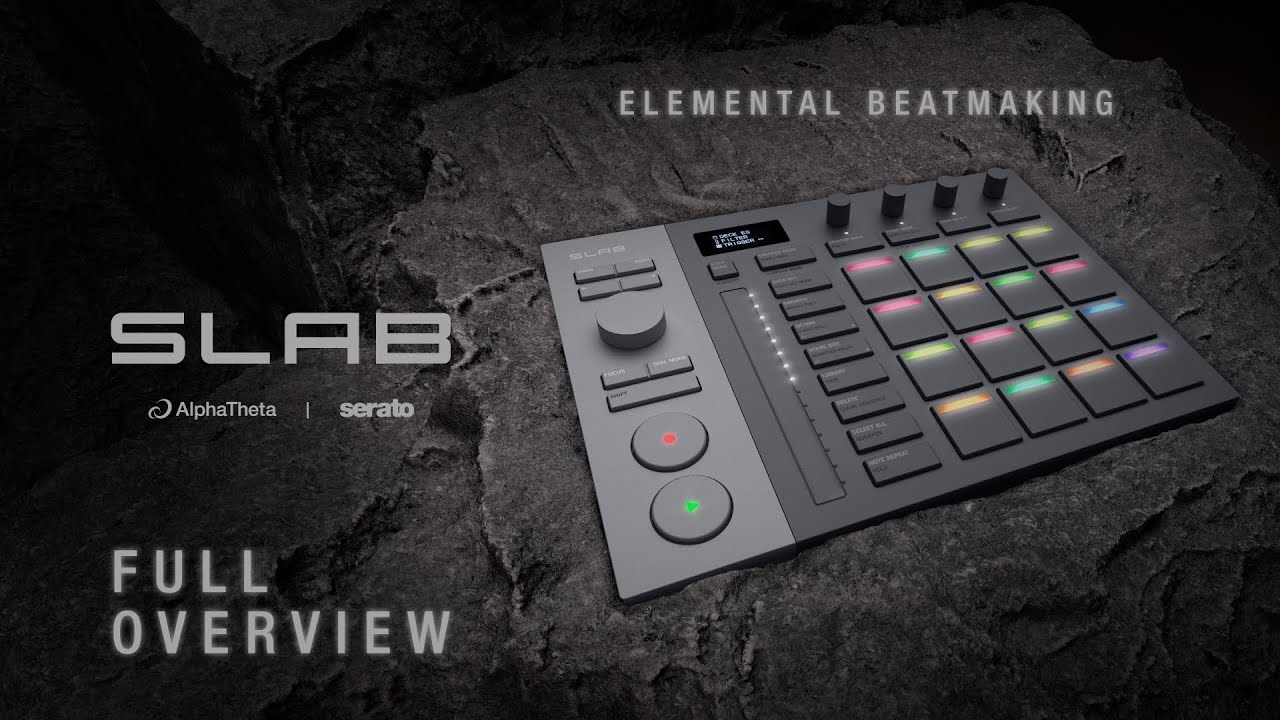
The AlphaTheta Slab is, functionally, a MIDI controller. It takes after familiar beat-making hardware of old, with a 4x4 sample pad layout and some additional control-surface gubbins for expression and parameter control. So far, so MIDI controller – but look closer at those buttons, and you’ll see some mighty specific phrases…
This is because the Slab is designed, primarily, to work with Serato Studio – a relatively young DAW under the AlphaTheta/PioneerDJ umbrella, which seeks in its own way to make beat making as easy and intuitive as it can be. The Slab is a hardware extension of this software, putting navigation, control and creativity at your hands instead of via screen-hunting and mouse-clicks. In this way, the Slab takes more after the Maschine than the MPC – though it wants you to feel more like you’re using the latter than the former.
The symbiosis with Serato Studio is completed with the inclusion of a free licence for the software, activated wherever you plug the Slab in. This means some of the key selling points of the Slab are nestled within the software – particularly, the stem separation technology that enables you to instantly control the levels of vocals, melody, bass and drums independently of one another. It’s one-touch with the Slab, with each of its four top-row rotary encoders assigned one ‘stem’ to affect.
When not controlling stems, those same four encoders can be programmed to control effects, EQ and other levels, depending on the mode you select using the Encoder Mode button to their left. The 16 sample pads do exactly what you’d expect them to do, with additional utilities and navigation possibilities governed by four control buttons above them.
A vertical touch-strip provides tactile control over filters and modulation; more control buttons help with navigation and session adjustments; and on the far left, a large jogwheel lets you scrub through audio samples, navigate menus and alter cue points, amongst other things. A small OLED screen gives you onboard visual feedback for adjustments, moves and settings. Throw in some extra AlphaTheta flourishes, in the form of dedicated cue and play buttons a la the humble CDJ, and you’ve got a compact piece of kit that offers to be an instigator of songwriting and live-performance creativity in one.

Here, we’ll mention that the Slab also talks to Serato Sample and to Serato DJ Pro as a performance-pad extension that enables access to more hot cues as well as FX and stems control. Of course, the Slab can be used outside of the AlphaTheta cinematic universe. It’s MIDI-compatible with pretty much every DAW, though it goes without saying that you won’t benefit from the same features and controls; you have to invest some time into creating your own mappings.
In short, the AlphaTheta Slab is a hardware appendage to Serato software, designed for beat making, re-mixing and laptop performing with confidence and control. But does it meet its own expectations?

Performance
From the jump, and by and large, we’re big fans of the interface here. Clicky buttons nestled under pleasingly firm rubbery pads; four seamless rotary encoders for parameter control; a clicky jogwheel for navigation; a textured touch-strip for expressive movement and automation. That said, the sample pads themselves took some getting used to at first, on account of being supremely sensitive.
This sensitivity has its merits when it comes to creating dynamic beats – and we were grateful for the ease with which we could programme ghost notes into them accordingly – but it can also lead to a lot of annoying misfires from resting fingers, palms or wrists. At least, unless you adopt a more intentional, hands-off approach with the Slab when recording. It’s a small learning curve, but you reach a harmony with it.
Meanwhile, the jogwheel encoder sort-of has the opposite issue. It’s a 24-detent encoder, which means stepped movement between values – hence less precision when scrubbing through samples and setting slice points. This isn’t a major issue, since holding the shift button lets you zoom into the sample and scrub with progressively smaller values, but you might find it quicker to move to your mouse and scrub that way.
It’s understandable why the jogwheel is like this. It’s performing multiple functions including library navigation, and the detents make for great physical feedback on scrolling through options. It’s part of a familiar CDJ-esque navigational flow, but from a music-making standpoint, it can occasionally get in the way. And this is part of a wider, and unavoidable, tension inherent to the Slab as a piece of DAW-specific MIDI-controller gear.

The idea is to spend less time clicking around in your DAW and more time flying through your sample libraries, auditioning and chopping up samples, and drumming in beats and phrases; the reality is that quite often, you still have to click around in your DAW, despite how game the Slab is for putting control features right at your hands.
A case in point for this would be the Slab’s Focus button – an excellent feature, which turns the detented jogwheel into a universal knob that can adjust whatever you hover your mouse over. Clicking the jogwheel in can also act as a mouse-click. This is revolutionary for controlling third-party VST parameters, particularly if you’re using a laptop with a trackpad. As soon as you have a mouse under your right hand, though, Focus starts to become a bit redundant.
Likewise, with the Slab’s screen – which is useful for keeping track of parameters you adjust and settings you navigate within the Slab, but not really for anything else. You’re still engaging with your computer screen for visual feedback most of the time, when you really want to be hunched over the hardware.
All this comes down to comfort, convenience and efficiency. It’s a mixed bag here, when so many comfortable, convenient and efficient moves are possible with the Slab – but you’re still faced with instances in which not using the Slab is more convenient.

We’ve been a little unyielding with our criticisms of the Slab thus far, and it’s certainly not because we don’t like it. Quite the opposite; with respect to making music in Serato Studio, this is an extremely well-designed, creativity-boosting appendage. It’s possible to enter a flow using it, and generating new demos or ideas is bonkers fast with it. It’s just not the one-stop shop that those familiar with standalone beat-making hardware might expect – and, if you’ll read on a smidge, we have our thesis on why.
In order to see how the Slab performed without its auto-mapped, Serato Studio-friendly controls, we opened up a new session in Reaper and tried out a few VST samplers. The sample pads were automatically mapped to MIDI notes, so drumming out beats and patterns was possible out of the gate. None of the other buttons or encoders was as lucky, though; common commands like ‘undo’ and redo’ didn’t work, and even the dedicated record and play buttons didn’t record or, well, play.
The need for extensive re-mapping in other DAWs was already clear, and this is no real surprise, but it remains a minuscule shame that some of these simpler controls aren’t auto-mapped too. All this serves to prove is something we knew about the Slab already: this really is a hardware extension of a specific DAW, and if you’re buying this for use with any other DAW, you’ve got your work cut out for you.

Verdict
In all, we greatly enjoyed our time with the AlphaTheta Slab. And on its own merits, as an extension of Serato Studio, it passes with flying colours. Many of the gripes touched upon in this review are much starker simply for the fact that using the Slab with Serato Studio was, after getting to grips with it, such a seamless experience – at least, until it wasn’t. And we think this is because the Slab should be thought of like an instrument.
Much in the same way you put the guitar or drumsticks down after recording a part, you put the Slab away once the sausage is partly made. Also like an instrument, the AlphaTheta Slab gets better the more you use it – as does your own workflow in Serato Studio. Having tactile access to DAW navigation shortcuts and useful commands feels efficient and ergonomic, especially when they’re committed to muscle memory. And this makes your compositions both better and quicker to come together.
In this way, the Slab is hugely convenient and phenomenally swift for generating ideas, laying them down and ultimately for getting a great deal of the way towards a Cool New Thing. Once you start moving from creation to consolidation, into the mix phase, though, it’s mostly played its part. Maybe this is true of Serato Studio too, though – which doesn’t quite have the same depth as other DAWs for production. If you’re OK with the Slab being part of a hybrid workflow, rather than as a complete interface, it could well become indispensable to your beat-making setup.
Hands-on demos
AlphaTheta / Pioneer DJ USA
Alternatives
Specifications
Price |
£259 / $329 / €299 |
Connectivity |
1x USB-C |
Compatible applications |
Serato Studio (DAW); MIDI-compatible with other DAWs (Logic Pro, Pro Tools, Reaper inclusive) |
Power requirements |
DC 5V |
Power consumption |
500 mA |
Dimensions |
284.3 × 209.0 × 44.6mm |
Weight |
1.0 kg |
Contact |
