Recording system audio from apps on your computer – Safari, Spotify or Zoom, for example – sounds like it shouldn’t be a difficult task, but historically, it’s not been quite as simple as you’d expect.
Apps like Blackhole and Soundflower have allowed Mac users to route audio from one app to another on macOS, but this required configuring virtual audio devices, adjusting audio settings and recording to another application, and wasn’t quite the one-click solution that many of us would prefer when we’re in the creative flow.
Several alternatives have since popped up – most recently, the useful SoundPaste app and WebSampler plugin – but today, another hassle-free solution for internal audio routing has just dropped: AudioRoute.
A cross-platform tool for recording system audio that’s equipped with three unique capture paths to suit any workflow, AudioRoute could be a major time-saver for DAW users routing audio from other applications or samplists hoping to lift sounds from YouTube, Spotify or any other platform with minimum faff.
(This probably goes without saying, but if you are sampling copyright-protected material, make sure it's legally cleared with the relevant rightsholders before you release your track.)
AudioRoute offers the user three different ways of capturing system audio across both macOS and Windows. In macOS, AudioRoute sits in the menu bar and in Windows, it lives in the system tray. The minute you want to record, all you need to do is hit a single keyboard shortcut and AudioRoute will begin recording your entire system audio mix. To stop recording, repeat the shortcut and a WAV file will be saved to your drive, ready to drop into your DAW or use elsewhere.
There’s also a dedicated panel that can be opened up with Record and Stop buttons, displaying the current Capture status with a level meter and timer, along with access to settings that allow you to adjust bit depth, change the destination for saved audio files and more. Rather than running permanently in the background, AudioRoute begins its capture process only when needed, returning to an idle state once recording is complete.

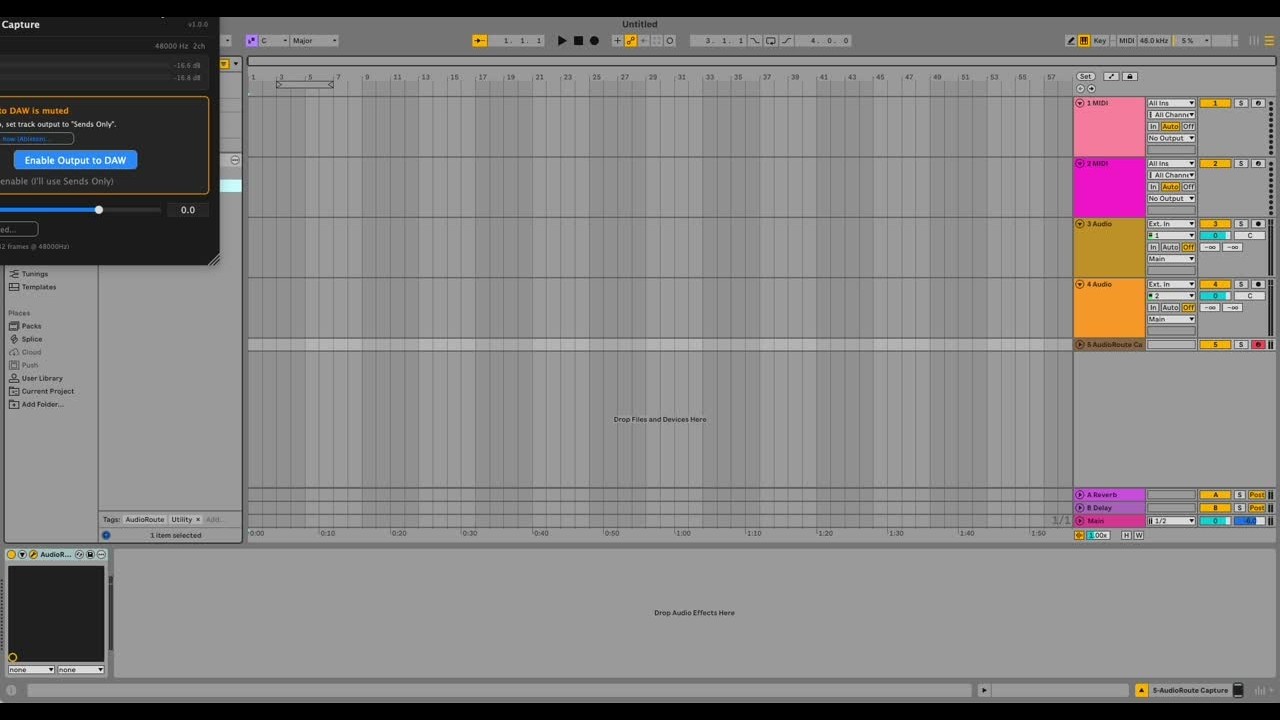
Though that’s the fastest route for recording straight to WAV, AudioRoute’s second capture mode is even quicker and more efficient for DAW users: the app runs as a VST3/AU plugin that makes system audio available in Ableton Live, Bitwig, FL Studio, or any compatible DAW for recording. The app’s makers promise sample-accurate, low-latency recording, and thanks to a helpful feedback protection feature, AudioRoute automatically detects the DAW’s output and excludes that from its system audio capture to prevent feedback issues.
Finally, AudioRoute’s Input mode exposes AudioRoute as a virtual audio input device that can be selected in other applications, allowing you to select AudioRoute as an input in your DAW, or in apps like OBS, Zoom, Discord, and Voice Memos.
AudioRoute’s main selling point is its simplicity and ease-of-use: all you need to do is run the installer, hit the keyboard shortcut or open up your DAW and the AudioRoute plugin, and you’re ready to go: no Audio MIDI setup, no aggregate devices, and no messing around in your System Preferences.
On paper, AudioRoute seems to be one of the more streamlined solutions for recording system audio that we’ve come across, and it’s not unreasonably priced either, at €29 for a perpetual license with lifetime free updates and no subscription required. There’s a 14-day free trial available, too, if you’d like to test it out first.
Visit AudioRoute's website to find out more.