This is it - the final part of MusicRadar's alphabetical guide to Apple's GarageBand. Covering the letters U to Z, this completes our whistle-stop tour of the software.
If you've come here first, may we suggest that you also check out part 1, part 2 and part 3. Once you've read that lot, you should have a pretty good idea of what GarageBand is all about.
U is for Undo
Just pressed Delete by accident? Lost the best guitar take the world has yet to know? Oops. Shame, that. Might as well call time on your music career right now, or suffer a rock 'n' roll outburst and throw your Mac out of your hotel window.

Actually, before you do, just press Cmnd+Z. Hey, look at that - your take's back! Just as well you didn't chuck out the old machine, eh?
The great thing about Undo is that it means you're able to try things out without any fear of overwriting moments of genius or thoroughly messing up a promising arrangement. It goes without saying that you should save everything you work on - doing so will cost nothing, whereas not doing so might cost you days of work - but while you're working, anything you don't like can be deleted with a simple strike of the Backspace key, and if you get a bit over-zealous, you can go back a step with Undo.
V is for Vinyl
When CDs were launched back in the early 80s, many predicted the demise of the humble vinyl record. Why? Well, superior sound, no pops and crackles, longer recording times… lots of reasons.
What the prophets of doom failed to factor in, however, was that everyone rather liked the sound of vinyl, with those pops and crackles somehow acting as a subconscious stamp of authenticity for certain types of music. Now we're surrounded by ways to get the sound of vinyl back into our tracks, whether by way of vinyl crackle loops that can be loaded onto particular tracks of our projects, or via the use of bitcrushing and other resolution-lowering effects processes. If you're a retro beat loop vinyl junkie, you'll find stacks of these in the Loop Browser.
W is for Wizard
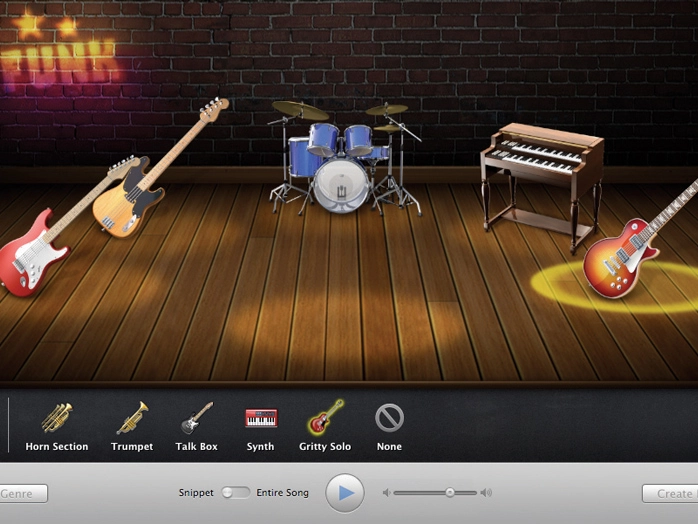
If you're a beginner, either new to music technology or a particular style of music, the Magic GarageBand Wizard could be just the thing for you. When you first boot GarageBand, select a new Project and choose the Magic GarageBand option at the bottom. When prompted, pick the musical style you fancy from the list of templates and a virtual band will load and start jamming away when you press Play. You can then click on each instrument in turn and replace it with any number of alternatives. Check out different drum playing styles, or substitute an acoustic rhythm guitar for an electric one.
If your mic is plugged in, you can jam your solo or vocal of choice over the top, and when you're jammed out, click the Create Project button. This opens a brand new GarageBand song with all of the musical parts and instruments you've selected, ready for you to add to, rearrange and burn to CD when you're ready.
The Wizard is a great place to get a handle on production, arranging and hearing different instruments in combination.
X is for Xenomania
This hugely successful production company writes hits for pop bands like Girls Aloud and the Sugababes, and is even working with Franz Ferdinand. Here's a team of writers and producers who know how to create pop gold and turn it into multi-platinum success. If this is a career path that interests you, you could do worse than start out by analysing and trying to replicate their sound and production style.
As ever, GarageBand is here to help. Start with a killer groove and chord progression and then spend time trying to program similarly infectious basslines, synth leads and knockout chorus sequences. You'll find it's less than easy but hugely enjoyable. With GarageBand as your writing partner, you'll soon be achieving great things.
Y is for You
Once you've moved on from pastiche, you'll want to express yourself without so much outside influence. With GarageBand, music-making is all about your creativity. If you want to learn how records are made or how pieces of music are constructed, this program is a wonderful playground.
If you're happiest combining loops, safe in the knowledge that they'll snap to tempo for you, no problem. If you're ready to make note-based recordings or even plug in a mic and start singing, go ahead - GarageBand is ready to help you realise your creative vision.
Z is for Zoo Monkeys
Don't worry, this isn't the name of the latest indie band that you simply have to know about. Rather, it's the name of just one of GarageBand's many sound effects that you're free to incorporate into your arrangement.
If you're a film-maker who's looking to add a sound effect track or musical arrangement to your work, GarageBand provides a hassle-free way to get started. If you need ready-made textures, atmospheres or, indeed, zoo animals, look no further. As ever, simply set up the number of Real Instrument tracks you need and away you go.
To work with video, simply select Show Movie Track in the Track menu. Import your movie from the Browser on the left-hand side and it will play while you compose in real-time. Exporting the finished movie to disc will dub your musical composition onto your film for you. In combination with iMovie, you've got a full-spec production suite ready to do your bidding.