When Apple launched GarageBand '09 last month, its decision to try and sell it on the back of the software's new Learn To Play features concerned us slightly. Could they really be that good?
Well, now we've tried them, and the answer is yes.
To recap, Learn To Play has two elements. Firstly, there are the Basic Lessons, which are designed to teach you the rudiments of piano and guitar playing. These come included with the software, though only one (of nine) for each instrument is provided as part of the iLife '09 installer. The others have to be downloaded from Apple's new Lesson Store.
The Basic Lessons are fine for beginners, but of much greater interest are the Artist Lessons. As their name implies, these feature artists teaching one of their more famous songs.
"Put simply, the presentation is beautiful. Folds strolls on, takes his seat at the grand piano and proceeds to teach you how to play Brick, one of his finer ballads."
Sting, Sarah McLachlan, Fall Out Boy, Norah Jones, Colbie Caillat, Sara Bareilles, John Fogarty, OneRepublic and Ben Folds are already in the Lesson Store, and Apple tells us that it has more people lined up.
Purchasing a lesson is easy - just go into the Lesson Store, add your selection(s) to your cart and checkout via the Apple website. The process can be completed in a matter of minutes, but actually downloading your lesson might take rather longer.
With an 8MB broadband connection, downloading Ben Folds' contribution took a good two hours. This is slightly tedious, but once we'd opened the 699MB file, it quickly became apparent why it was so large.

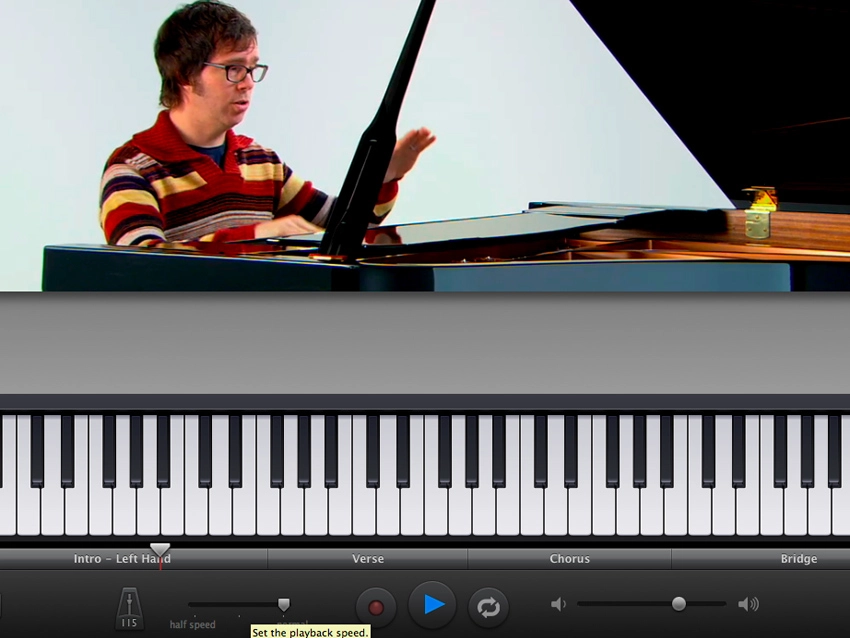
Put simply, the presentation is beautiful. Folds strolls on, takes his seat at the grand piano and proceeds to teach you how to play Brick, one of his finer ballads.
What's so impressive is the attention to detail. For a start, the video is high-definition, so you can see exactly what's going on with Folds' hands. The camera angles are also perfect.

Video is just one element of the Artist Lesson experience, though. Below this you'll find the notation (left hand, right hand or both) or, if you'd rather, the chords (guitar lessons also feature Tab). At the bottom of the screen, meanwhile, there's a virtual keyboard/fretboard.
As the video plays, all the other displays run in sync, and you can loop specific sections (a timeline divides the lesson up into its constituent parts), or slow them down. What's more, the display is user-configurable via the numerical keys on your keyboard.

Because the lessons run within GarageBand, it's also easy to play along with them - for the piano-led ones, it's simply a case of plugging in your MIDI keyboard. There's even a mixer, so you can adjust the levels of the teacher's voice, his or her instrument, the backing band and your instrument.

Once you're learnt the song, you can play along with the full arrangement, and then proceed to the Story section to hear how and why it was written.
Artistic merit?
Our experience of taking an Artist Lesson was terrific. It was rewarding, entertaining and, crucially, fun (and yes, we can now play Brick properly). Apple has raised the bar as far as video tuition is concerned - we haven't seen anything of this quality before.
This isn't to say, however, that GarageBand '09 users should rush out any buy all the lessons immediately. Let's face it - the only ones that are going to be of value to you are those that feature songs that you want to learn. £3.95/$4.95 isn't an insignificant sum to pay, so you probably won't be making any impulse buys.
What's also debatable is how much the quality of the lesson will depend on the skill of the person presenting it. Folds does a great job, checking his zaniness at the studio door, but it's hard to say how much of his success is down to personal skill and how much can be attributed to good direction.
Overall, though, the Artist Lessons get a big thumbs-up from us. Is it too much to hope that they'll convince some kids to put down their Guitar Hero controllers and start playing for real?