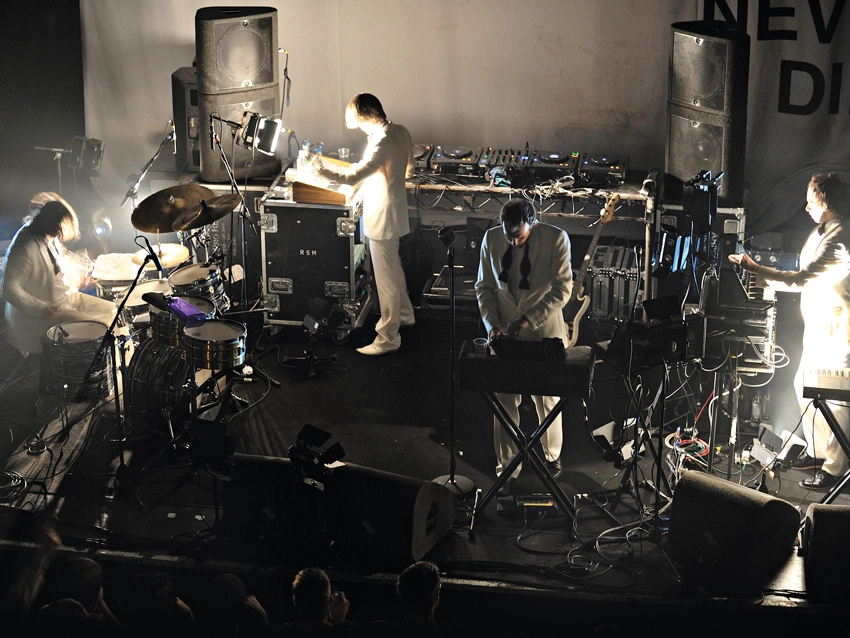
Taking your hi-tech music setup on the road used to be considered A Bad Idea, but fast laptops, portable controllers and intuitive, reliable software have ensured that it's now relatively simple to transfer your studio to the stage.
However, when you're deciding what to take to your gig, you still need to consider every problem or eventuality - and then pack your bag accordingly.
What follows is a checklist of items that you should take in addition to your hardware and software. If you haven't got a tick against every single one before you leave the house, don't blame us if things go wrong…
1. Long cables
In our experience, cables simply can't be long enough, but a bunch of 3m and 5m cables should cover every eventuality. You'll be slinging sound from your equipment output - be it mixer or a soundcard - to a desk out front or to the side so a bit of slack will stop them being a trip hazard. Using a heavy duty and well-shielded brand will help keep the miasma of electro-magnetic interference that curses live venues/clubs at bay.
2. Plug adaptor
Whether your output is phono, 1/4-inch TS/TRS or XLR it is certain that the venue will be equipped with something else. Carrying converters to the remaining two connector types means you will never have to run about asking to borrow cables from PA crews and other acts. It also means you don't have to carry three types of cables.
3. Spare batteries
If you use anything that requires a battery then carry at least one spare set, especially as equipment may have to be left switched on from when you set up to when you perform - which can be hours. Changing the batteries just prior to performance can remove any worries about effects pedals and the like dying mid-set.

4. Data backups
Whether you're working from an external hard drive, a sampler or just a lone laptop, you do not want to end up with a 'corrupted data' message just before show time. Having a backup or backups on data sticks, CDs, DVDs, or duplicated on internal/external hard drives will reduce your chances of being thwarted by bad data before you even start
5. Audio backups
The worst, quite often, does come to the worst, in which case you may need to ditch all your careful programming and setting up entirely in favour of a last resort audio backup of your entire set. Have a CD or MP3 player plugged into your mixer (or any other connection to the PA) just in case it all goes pear-shaped. Alternatively, simply load up a track or 'interlude' sound that can be set off while you reboot and recover your composure. This should help you to avoid any silence and keep the audience on side.
6. More sockets
There will not be enough plugs - guaranteed. Bring as many as you can muster. A mains 'four bar' can save the day. And bring a spare in case the one you've been using for months decides to blow a fuse or acquire a faulty connection. Venues can often be poorly equipped with power sockets near to where you set up. A good bit of slack will also reduce the potential for the cable to be yanked out of the socket or for it to pull your equipment onto the floor.
7. Fuses
They're tiny, so this will hardly break your backpack, but the often wild electrical current surges that occur in live venues (lighting rigs and high wattage PAs make it an unforgiving environment) can easily knock out standard plug and extension cable fuses. Multipacks of 13amp, 5amp and 3amp mains fuses are cheap and will cover power cables (13A) and kettle lead plugs (3A and 5A)
8. Tools
Head and Philips/Pozidrive screwdrivers are a must for changing plug fuses and other emergency fixes you may need to do. Don't rely on the venue or PA staff having them or lending them to you. A pair of pliers is also handy, and pack a hammer for bashing pesky scaffolding into place.

9. Gaffer tape
This stuff is a kind of currency in live music as it fixes nearly everything and people will often be reluctant to lend it to you. Taking your own roll is essential for preventing cables from being snagged and pulled out of your equipment at inopportune moments, or worse, pulling your system off of a table. It is wise to keep its existence quiet or at least keep it on a short leash as it will disappear into bags and flightcases before you can blink.
10. Hum eliminator
A simple hum eliminating box can save the day. You will find that, for no good reason, your laptop or audio interface outputs a terrible hum every time it's connected to the in-house power. A hum eliminator will prevent you looking and sounding like an amateur.
11. A cable tester
When a signal goes astray in the heat of the moment, trying to find it can get even the most seasoned performer into a fluster, so this simple and inexpensive device will save time and can settle arguments with sound engineers who will always blame you first, even though their cables have always seen better days.
12. Labels
Odds are that you will have some equipment, be it a pair of headphones, a mixer or even a phono cable that will be identical to someone else's at the gig, and you don't want to get into a school playground-style argument. So, stick a name label on everything.
13. A stage plan
If you are a band then you may well have been asked to send a stage plan and channel list ahead for the gig. Usually this never makes it to the stage crew and sound engineer so it's a good idea to take spare hard copies.
14. A piece of foam
If you're performing with a laptop, chances are it will be sat on a table, which, in the confines of a club or live venue, is not a forgiving environment. Taking some form of shock absorbent stand (either purpose made products or some foam pads) will reduce the physical stress on the drive of loud bass and raise it off the table, to keep it cooler and away from inevitable liquid spills.

15. A powered USB hub
Even if your current plain vanilla hub works just fine, you can bet that the voltages at the gig will be different and if you've a bunch of gear on USB they'll suddenly not have enough power to function. It's gig over unless you have a powered hub that can take the strain.
16. CDs and business cards
If you don't have a CD for sale a few simple rough mix CDs or just some printed up cards with your contact details (name, mobile, email, website, etc) will be well worth the effort when you finally meet someone useful. It doesn't have to be super slick or flashy, just make sure that whoever thinks you're great can remember you and get in contact.
17. Earplugs
These are a must for anyone who wishes to continue enjoying music for their whole life, but they come into their own when the monitor engineer suddenly ramps up the onstage levels or there is a spike of feedback. Also, getting through support acts without losing your hearing can make your own set that much more pleasant.

18. A torch
Lighting is bound to be at its minimum when you're setting up so this age-old lifesaver is essential for making sure you've plugged everything in right.
19. A bottle of water and a sandwich
Promoters always forget that performers need to drink something other than beer, and trying to get a pint glass just before you go on is only going to end in disaster. Likewise, something instant to eat will stop you keeling over as you squat in the dark for four hours waiting to go on.
For a comprehensive guide to performing live with your hi-tech setup, check out the June issue of Future Music (FM214) which is on sale now.
Liked this? Then try:
The ultimate gig survival guide
BLOG: The creative benefits of playing live
Sign up for our free weekly newsletter
The free MusicRadar newsletter serves up the week's biggest artist and product news stories alongside exclusive tuition and gear reviews. Sign up here!
Follow MusicRadar on Twitter
Get instant updates and bonus content plus chat with the team. Start here!
