
Afflicted with an almost unnatural desire to learn Max/MSP properly (read fear of blog-publicised failure), it took me two instalments of my Max/MSP diary just to ensure I wasn't holding the program upside-down.
This week, however, certain I was approaching my quest to learn the ludicrously involved program from the right direction, I actually dived in and started using the thing.
And it's brilliant. Despite my preconceptions, Max was surprising easy to make sense of right off the bat, although that's not to say there wasn't a fair amount of head-scratching involved too…

Starting out
On the advice of Tom Newell, one of my Maxite (not a type of industrial glue) consultants, I started with the Max side of the Max/MSP/Jitter parcel. Max, as Tom explained for my last blog entry, is the foundation for the other areas of the program - so I headed to Max section of the supplied tutorials first.
Max 5's tutorials are fantastic. Each tutorial introduces you to one or two concepts, and each has its own Max 'patch' (a Max/MSP program) that's fully interactive. The tutorials are well put together and clear, but also - and this is the key - they don't quite hold your hand through the whole patch, meaning you have to think things through and make sure the information actually goes in to understand what's going on.
Patches
Max patches, I learnt, are made up of different objects all connected together. A basic patch, for example, might be linear in fashion. You might have an input box at the start, where the user enters a number. This number would then get sent down a patch lead to another object that would divide the number by two. Next in the chain, an object might roll the number into a tiny ball; the next object might colour the ball ice blue; the next might cut bits out of the ball; the last object might unroll the ball to reveal a pretty snowflake.
Max is so diverse that it's difficult for me to pick a specific, practical example, but you get the idea: each object generally actions a very minor, simple task within the chain, which, as part of a larger process, creates something useful.

Above: Max patches are made up of several 'objects', each of which performs a small task
It's because of this low-level approach to creating programs that Max patches can seem complicated on the surface - but when you look deeper they're never actually doing anything too complicated at any given point. The difficulty in understanding Max, then, lies in being able to see 'the bigger picture' - to understand how a patch is working as a whole.
It's probably for this very reason that the difficulty of working through the first ten tutorials increased exponentially. Tutorial one? Simple as a sandwhich. Tutorial six? Makes sense, I guess. Tutorial nine? Whoa, hang on a minute… what?
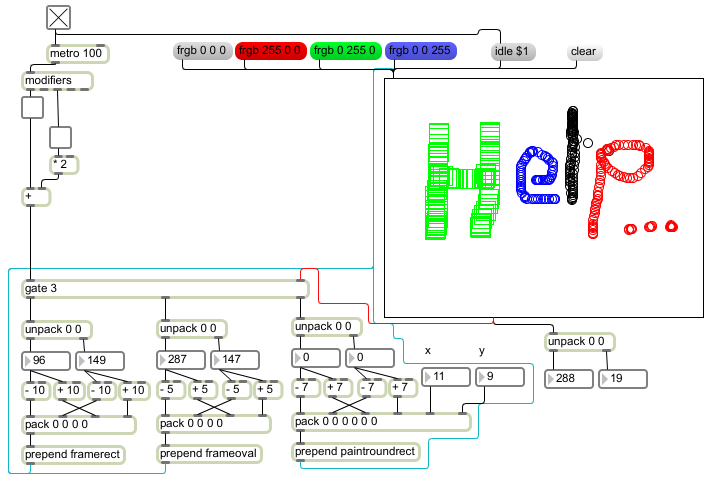
Above: At tutorial nine, things suddenly got a lot more complicated
The daunting sight of the mass of rectangular boxes and snaking patch leads now facing me cleanly wiped away the glowing, I'm-so-clever feeling I'd gained from working through the basics of the program. But again, I found that when I looked a bit closer I was able to (slowly) decipher what was going on.
Syntax error?
Although it can sometimes take a while to figure out what's happening, the interactive nature of the program means that you can 'unlock' a tutorial patch and mess about with it, seeing how your changes affect things in real time. Unlike traditional programming languages (of which I have a small amount of frustrated experience), Max's visual nature means that syntax is pretty much sorted out for you. You won't get a stream of error messages if you misplace a colon or end bracket - instead, the patch will at least work a bit, which is a far more encouraging environment to learn in.
By setting challenges for myself, involving tweaking existing patches to do something slightly different, I would gain a more complete understanding of what an object does. "Can I make Max draw a circle instead of an oval? And can I colour the line red?" Well, no, but trying to still helped.
I'll post part four soon. You never know, I might have got some sound out of my computer by then…
Previous (Part 2: getting started)
Next (Part 4: music and maths)
