
2009 was the year in which Apple's iPhone became a viable music-making platform, with countless tune-crafting apps finding their way into the iTunes Store.
Earlier this year, you nominated your favourites in an Ask MusicRadar poll, but since then, there have been several more notable releases.
You can find reviews of these newer apps below, and we've also included write-ups of several other bits of software that weren't included in our Ask MusicRadar round-up.

Oh, and don't forget that all the titles will run not just on the iPhone, but on the iPod touch, too.

White Noise Audio Software bleep!Box £5.99
Sticking to the tried and tested step-sequencing formula, bleep!Box is a simple app that can put out some serious grooves. It takes a little while to figure the control system out, but once you've got the hang of it, it's easy to put together loops and patterns, then tweak them in real time.
As well as the main programming pages for composing patterns, you'll also find a couple of live performance options enabling you to loop/ stutter, mute and preview parts. An updated version (which should now be available) will enable you to sequence patterns into songs.
Each pattern is composed using a maximum of ten parts, split into six drum instruments and four synths. The drum sounds are reasonably authentic 808- and 909-style hits (three kick parts, one snare and two hi-hats) all synthesised in real time. This might not sound like much, but the excellent synthesis engine makes it surprisingly effective.
To offer more variety, all the sounds can be triggered at any pitch from C0 to A8, meaning you can create all kinds of zaps, crashes and claps to throw into the mix.
The synthesis engine of bleep!Box is where the software shines, with eight waveforms, frequency/phase/ring modulation and dozens more variables to play with. The results are surprisingly usable and every parameter can be automated, too.
Although the app itself is stable during use, there are a couple of minor graphical glitches that make it look slightly less slick than it otherwise would - hopefully these will be ironed out in the update. Overall, though, bleep!Box is a simple but surprisingly versatile step sequencer that could also make a great performance tool. At this price, it's a bargain.

NEXT: Xewton Music Studio

Xewton Music Studio £11.99
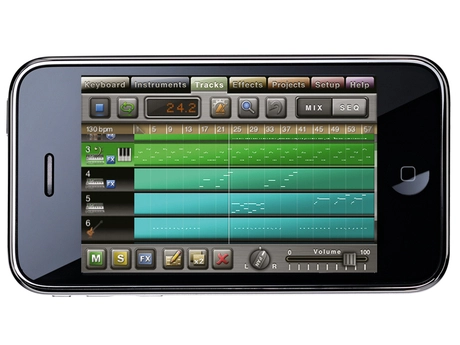
The fact that an app like Music Studio can exist at all on a phone will astonish anyone who made music back in the good old Atari and Amiga days (or, indeed, anyone who ever thought they were 'it' with their hefty old-school brick phone). This is a fully fledged sequencer with a slick interface that makes good use of the iPhone's capabilities.
The Keyboard page is where most of the action takes place. It enables you to play up to two instruments simultaneously by splitting the screen horizontally. The iPhone touchscreen excels in this area and you can play some surprisingly complex parts once you get the feel for it.
Music Studio uses sampled instruments rather than synthesised sounds, with a selection of 21 presets to choose from (including pianos, drum kits, organs, brass, guitar and so on), but very little in the way of editing capabilities. The drum sounds are good, although it's a shame they have to be triggered using the keyboard interface - pad-style input would've been preferable, clearly.
The Tracks page offers mixing and editing of up to 128 tracks, and Music Studio has excellent sequencing capabilities with reassuring attention to detail. Adjustable time signature? Quantise? Transpose? Note velocity? It's all right there.
Finally, the Effects page offers a basic but useable reverb, tempo-synced delay, three-band EQ and an amp simulator with adjustable overdrive. Each of the effects can be applied to the master out or used for FX sends. Once your track's finished, you can export as WAV, but we'd like to see the ability to export tracks as MIDI in future versions, enabling you to take your ideas into your DAW and develop them further using production-quality sounds.
Although Music Studio lacks any synthesis and sampling capabilities, it's excellent at what it does and would make a great tool for jotting down ideas on the run or even for writing quick demos. This is already a very serious sequencer and we'll definitely be keeping an eye on it to see how it develops.

NEXT: Amidio Inc. JR Hexatone Pro

Amidio Inc. JR Hexatone Pro £5.99
The peeps behind the Noise.io synthesiser have collaborated with Dream Theater keyboard maestro Jordan Rudess, and the result is not a cheesy virtual keyboard, nor a performance instrument of any kind - it's a drum machine with a hex-citing sequencer.
A Hexatone session uses six sampled sounds (400 are supplied and you can import WAVs), each with parameters like tuning, panning and variable distortion/bitcrushing. Each sound originates from a central, coloured hex pad and moves randomly from pad to pad at its specified rate.
You can influence movement with the Grid mode, which sets the 'priority' of individual pads - higher priority pads always take preference. The sounds jump back to their start points every couple of bars, thus maintaining some regularity.
The Sound tool designates which pads trigger sounds (shown by a red outline), but most exciting are the Cells pad modifiers, which can do things like force a certain route; retrigger the sound, IDM-style; modify volume/panning; wait a specified duration, to create funkier rhythms; and slice up sounds.
It feels like you're playing with an abstract puzzle game, as you set up crazy rhythmic chain reactions, and while 'normal' beats are possible, this is missing the point - you'll probably get it wrong anyway and hit upon something entirely unexpected! Your creations can be exported as CAF/WAV files and shuttled straight into Intua's BeatMaker app or pulled onto your desktop computer via a simple built-in webserver.
While the basic concept of JR Hexatone Pro works well, it would benefit from, say, filtering or reverb, in order to add life to the static samples, as the results can be sonically uninteresting. Furthermore, the retriggering is really a 'loop sample' command (so it's ineffective with longer sounds) and the slicing often clicks.
Still, it's a solid start for this funky, forward-thinking rhythm machine and it runs on your phone, so we shouldn't grumble too much.

NEXT: Chris Wolfe Jasuto

Chris Wolfe Jasuto £2.99
Jasuto, its developer claims, is the first modular synth for the iPhone. Think 'Reaktor Mobile' and you're getting there, though of course, this is far simpler. Being on the iPhone, you get to use your fingers rather than a mouse and pointer, although there is a free VST plug-in version for your desktop too.
So what you have here is a lovely-looking but slightly alien setup. View some of the excellent videos on the website, though, and you'll soon get your head around it, as well as discover how filthy Jasuto can sound!
You can create your own synth within a Scene (of which eight examples are provided) using various components, called Nodes. Starting from scratch, you'll need a speaker Node in order to hear the results and a source Node, which can be one of six oscillator types: Sin, Tri, Saw, LFO, Square and Noise. The Nodes connect (and the signal flows) from top to bottom and they link to one another via user definable inputs and outputs so you can have, say, three oscillators connected to one speaker for really fat, layered sounds.
Things get really interesting when you insert effects or a filter into the signal path - place a filter betwixt synth and speaker, for example, and control the sound with your fingers by connecting and moving filter and resonance Nodes. All movements can be easily recorded and looped, and a keyboard screen lets you play while a sequencer enables the recording of 16 steps of note information, so you can create simple riffs with relative ease.
Once you get your head around the concept, you'll grow to love Jasuto. Yes, it is a mite fiddly and, if you work with complex patches, you do get the occasional audio dropout, but even though it's no longer available at the introductory price of 59, it's still a great deal. Get it now.
NEXT: Hexlar TouchOSC

Hexlar TouchOSC £2.99
You've surely noticed JazzMutant's Lemur - it's a modular controller with a 12-inch multitouch display that uses the Open Sound Control (OSC) protocol to talk to DAWs, synths and other audio software. It looks absolutely gorgeous, but as you might expect, it doesn't come cheap. TouchOSC for iPhone offers broadly similar functionality and, what's more, it looks equally pretty, yet costs just a few quid.
TouchOSC includes five non-editable layouts, and each consists of several screens of colourful, touch-friendly virtual faders, pots, axis controllers and buttons. Five of these can be triggered and used simultaneously, and each layout approximates a common task - there are two for mixing, one for drum programming, one for general control and another that provides an octave of virtual keys.
We say 'approximates' because, on their own, these layouts do nothing - they simply transmit and respond to OSC commands. TouchOSC also transmits accelerometer data.
To use the app, you need to bind its controllers to an OSC-compatible application running on your computer. This requires a little juggling of IP address and incoming and outgoing port numbers (as it connects across a Wi-Fi network), but we had it up and running without any trouble. There are dozens of applications that can talk OSC, but the most common are Cycling '74's Max/MSP, the freely available Pure Data and the SuperCollider programming environment.
All of these bits of software are of a fairly technical nature, but thanks to a stack of bundled examples, you don't need any in-depth knowledge to effectively use them with TouchOSC. Download the Mix2‑MIDI patch for Pure Data, for example, configure MIDI ports to your DAW and start moving your fingers around the screen. A simple MIDI learn on your DAW is all you need to start manipulating the software's parameters.
The response time is fantastically short, and you have absolute control over the widgets on the screen, complete with feedback, if the OSC patch and application caters for it. And if you have the confidence to stick with native OSC control, almost anything is possible.
NEXT: Frozen Ape Euphonics, Normalware Bebot

Frozen Ape Euphonics £0.59
Euphonics is an ambient music creation app that sits halfway between the freeform floatiness of Brian Eno's Bloom and the more traditional angle of something like Mini Piano.
The main screen is divided into three sections: an arpeggiator, a chord selector, and a keyboard. These are used to control the software's four musical elements: a pad, a bass, an arpeggiated synth sound and a sampled piano.
The chord selector sets the tonality of the pad and arpeggiator, and defines the bass note. The polyphonic piano-playing keyboard only displays a single octave, but the instrument has a three octave range that can be scrolled by tilting the device left or right.
Euphonics is pretty simple and has a couple of interface problems (it's hard to bring up the options screen or stop the music without inadvertently changing chord or adjusting the arpeggiator), but it's a pleasing diversion and cheap as chips - cheaper, in fact.

Normalware Bebot £1.19
Sometimes the simplest applications are the best, and Bebot is a case in point. Opening this app you are presented with a retro-graphic robot in a tux. Touch the screen and he emits a 'talking robot' tone, with pitch changes as you move from left to right, and a variable formant filter as you move upwards.
Double-clicking on the bottom right of the screen accesses three other synth modes (including Theremin, Pulse and PWM), each with a small set of editing parameters. For more accurate pitching Bebot can show a graphical note grid (with zoom). Autotune mode snaps pitches to the nearest note and can restrict playback to a certain scale. Basic effects include a variable feedback delay and overdrive section and what's more, the synth is polyphonic.
Bebot really scores in its immediacy, and we know that it's been used on a number of commercial projects already.
