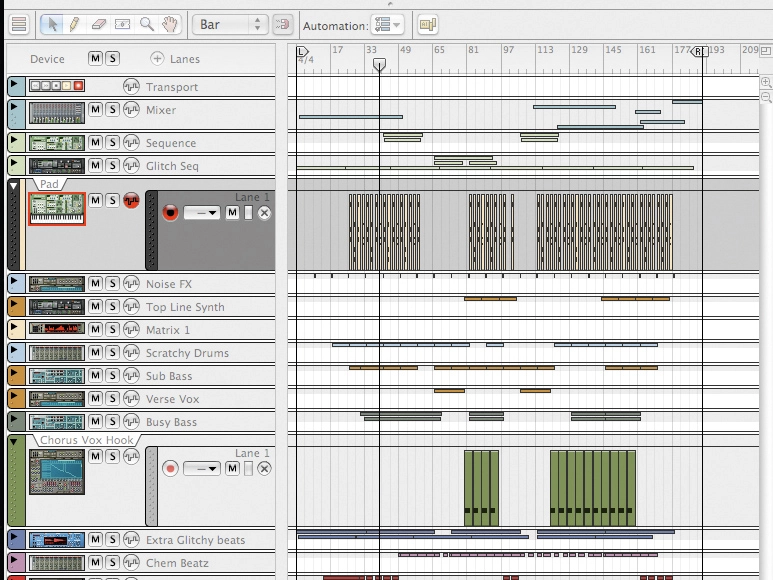
Great for producing original tracks, Propellerhead's Reason is also a superb remixing studio. It might not enable you to record audio, but it features a whole host of creative tools that enable you to rework your source material in all manner of different ways.
Here, MusicRadar presents 11 tips for budding Reason remixers. You bring the ideas - we'll show you the techniques.
1. Propellerhead's refusal to engage Reason with the world of audio editing isn't entirely without benefit - it remains perhaps the world's most stable sequencer as a result. Using an external program remains the easiest method of preparing samples, though you can chop material up directly within either of Reason's samplers, if you don't mind a more fiddly approach.

2. If you're working with a lead vocal, you can chop it up into lots of little bits and assign each individual phrase to a separate key with either of Reason's samplers. Setting up key notes and note ranges in the NN-XT is a breeze, and soon you'll have a library of trigger-able clips.
3. The best place to start with any remix is to work out which parts of the original you want to use and why. Is there a vocal hook that could be used to set the mood? Is there a stand-out instrumental loop around which to base the whole structure? Listen carefully at the beginning and a clear idea should form.
4. Dr.Rex is a remixer's dream tool for working with lots of percussive material. Import a loop, chop it up… it's perfect for integrating source material without having to worry about syncing patterns to tempo.
5. Reason is ideal for building foundations for your beats. Start out with something basic - you can always get more complicated when the track has progressed. Throw down a basic one-bar loop in Redrum, copy it to the track and then work on some variations when the time is right.
6. Thor's flexible filter options are powerful and reward tweakers. In particular, the formant filter is great for spoken filter treatments and will enable you to simulate talk-wah effects. Increase the Gender dial to move from muted, 'male' settings, to brighter, more 'female' sounding ones.
7. Try using auxiliary effects. Inserted treatments for specific instruments and sounds are fine, but they won't help you glue together the various elements of your mix. Being able to treat a bassline and a vocal with the same dub delay will help unite different parts.
"The best place to start with any remix is to work out which parts of the original you want to use and why."
8. If you're looking for something dirty, turn to the Scream 4 distortion unit. Don't just reserve it for guitar treatments - try it as a cruncher of any audio material. Put Scream 4 on an auxiliary and experiment with sending each and every aspect of your mix to it.
9. As your remix develops, try to make sure you label all the various parts you record. It might sound tedious and boring, but keeping tabs on your tracks is really helpful as those parts start to stack up. You'll be able to see what's going on at a glance, and it makes tweaking mixer settings much easier, too.
10. Once your arrangement is coming together and you've got your various loops and phrases copied to the appropriate tracks, be sure to go back into the note data for each track to provide variation. This is particularly important with beats - simply copying one-bar loops for the duration of your remix will rarely cut the mustard.
11. Get creative with your cabling. Remember, many opportunities for experimentation lie around the back of Reason. Why not route a Thor signal directly into Malstrom for processing, or vice versa? It's not just the effects plug-ins that can accept audio input.
12. As your mix develops, don't forget that incorporating insert effects is as simple as dropping the relevant effect module under the element you want to process. If your vocal part suddenly needs a little extra compression, drop it in and Reason will sort the cabling for you.
13. Automation is key. Whether it's a little volume ramp to introduce a new element, or lines of squelchy filter cutoff data, one of Reason's most powerful tools is the ability to stack up lanes and lanes of data. Remember, all mixer rides will be written to the Mixer track, not to the individual instrument tracks.
14. When it comes to output levels, the MClass Mastering Suite will make life very straightforward. However, don't just use the default setting unless it's sounding fantastic - be sure to make this as creative a decision as all of the others you've made throughout the remix process.