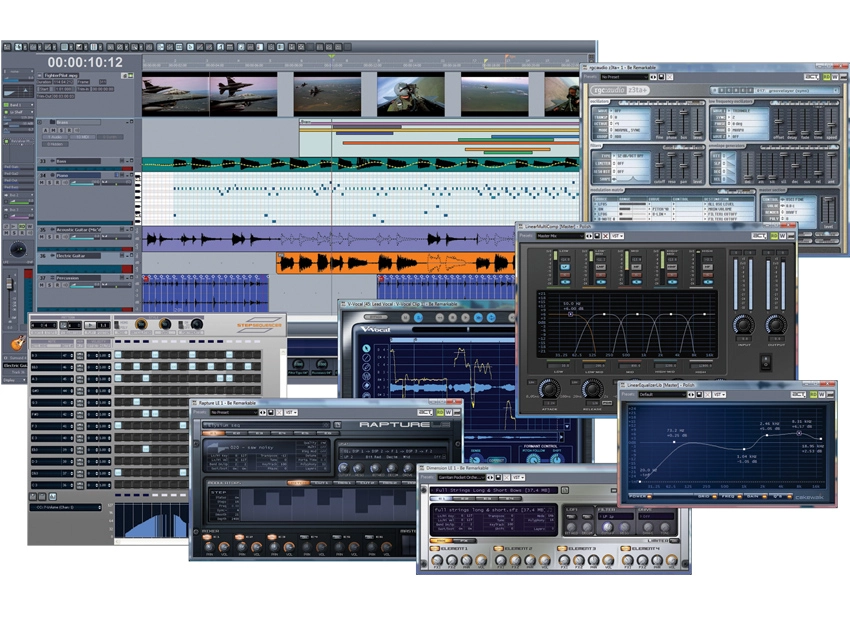
The seventh version of Cakewalk´s audio/MIDI sequencing package brings with it more than a few surprises. The developers have not only listened and responded to user requests, but they´ve also come up with some clever ideas of their own.
But of course, implementing new features is one thing - learning how to tame them from a user perspective is quite another. So, here are MusicRadar´s top 12 tips for getting the most out of Sonar 7…
1. If you´ve ever created projects with numerous instrument plug-ins (and who hasn´t?), you may be glad to know that you can now give your instruments easily recognisable names. Looking for a ‘Plucked Bass´ sound is certainly easier than trying to remember which of your umpteen synths was making that sound!

2. We´re well aware that you can ‘do it all´ within your computer, but sometimes it´s nice to let a little of the outside world shine on your songs - moving some air about can add some vitality to your tracks. Take advantage of Sonar 7´s support for external hardware to pump some signals though an amplifier and mic up the results!
3. Ever needed to rip audio files from a CD directly into a project? Cubase users have been doing this for yonks, and now Sonar fans can perform the same functions within the application itself. It works the other way around, too: you can now burn multiple tracks to an audio CD from directly within the app.
4. Nothing can get more tiresome than setting up the exact same EQ curves for multiple tracks. Anyone who regularly records vocal comps will know what we´re talking about! Now you can drag-and-drop EQ parameters from one track to another. Next time you´re mixing down multiple vocal takes, try dragging your settings to each track and then subtly tweaking each one for a huge vocal sound.
5. Getting your head around your velocity controller edits is now a lot easier, thanks to Sonar´s new Velocity Colorizer. Individual notes are tinted according to velocity level for instant visual feedback. Other applications already have this function, but this is the first time it´s been made available to Sonar users.
6. So your freeware Minimoog plug-in just doesn´t have the life and lustre of the genuine article? Borrow a hardware synth, preamp or DI box and use Sonar 7´s external hardware features to send your soft synth´s signal through some real, honest analogue circuitry to fatten it up. You´ll be amazed at how your virtual synthesizer springs to life!
"Sonar 7 adds a whole slew of new MIDI features, but one of the most welcome is multiple controller lanes. Now you can view numerous MIDI parameters simultaneously in the Piano Roll View."
7. Between DropZone´s powerful drag-and-drop sample import and Step Sequencer´s intuitive pattern sequencing options, Sonar users may have the ultimate combo for resequencing audio files. It couldn´t be easier to chop up an audio track and drag the bits into DropZone to be resequenced using the new Step Sequencer.
8. Cakewalk is nothing if not attentive to its customers. Sonar users have always been a vocal lot, making it known when they aren´t getting the tools they need, and one area that´s frequently been questioned is that of MIDI editing. Sonar 7 adds a whole slew of new MIDI features, but one of the most welcome is multiple controller lanes. Now you can view numerous MIDI parameters simultaneously in the Piano Roll View, making it easier to grasp the big picture when editing loads of MIDI data. Better still, MIDI CCs can be copied and moved between lanes. Try using these functions to build ever more complex relationships between your controllers.
9. What good is there in making all of this music if no one else hears it but you? Cakewalk Publisher is included with Sonar 7 Producer Edition to help you get your masterpieces out of your computer and into the great wide world. You can use it to create playlists and upload them to your website so that others can experience your genius first-hand. It´s dead easy to use, thanks to drag-and-drop, and you can easily add album art and even build custom Flash audio players.
10. Have you ever wanted to isolate a particular track at mixdown, but still hear it in relation to the material on other channels? For instance, maybe you needed to fine-tune the EQ of a given track in relation to another one that was being crowded by it. Solo just didn´t do the trick… until now. Dim Solo enables you to apply a user-definable -6, -12, or -18dB dim to unsoloed tracks. Genius!
11. Nothing slows the flow of creativity like having to plow through menus when you´re on a roll. Searching for that elusive perfect audio or MIDI file is time-consuming enough without that. Now, Sonar users can right-click to import audio or MIDI at the current cursor position.
12. We live in an era of inflation. Our bit-rates are getting deeper, and our sample rates are getting higher. With many people now tracking at 24/96 and higher, file sizes can quickly start to spiral out of control. There has, until now, been a limit to the file sizes available to DAW users, but with Wave-64 support built-in, Sonar breaks the 2GB barrier!
